
Instagram Reels Downloader
Free Instagram Reels video Download in HD MP4 with no login, no watermark, works on all devices. Also saves feed posts, carousels and IGTV.
Supports: /reel/ and /reels/, feed posts /p/ including photo carousels, IGTV /tv/, and share links with ?igsh=
How to download Instagram reels in HD
Paste a reel link into the box above and press download. That is the whole process, and it takes under ten seconds. This Instagram reels downloader also accepts feed posts, photo carousels and IGTV links, so one box covers all four. The sections below cover the parts people actually get stuck on: which links work, what to do when a reel refuses to download, what format you end up with, and where the line sits on reusing someone else's video.
Copy the reel link
In the Instagram app, tap the three dots on the reel and choose Link, or Share then Copy link. On desktop, copy the URL from the address bar. Share links with a long ?igsh= tag on the end work fine, there is no need to trim them.
Paste it into the reel downloader
Drop it in the field above. The link is cleaned automatically, so /reel/, /reels/, /p/ and /tv/ all resolve to the same place.
Save the video or the audio
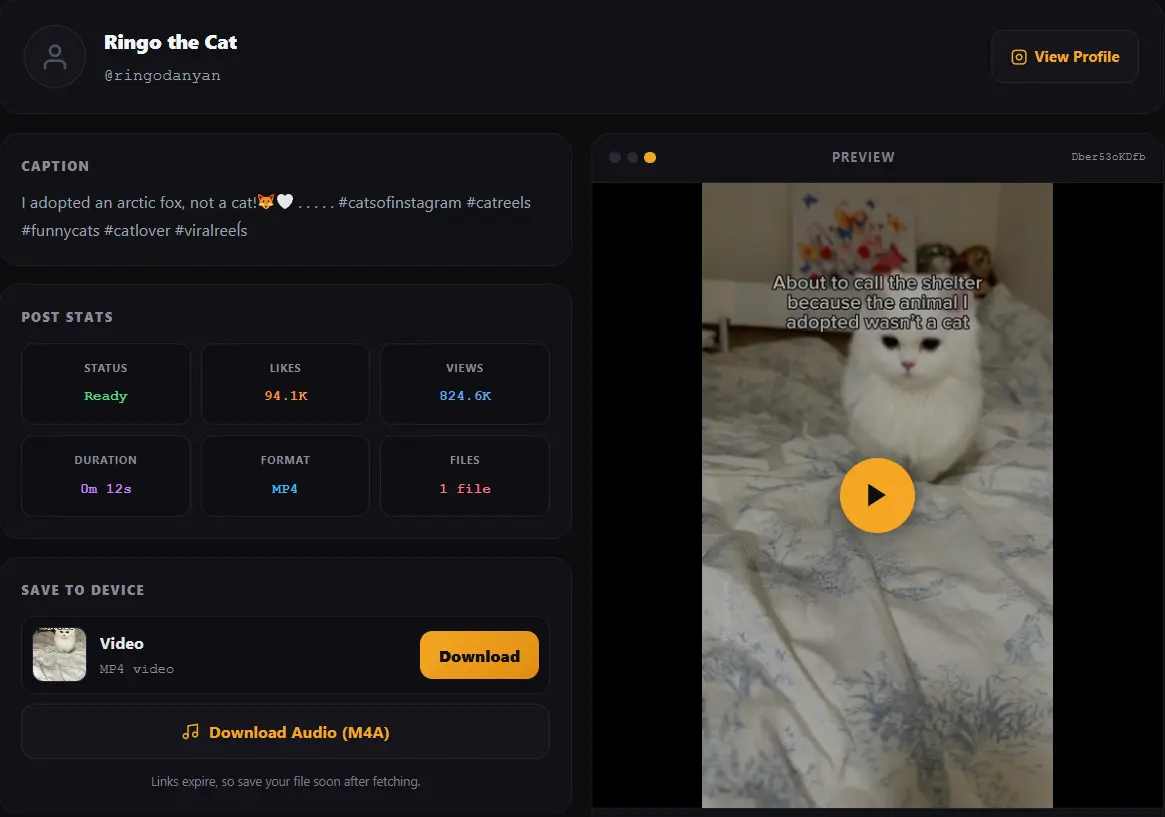
You get an MP4 at the quality Instagram serves, with the caption, view count, like count and duration shown alongside it. Where the reel has a separate audio track, an M4A download appears too.
What this Instagram reels downloader can save
Most reel downloaders handle exactly one link type. This one accepts five, because an Instagram video download and a reel download are the same request underneath, and the same post format covers photos too:
| Link type | Example | What you get |
|---|---|---|
| Reels | /reel/ or /reels/ | Vertical MP4 plus audio where available |
| Feed posts | /p/ | Video posts save as MP4, photo posts save as JPG |
| Carousels | /p/ with several slides | Every slide listed separately, save one or all |
| IGTV | /tv/ | Longer-form video as MP4 |
| Share links | with ?igsh= | Cleaned automatically before fetching |
So if you came here for reels but have a feed video, a photo carousel or an old IGTV link, the same box handles it. A carousel comes back as a list with one download button per slide, so you can take a single photo out of a ten slide post without saving the other nine. Where one of those formats is your usual job rather than an occasional one, there are dedicated pages for feed video and IGTV and for photos and carousels. What the tool cannot reach is anything on a private account or in Stories, and the reasons for that are worth knowing before you assume it is broken.
Instagram to MP4: what format and quality you actually get
Every reel download from this tool arrives as an MP4, which is the format Instagram stores video in. That is all an Instagram to MP4 download amounts to here: no conversion step at all, just the original file handed straight to you. Nothing is re-encoded on the way to you, so there is no second round of compression and no quality loss beyond whatever Instagram already applied when the creator uploaded.
That last point is worth being clear about, because plenty of sites promise 4K or "enhanced" Instagram downloads. Instagram serves a compressed delivery copy, and no downloader can recover detail that was thrown away before the file ever reached a server. A tool claiming to upscale a reel is interpolating pixels, which makes the file bigger without making the picture better. What you should expect is the same file Instagram would play, saved to your device. An honest Instagram to MP4 download is a copy, not an upgrade.
Audio comes as M4A when the reel has a separately addressable track, which is useful if you want the sound from a trending reel without the video. It will not always be present, and the tool only shows the audio button when it genuinely found one rather than offering a button that fails.
Download Instagram reel without watermark
Nothing is added to your file. The MP4 you save is the one Instagram serves, so there is no site branding, no overlay and no corner logo stamped on top.
One honest clarification, because this phrase means two different things and most pages blur them. A downloader can avoid adding its own watermark, which this one does. It cannot remove a watermark that is baked into the video itself. If the creator exported their reel from TikTok or CapCut with a logo burned into the frames, that logo is part of the picture, and no download tool can lift it out. Anything advertising watermark removal rather than watermark-free downloading is either cropping your video or blurring a patch of it.
Why some reels will not download
When a reel download fails it is almost always one of four things, and the tool tells you which rather than showing a generic error:
The account is private
Private reels are not publicly served, so there is nothing to fetch. This is not a limitation to work around, it is the setting doing its job. If you need the video, ask the creator.
It is a Story, not a post
Stories are served against the logged in viewer rather than published openly, so a public fetch has nothing to request. Photo posts and carousels do work, they simply save as JPG instead of MP4.
It is region-blocked
Some reels are restricted by country, usually for music licensing. If the reel will not open in a normal browser in your region either, that is the cause.
The reel was deleted
If the creator removed it or the account was disabled after you copied the link, the link still looks valid but resolves to nothing.
There is a fifth case worth mentioning: occasionally a fetch takes longer than usual because Instagram is throttling requests. The progress bar keeps moving and the tool waits rather than giving up early. If it does time out, trying again a minute later usually works.
Saving reels on iPhone and Android
The reel downloader works the same in any mobile browser, and no app or extension is needed. Where phones differ is what happens after you press download.
On Android, Chrome saves the MP4 straight to your Downloads folder and it appears in your gallery shortly after. On iPhone, Safari saves to the Files app rather than Photos by default. To move it across, open Files, find the MP4 in Downloads, tap Share, then Save Video. That extra step catches people out and is not a fault with the download.
If you use Instagram mostly on your phone, the fastest route is to copy the reel link inside the app, switch to your browser, and paste it here. There is no login step, so nothing connects to your account.
Is there an Instagram reels download application?
A large share of the people who reach this page were looking for an application rather than a website, so it is worth answering plainly instead of pretending the question was not asked. The short version: there is no Calcxi app to install, and that is a decision rather than something missing.
A reel downloader has nothing to keep on your phone. It takes a link, fetches a file, and hands it over, and a browser already does all three. An installed app for that job costs storage, asks for permissions it does not need, and has to be rebuilt every time Instagram changes something on their side. A web page updates once, for everyone, without you doing anything. That holds whether you searched for an ig reel download, an insta reel download or a reel download app, because all three describe the same job.
Make it behave like an app anyway
If what you actually want is an icon to tap rather than a URL to retype, add this page to your home screen. It takes a few seconds and installs nothing.
On Android, open this page in Chrome, tap the three dots in the corner and choose Add to Home screen. On iPhone, open it in Safari, tap the Share button, scroll down and choose Add to Home Screen. After that it opens from an icon, full screen, with no address bar to type into and no login prompt.
One warning about downloaded reel apps
Results for a reel download app include APK files hosted outside the Play Store, and a fair number of them ask for your Instagram username and password before they will do anything. There is no technical reason for that. Public reels are public, and fetching one needs no account at all. An app asking for those details is collecting credentials rather than fetching videos. Nothing on this page ever asks you to sign in, which is the same reason private accounts do not work here.
Other Instagram tools on Calcxi
This page is built around reels, and it saves a feed video or a photo carousel too. Where a different format is the main thing you came for, these pages go deeper on it and show the options that matter for that format.
Instagram Video Downloader
For feed videos and IGTV as well as reels, with a quality picker where Instagram serves more than one size and a separate button to save the audio on its own.
Instagram Photo Downloader
Saves pictures at the full size Instagram stores rather than the smaller copy shown in the feed. Every slide of a carousel is listed separately with its own download button.
Instagram to MP3
When it is only the sound you want. The audio is pulled out and turned into a real MP3 on your own device, with the untouched M4A offered next to it.
Instagram Carousel Downloader
For posts with several slides. Each slide gets a tick box, photos and videos stay in the order they were posted, and the whole set can come down as one numbered ZIP.
Instagram Caption Extractor
When you want the words rather than the file. Copies the caption as plain text and splits the hashtags and mentions out of it, with counts against Instagram's real limits.
All Instagram tools
The full set in one place, with a short table of which tool suits which link type so you do not have to open several pages to find out.
Using downloaded reels responsibly
Saving a reel and republishing one are separate questions, and it is worth keeping them separate. This is general information rather than legal advice.
What is usually fine
Saving your own reels as a backup, keeping a reference file of a video you appear in, downloading content you have permission to use, or saving something for private viewing. Creators backing up their own work is probably the most common legitimate use of any reel downloader.
What causes problems
Reuploading someone else's reel as your own content, which most platforms treat as unoriginal and which the creator can report. Using a reel commercially without permission. Removing a creator's credit or handle. Reposting content featuring a recognisable person in advertising, which raises personality rights on top of copyright.
The straightforward version
If you did not make it and you are going to publish it, ask first or credit clearly, and do not monetise someone else's work without an agreement. If you believe your content has been downloaded and reused improperly, the DMCA page explains how to raise it with us.
Instagram reels downloader FAQ
How do I download Instagram reels?
Copy the reel link from Instagram using the three dots menu or the Share button, paste it into the box at the top of this page, and press Download Reel. The file saves as an MP4 in the quality Instagram serves. No account, login, app or browser extension is needed, and the tool also accepts feed post and IGTV links.
Is this Instagram reel downloader free?
Yes, with no download limit, no signup and no account connection. You paste a public reel link and get the file. Nothing is posted to Instagram on your behalf and no credentials are ever requested, because the tool never touches your account.
Can I download Instagram reels without a watermark?
Yes. Nothing is added to your file, so the MP4 carries no site branding or overlay. What no tool can do is remove a watermark the creator burned into the video before uploading, for example a TikTok or CapCut logo, because that is part of the picture itself rather than something layered on afterwards.
What format is the reel download, and can I get 4K?
MP4, at the quality Instagram serves, with no re-encoding on the way to you. There is no 4K option because Instagram does not store one: it keeps a compressed delivery copy, and no downloader can recover detail discarded before the file existed. Any site promising 4K Instagram downloads is upscaling, which makes the file larger without adding real detail.
Can I download just the audio from a reel?
Yes, when the reel has a separately addressable audio track. An M4A download button appears alongside the video when one is found, which is useful for saving a trending sound. Some reels have audio baked into the video only, and in those cases the button does not appear rather than appearing and failing.
Do I need an Instagram reels download application?
No, and there is no Calcxi app to install. A downloader takes a link, fetches a file and hands it over, and a browser already does all three, so an installed app would only cost storage and permissions it does not need. If you want an icon instead of a URL, add this page to your home screen: on Android tap the three dots in Chrome and choose Add to Home screen, on iPhone tap Share in Safari and choose Add to Home Screen. It then opens full screen like any app.
Is a reel download app safer than a website?
Usually the opposite. Results for reel download apps include APK files hosted outside the Play Store, and many of them ask for your Instagram username and password first. There is no technical reason for that, because public reels need no account to fetch. An app asking for your login is collecting credentials rather than downloading videos. Never enter Instagram details into any downloader, app or website.
Why is my reel download not working?
Usually one of four reasons: the account is private so nothing is publicly served, the link points at a Story rather than a post, the reel is region-blocked for music licensing, or it was deleted after you copied the link. The tool names which one it hit instead of showing a generic failure. Occasionally Instagram throttles requests, in which case waiting a minute and retrying works.
Can I download reels from a private account?
No. Private reels are not served publicly, so there is nothing for any downloader to fetch, and any site claiming otherwise is either wrong or asking you to hand over your Instagram login. Never enter your Instagram credentials into a download site. If you need a private reel, ask the person who posted it.
How do I save an Instagram reel on iPhone?
Copy the reel link in the Instagram app, open Safari, paste it here and download. Safari saves the MP4 to the Files app rather than Photos, so to get it into your camera roll open Files, find the video in Downloads, tap Share and choose Save Video. On Android the file goes to Downloads and appears in your gallery without the extra step.
Does the tool work for Instagram video and IGTV, not just reels?
Yes. Feed video posts using /p/ links and IGTV using /tv/ links both work in the same box and save as MP4, as do share links carrying an ?igsh= tag. Photo posts and carousels work too and save as JPG, with a separate download button for each slide.
Is it legal to download Instagram reels?
Downloading a public reel for private viewing, or backing up your own content, is generally fine. Republishing is where the risk sits, since the reel is the creator's work. Reuploading someone else's reel as your own, using it commercially without permission, or stripping their credit can all draw a complaint. Ask or credit clearly if you intend to publish. This is general information, not legal advice.
Does the tool store the reels I download?
No. Reels are fetched on demand and passed to your browser, and nothing you download is kept as a library or made searchable. Links you paste are not published anywhere. Download links expire shortly after they are generated, which is why the tool asks you to save the file promptly.
Limits and disclaimer
This tool works with public Instagram content only. It cannot access private accounts, cannot recover deleted posts, cannot bypass region restrictions, and cannot improve quality beyond the file Instagram serves. Fetches occasionally take longer when Instagram is throttling requests.
Calcxi is an independent tools site and is not affiliated with, endorsed by or sponsored by Instagram or Meta. Instagram is a trademark of Meta Platforms, Inc. Nothing on this page is legal advice. Respect creators' rights: download responsibly, credit where you share, and get permission before using someone else's work commercially. See the DMCA policy and the Terms and Conditions.

Written & verified by
B.Tech Computer Science · 8 years in web development & SEO · Bhilwara, India
About ·
LinkedIn ·
Report an error