
Robots.txt Tester
A free robots.txt tester and validator. Fetch any site's live file or paste your own, test URLs for Googlebot, Bingbot and AI crawlers such as GPTBot and ClaudeBot, and see the exact line that allows or blocks each one.
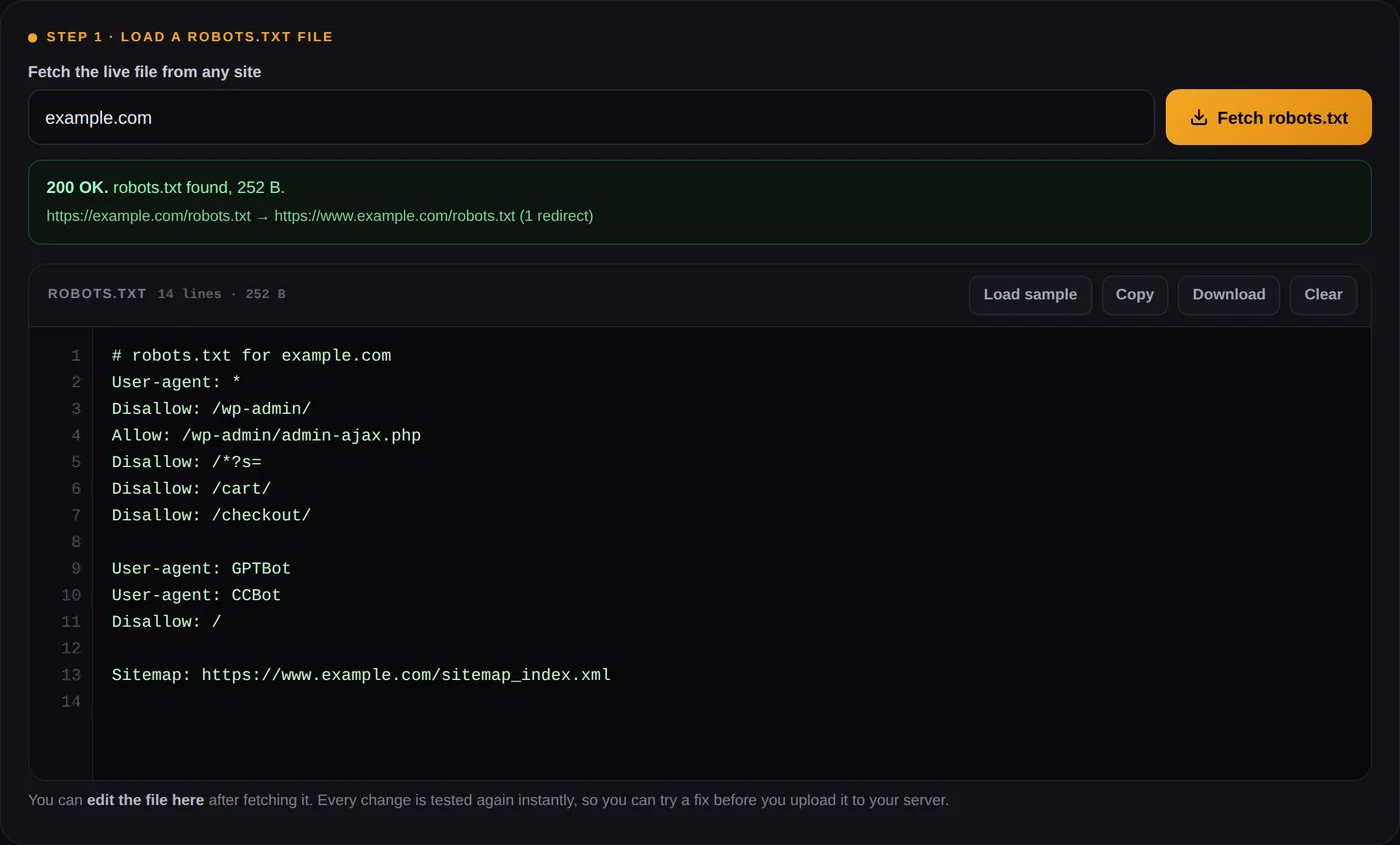
You can edit the file here after fetching it. Every change is tested again instantly, so you can try a fix before you upload it to your server.
Up to 100 lines. A path such as /private/ works too.
Results update as you type in either box.
How to use this robots.txt tester
Load a robots.txt file, list the URLs you care about, pick a crawler. The robots.txt tester shows each URL as allowed or blocked, names the exact line that made the decision, and tells you which group of rules the crawler followed. That last part is where most robots.txt mistakes hide, and it is the part most testers leave out.
Fetch the live file or paste your own
Type a domain such as example.com and press Fetch. The tool downloads /robots.txt from that host, reports the HTTP status and loads the text into the editor. You can also paste a file you have not uploaded yet.
Add the URLs you want to check
One per line, up to 100. Full URLs and bare paths such as /checkout/ both work. Include the pages you need indexed as well as the ones you want kept out, because the costly mistake is usually blocking something by accident.
Choose a crawler and read the deciding rule
Googlebot is selected by default. Switch to Bingbot, GPTBot, ClaudeBot or any of the others, or type a custom user agent. Click a rule in the results and the matching line lights up in the editor.
Fix it in the editor and test again
Edit the file right there. Results update as you type, so you can test robots.txt changes safely, then copy or download the corrected robots.txt and upload it to the root of your site.
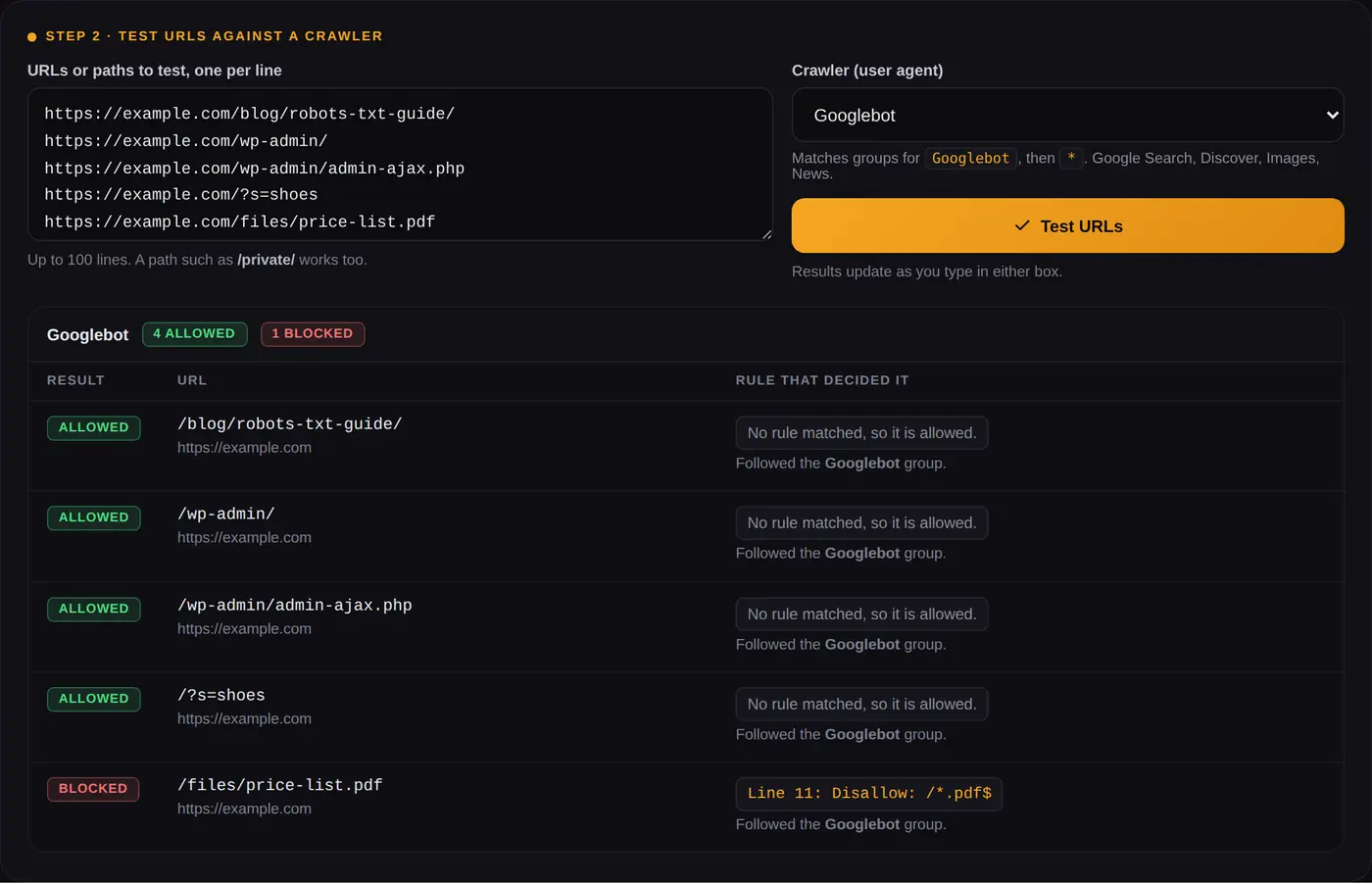
/wp-admin/ is allowed for Googlebot even though the file disallows it, because Googlebot has its own group and skips the * rules.What this robots.txt checker shows you
Most robots checker tools stop at a plain yes or no, and that is not enough to fix a problem. Every result in this robots.txt checker carries three pieces of information, and together they explain why a crawler behaves the way it does.
Allowed or blocked, and the line that decided it
Crawlers pick one winning rule per URL. The tool reports that rule with its line number, for example
Line 11: Disallow: /*.pdf$. If no rule matched, the URL is allowed by default and the result says so.
Which group the crawler actually followed
A robots.txt file is split into groups, each starting with one or more User-agent lines. A crawler
follows exactly one group: the one that names it most specifically. Only if no group names it does it fall back to
User-agent: *. The results tell you which group was used, including the less obvious cases, such as
Googlebot-Image falling back to the Googlebot group, Applebot following Googlebot when it has no group of its own,
and AdSense's Mediapartners-Google ignoring the * group completely.
Check robots.txt on a live site: the HTTP status
When you fetch a live file, the status code matters as much as the text. Google's handling is specific, and the tool applies it to the results automatically.
| robots.txt returns | What Google does |
|---|---|
| 200 OK | Reads the file and follows the rules in it |
| 301, 302, 307, 308 | Follows up to five redirects, then treats the file as missing |
| 404, 410, 401, 403 | Treats the file as missing and may crawl everything |
| 429 | Treats it as a server error and pauses crawling |
| 500 to 599, timeouts, DNS errors | Stops crawling the site, retries, uses the last cached copy for up to 30 days |
The server error row surprises people. A robots.txt that times out does not mean "no rules". For Google it means "do not crawl anything yet", and a flaky server can quietly slow down crawling of the whole site.
How Google decides if a URL is blocked by robots.txt
The rules come from the Robots Exclusion Protocol, published as RFC 9309 in September 2022, plus a few leniencies Google documents. The matching logic in this tool is a line by line port of Google's open-source robots.txt parser, and it gives the same answer as that parser on every URL matching check in the test suite Google publishes with it. In short:
- The crawler finds the group that names it. Letters, hyphens and underscores count, case does not, so
googlebotandGooglebot/2.1both mean Googlebot. - If several groups name the same crawler, their rules are merged into one.
- If no group names it, it uses the
*group. If there is no*group either, everything is allowed. - Within the chosen group, the rule with the longest matching path wins.
- If an Allow and a Disallow match with equal length, Allow wins.
The most specific group wins, and the * group is ignored
This is the mistake the sample file above demonstrates. Once a site adds a User-agent: Googlebot group,
Googlebot stops reading the * group entirely. Every shared rule, such as keeping
/wp-admin/ or internal search out, has to be repeated inside the Googlebot group. The validator below the
tool flags this whenever named groups and a * group exist side by side.
The longest rule wins, and ties go to Allow
| Rules in the group | URL | Result |
|---|---|---|
Disallow: /shop/Allow: /shop/sale/ | /shop/sale/shoes | Allowed, the Allow rule is longer |
Disallow: /shop/Allow: /shop/sale/ | /shop/shoes | Blocked |
Allow: /pageDisallow: /*.php | /page.php | Blocked, /*.php is one character longer |
Allow: /$Disallow: / | / | Allowed, only the homepage |
Disallow: /folderAllow: /folder | /folder/page | Allowed, equal length so Allow wins |
Wildcards: * and $
* matches any sequence of characters, including none. $ marks the end of the URL, but only
when it is the last character of the rule. A rule always matches from the start of the path, so
Disallow: /fish blocks /fish, /fish.html and /fishheads/, while
Disallow: /*.pdf$ blocks /files/list.pdf but not /files/list.pdf?download=1.
Case, encoding, file size and typos
Paths are case sensitive: /Private/ and /private/ are different rules. Non-ASCII characters
are compared in percent-encoded form, so a rule for /café/ matches /caf%C3%A9/. Google reads
only the first 500 KiB of the file. It forgives a handful of misspellings, including Disalow and
User agent, and a missing colon. Other crawlers are not guaranteed to, which is why the validator still flags
them.
Test robots.txt for AI crawlers such as GPTBot and ClaudeBot
Step 3 of the tool runs one URL against every crawler in the list at once, grouped into Google, other search engines, AI crawlers and SEO tools. It is the quickest way to answer a question search engine testers were never built for: which AI systems can read this page?
Most AI companies now run more than one bot, and they are not interchangeable. Blocking a training crawler keeps your content out of future models. Blocking a search crawler removes you from that assistant's answers and citations.
| Token | Company | What blocking it does |
|---|---|---|
| GPTBot | OpenAI | Opts out of model training |
| OAI-SearchBot | OpenAI | Removes the site from ChatGPT search results |
| ClaudeBot | Anthropic | Opts out of model training |
| Claude-SearchBot | Anthropic | Keeps pages out of Claude's search index |
| PerplexityBot | Perplexity | Keeps pages out of Perplexity's index |
| Google-Extended | Opts out of Gemini training and grounding. Google Search is not affected | |
| Applebot-Extended | Apple | Opts out of Apple AI training. Pages stay in Apple search |
| CCBot | Common Crawl | Keeps pages out of an open dataset many AI models are trained on |
Two details the matrix points out for you. Google-Extended and Applebot-Extended are control
tokens: they never visit your site, they only tell Google and Apple how pages fetched by their main crawlers may be
used. And user-triggered fetchers such as ChatGPT-User and Perplexity-User may not follow
robots.txt at all, according to their own documentation, because a person asked for the page.
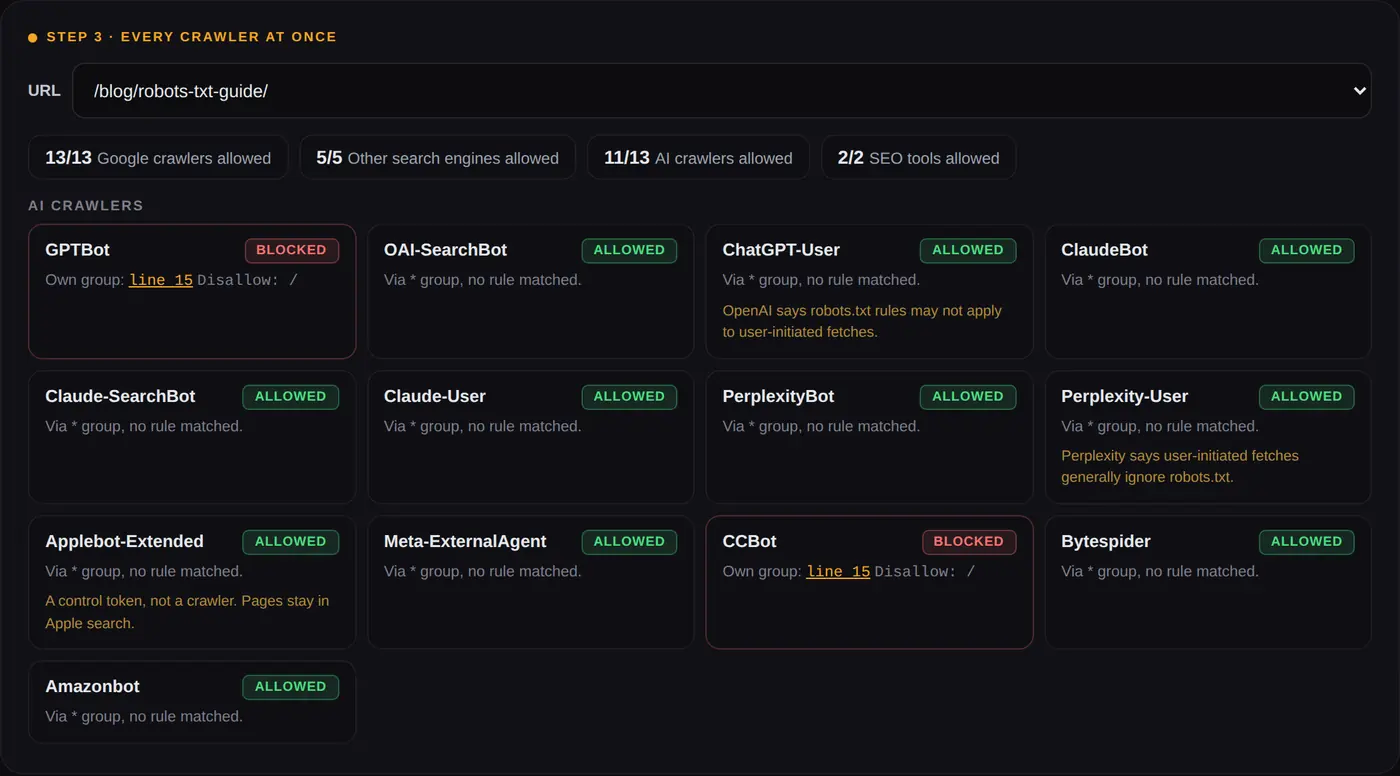
* rules.Blocking AI training while staying in AI search
A common choice is to refuse training but keep the search and answer bots, so the site can still be cited. Paste this into the editor above and switch between GPTBot and OAI-SearchBot to see the difference:
User-agent: GPTBot
User-agent: ClaudeBot
User-agent: Google-Extended
User-agent: Applebot-Extended
User-agent: CCBot
Disallow: /

User-agent: *
Disallow: /wp-admin/
Allow: /wp-admin/admin-ajax.php
Googlebot blocked by robots.txt? How to find the cause
If Search Console reports a page as blocked, fetch your live file here, add the exact URL from the report, keep Googlebot selected and read the deciding line. It is almost always one of these:
- A short rule matching more than intended, such as
Disallow: /palso blocking/products/and/pricing/. - A staging file shipped to production with
Disallow: /still in it. - A wildcard like
Disallow: /*?catching tracking or pagination parameters on pages you want indexed. - A rule written for the wrong host.
www, the bare domain, each subdomain andhttpversushttpseach need their own file. - A CDN or firewall serving a different robots.txt, or a 5xx error, to Google than to your browser.
"Blocked by robots.txt" and "Indexed, though blocked by robots.txt"
These two Search Console statuses are easy to mix up. Blocked by robots.txt means Google did not crawl the URL
and did not index it. Indexed, though blocked by robots.txt means Google found links pointing to the URL and
indexed the address anyway, usually with no description, because it was not allowed to read the page. robots.txt
controls crawling, not indexing. To remove a page from results, allow crawling and add a noindex robots
meta tag, so Google can actually see it.
Using the tool as a Googlebot checker
Pick Googlebot to see what Google Search can crawl, which is what most people want from a Googlebot tester. Pick Google-InspectionTool to see what the URL Inspection tool and
Rich Results Test can reach; it follows the Googlebot group when it has none of its own. If you run AdSense, check
Mediapartners-Google too. It ignores the * group, so a site wide Disallow: / does not stop it,
but a group written for it will, and that costs ad relevance.
Robots.txt validator: the errors and warnings it flags
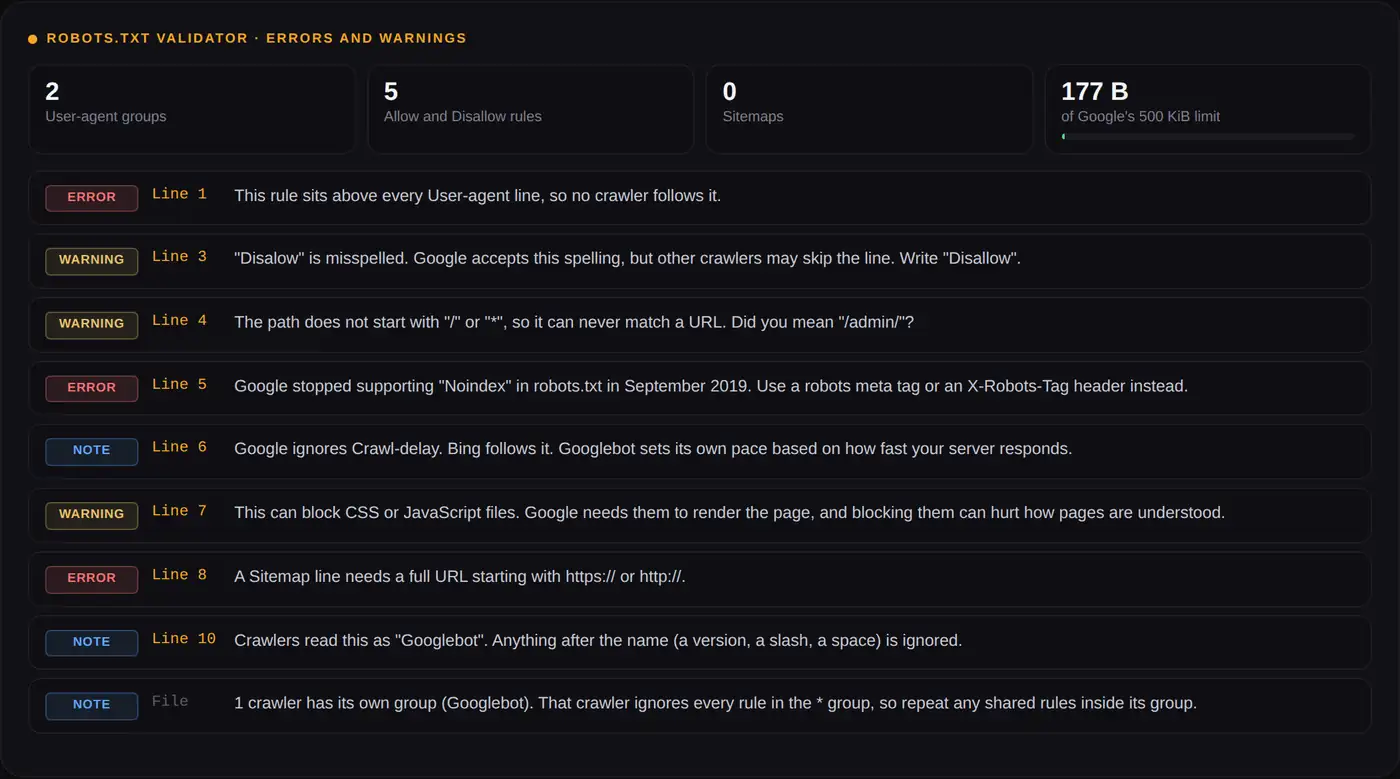
Below the tester, a robots.txt validator reads every line and reports problems with their line numbers. Click a line number to jump to it in the editor. It checks for:
- Errors: rules above the first User-agent line,
noindexin robots.txt (unsupported by Google since September 2019), relative sitemap URLs, and files over 500 KiB. - Warnings: misspelled field names, missing colons, paths that do not start with
/or*,Disallow: /for all crawlers, rules that block CSS or JavaScript, and unknown fields. - Notes: Crawl-delay (ignored by Google, followed by Bing), Yandex-only fields, user-agent values with versions attached, groups that are merged, and named groups that make crawlers skip the
*rules.
What happened to the Google Search Console robots.txt tester
Google retired the old robots.txt tester in Search Console in late 2023 and replaced it with the robots.txt report. The report is useful: it lists the robots.txt files Google found for your top hosts, when each was last crawled, any fetch errors or warnings, and it lets you request a recrawl after you change the file.
What it no longer does is let you type a URL and see whether a given rule blocks it, or try an edit before you publish. That gap is what this page covers, and it works for any site, not only the ones you have verified in Search Console. Use both: test and fix here, upload the file, then request a recrawl in the report so Google picks up the change sooner than its usual 24 hour cache.
Robots.txt examples you can paste and test
Each of these works as written. Paste one into the editor to check it against your own URLs before using it.
Allow every crawler everything
User-agent: *
Disallow:

Sitemap: https://example.com/sitemap.xml
Block the whole site, for example on staging
User-agent: *
Disallow: /
Staging sites are better protected with a password, because a blocked URL can still be indexed from links.
Block a folder but allow one file inside it
User-agent: *
Disallow: /wp-admin/
Allow: /wp-admin/admin-ajax.php
Block internal search and filter parameters
User-agent: *
Disallow: /*?s=
Disallow: /*?filter=
Disallow: /*&sort=
This is one of the few robots.txt changes that saves crawl budget on large sites, because faceted URLs multiply fast.
Block Googlebot only
User-agent: Googlebot
Disallow: /

User-agent: *
Disallow:
What robots.txt cannot do
- It does not remove pages from Google. Use a
noindexmeta tag or anX-Robots-Tagheader, and leave the URL crawlable so the tag can be seen. - It is not security. The file is public and lists the paths you would rather hide. Protect private areas with a login.
- It is a request, not a barrier. Reputable crawlers follow it. Scrapers and some user-triggered fetchers do not.
- It covers one host.
https://example.com/robots.txtsays nothing abouthttps://shop.example.comorhttp://example.com. - It does not describe your content. That is the job of structured data. If you are working on how pages appear in results, the schema markup generator builds the JSON-LD for that.
Other free SEO tools on Calcxi
These sit in the same SEO category as this robots.txt tester.
Robots.txt Generator
Build a new robots.txt from presets for WordPress, WooCommerce and Blogger, with AI crawler controls, then send it straight back here to test.
Schema Markup Generator
JSON-LD for 15 schema types, with Google's required fields marked and a clear label on which types still earn a rich result.
YouTube Tag Extractor
Pulls the hidden tags from any public video, useful for keyword research on YouTube.
YouTube Title Generator
Title ideas built around a keyword, with length kept inside what search results display.
YouTube Video Stats Checker
Views, likes and engagement for any public video in one place.
All SEO tools
The full set. More technical SEO tools are being added to this category.
Robots.txt tester FAQ
What is a robots.txt tester?
A robots.txt tester checks whether a crawler such as Googlebot is allowed to crawl a URL under the rules in a site's robots.txt file. A good one also shows which rule made the decision and which group of rules the crawler followed, so you can fix the file rather than guess.
How do I check if my robots.txt is working?
To check robots.txt on a live site, fetch the file with the tool above, confirm it returns 200 OK, then test a few URLs you need indexed and a few you want blocked with Googlebot selected. After uploading changes, open the robots.txt report in Search Console to confirm Google has fetched the new version, and request a recrawl if it has not.
Is there still a robots.txt tester in Google Search Console?
No. Google retired it in late 2023 and replaced it with the robots.txt report, which shows the files Google found, when it fetched them and any errors. It does not test individual URLs, which is what this robots.txt tester is for.
How accurate is this robots.txt checker for Googlebot?
The matching logic is a direct port of Google's open-source robots.txt parser and gives the same result on every URL matching check in the test suite Google publishes with it, including wildcards, the longest match rule, index.html handling and misspelled fields. It also applies Google's documented fallbacks, such as Googlebot-Image using the Googlebot group. Other search engines follow the same standard, RFC 9309, though they may differ on edge cases.
Why is Googlebot blocked by robots.txt when I never blocked Google?
Usually a rule written for everyone is broader than it looks, such as Disallow: /p matching every path that starts with those letters, or a User-agent: * group with Disallow: / left over from staging. Test the exact URL here and the result will point to the line responsible.
Does Disallow in robots.txt stop a page from being indexed?
No. It stops crawling. A blocked URL can still appear in Google if other pages link to it, shown without a description. To keep a page out of results, allow crawling and add a noindex robots meta tag or an X-Robots-Tag header.
How long does Google take to notice robots.txt changes?
Google usually caches robots.txt for up to 24 hours, sometimes longer if the file cannot be refreshed. You can speed this up by requesting a recrawl from the robots.txt report in Search Console.
Is it robots.txt or robot.txt?
It must be robots.txt, plural and in lowercase, placed at the root of the host, such as https://example.com/robots.txt. A file named robot.txt, or one placed in a subfolder, is ignored by every crawler.
How do I block Googlebot but allow other crawlers?
Add a group for Googlebot with Disallow: / and a separate User-agent: * group with an empty Disallow:. Remember that Googlebot-Image, Googlebot-News and Google-InspectionTool follow the Googlebot group when they have none of their own, so they are blocked too.
Does Google support Crawl-delay in robots.txt?
No, Google ignores Crawl-delay. Bing follows it, and Yandex stopped using it in 2018. Googlebot adjusts its crawl rate on its own based on how quickly your server responds, and a slow or failing robots.txt reduces crawling more than any directive would.
How do I block AI crawlers like GPTBot with robots.txt?
Add User-agent: GPTBot followed by Disallow: /, and repeat the User-agent line for each bot you want to stop, such as ClaudeBot, CCBot and Google-Extended. Test the result in Step 3 above, which checks every AI crawler at once and shows which ones are still allowed.
Does robots.txt apply to subdomains?
No. Each combination of protocol, host and port has its own robots.txt. The file at https://example.com/robots.txt does not cover https://blog.example.com or http://example.com, and the tester marks such URLs as belonging to another host.
What is the maximum size of a robots.txt file?
Google reads the first 500 KiB and ignores everything after that. The limit comes from RFC 9309, which requires crawlers to parse at least 500 KiB. The validator shows how close your file is to it.
How the live fetch works, and its limits
Browsers cannot read another site's robots.txt directly, so the Fetch button in this robots tester asks a small Calcxi
server to download it. The server only ever requests /robots.txt, identifies itself as CalcxiRobotsTester,
follows at most five redirects like Google does, stops reading at 500 KiB and stores nothing. Private and internal
network addresses are refused.
Some sites show different content to Googlebot than to other visitors, and a firewall may block the fetch entirely. If the result looks wrong, open your robots.txt in a browser, paste the text into the editor and test it there. Pasted text and test URLs never leave your browser. This tool is a guide to how crawlers read the file; the final word on what Google did with your site is always Search Console.

Written & verified by
B.Tech Computer Science · 8 years in web development & SEO · Bhilwara, India
About ·
LinkedIn ·
Report an error