
SEO & YouTube
YouTube Tag Extractor
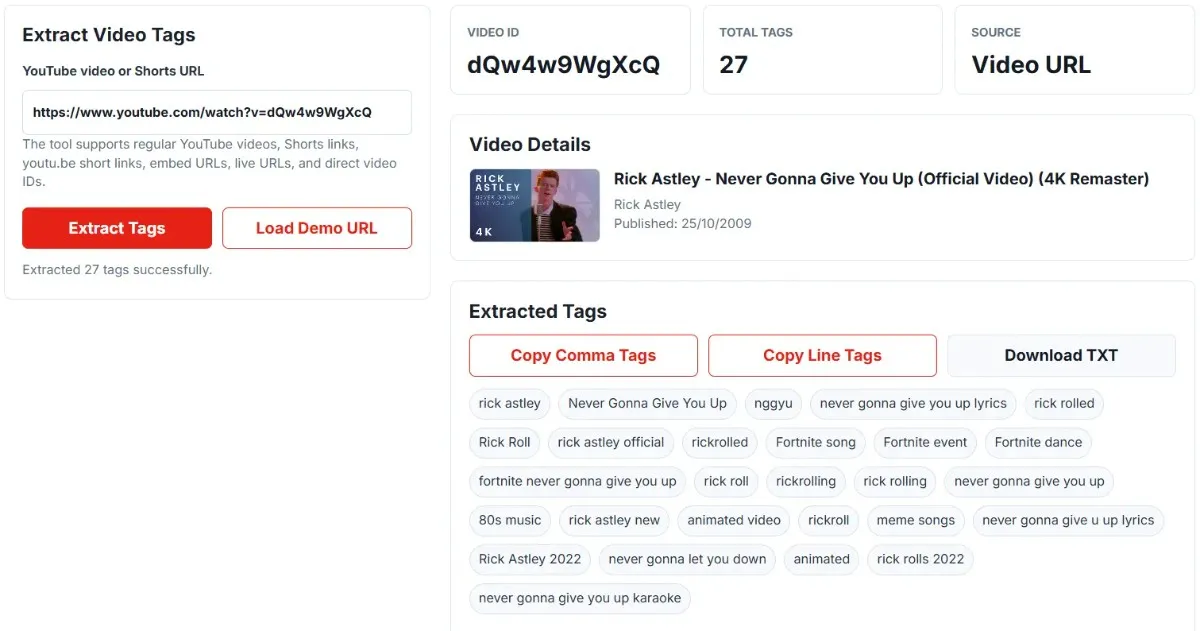
Extract public tags from any YouTube video or Shorts URL. Paste a video link, fetch the thumbnail and video details, then copy or download the extracted tags.
Video Details
Extracted Tags
Some videos return no tags at all. That usually means the creator never added any, which is common. It can also mean the video is private, unlisted or removed. An empty result is an answer, not a failure.
On the character count: most tag tools print a "500 character limit" next to this number. YouTube's own help documentation does not publish a character limit for tags, so this tool reports the count as a plain measurement and leaves the ceiling to YouTube.
What Is a YouTube Tag Extractor?
A YouTube tag extractor is a tool that helps you extract tags from a YouTube video. YouTube tags are metadata keywords added by creators to help describe the topic of a video. With this tool, you can paste a regular YouTube video URL, Shorts URL, youtu.be link, or video ID and quickly see the tags available for that video.
How to Use the YouTube Tag Extractor
- Copy the URL of a YouTube video or Shorts video.
- Paste the URL into the YouTube Tag Extractor.
- Click the Extract Tags button.
- View the video thumbnail, title, channel, and tags.
- Copy the tags or download them as a text file.
Why Extract Tags from a YouTube Video?
Extracting YouTube tags can help you understand how a video is categorized and what keywords may be connected to its topic. This can be helpful when researching competitors, planning video topics, or improving your own YouTube SEO strategy. You should not simply copy tags without understanding the content. Instead, use extracted tags as research signals to discover related keywords, video topics, and audience intent.
What Can This Tool Extract?
- YouTube video tags
- Video thumbnail
- Video title
- Channel name
- Video ID
- Tag count
Since the last update this page also reports the total tag character count, so you can see at a glance how much of the tag box a video actually uses.
Supported YouTube URL Formats
- Regular YouTube video URLs
- YouTube Shorts URLs
- youtu.be short links
- Embed URLs
- Live video URLs
- Direct YouTube video IDs
https://youtu.be/VIDEO_ID
https://www.youtube.com/shorts/VIDEO_ID
https://www.youtube.com/embed/VIDEO_ID
https://www.youtube.com/live/VIDEO_ID
VIDEO_ID
A channel URL, a playlist URL or a search results page will not work, because none of them point at a single video. Paste those and the tool now tells you exactly which kind of link you used, instead of reporting that your video does not exist.
YouTube Video Tags vs Keywords
The two words get used as if they mean the same thing, and they do not.
Tags
A specific metadata field. The creator types them into the tag box in YouTube Studio, they are attached to that one video, and they are invisible to viewers. This tool reads that field.
Keywords
The words people actually type into search. They are not a field anywhere. A keyword only helps you if it appears where YouTube and the viewer can both see it: the title, the description, the spoken words in the video.
The practical difference is that a keyword you never say and never write does nothing, no matter how many tags you put it in. Tags describe a video. Keywords describe a search. Matching the two up is the actual work.
Can Tags Help with YouTube SEO?
A little, and less than most tag tools want you to believe. Worth being straight about it.
Here is what YouTube itself says in its help documentation on adding tags:
"Tags can be useful if the content of your video is commonly misspelled."
Source: Add tags to your video, YouTube Help
That is the whole of the emphasis Google gives them. Not "tags drive discovery", not "fill all 500 characters". A misspelling safety net. Every ranking claim beyond that is somebody's opinion, including anything you read on a tool page, this one included.
What genuinely carries weight is what the viewer sees and what the machine can read directly: the title, the thumbnail, the first line of the description, the spoken words, and above all whether people keep watching. Tags are a small tidy-up at the end, not the strategy.
So why extract them at all? Because they tell you how another creator thinks about their topic. That is research value, not ranking value, and it is a perfectly good reason to look.
Best Ways to Use Extracted YouTube Tags
Read them as a vocabulary list
Pull the tags from the five videos already ranking for your topic and look for the words that appear in all five. Those are the terms the audience uses. Put them in your title and description, where they actually count.
Find the sub-topics you missed
Tags often reveal angles you had not considered: a software version number, a common beginner mistake, an alternative name for the same thing. Each one can be its own video.
Check your own back catalogue
Run your own older videos through it. You will usually find a video tagged for something you no longer make, or an early upload with no tags at all.
Spot the misspellings worth keeping
This is the one use Google actually endorses. If your topic gets typed wrong often, a tag catches the people who typed it wrong.
What not to do. Copying another video's tag list wholesale does not work and can hurt you. YouTube's own policy warns against tags that are not relevant to the video, and irrelevant tags are treated as metadata spam. More importantly, tags that describe someone else's video will pull in viewers expecting that video, who then leave, which is the one signal that reliably damages a channel.
Frequently Asked Questions
Limits, sources and independence
What this tool cannot do
It reads public metadata for one video at a time. It cannot see private or unlisted videos, it cannot show search volume or ranking difficulty for a tag, it cannot tell you whether a tag helped that video, and it has no bulk or channel-wide mode. It also cannot show a tag that was never added.
Where the data comes from
Tags, title, channel and thumbnail are requested from YouTube's public data interface at the moment you press the button. Nothing is cached and nothing you paste is stored on a Calcxi server. The statement about tags and misspellings is quoted directly from Google's own YouTube Help page, which was read before it was quoted. No character limit is claimed anywhere on this page, because Google does not publish one.
Not affiliated with YouTube
Calcxi is an independent website. We are not affiliated with, endorsed by or sponsored by YouTube, Google LLC or Alphabet Inc. "YouTube" and "YouTube Shorts" are trademarks of Google LLC, used here only to describe what this tool does. This site uses YouTube API Services, so your use of it is also subject to the YouTube Terms of Service, and Google's Privacy Policy applies to data handled by Google.
More free YouTube tools
Once you have the tags, these cover the rest of the upload:

Written & verified by
B.Tech Computer Science · 8 years in web development & SEO · Bhilwara, India
About ·
LinkedIn ·
Report an error