
Robots.txt Generator
A free robots.txt generator with presets for WordPress, WooCommerce and Blogger. Choose what every crawler may reach, allow or block Googlebot, Bingbot and AI bots one by one, and check who can crawl your site before you upload the file.
Used for the sitemap line and for testing. The robots.txt file itself never contains your domain except in the Sitemap line.
An Allow rule wins when it is longer than the Disallow rule it overlaps.
Google ignores Crawl-delay. Bing follows it.
Default follows your rules above. Allow lets the crawler in even if the default is Block, while still keeping your disallowed paths out. Block keeps it out of the whole site.
How to use this robots.txt generator
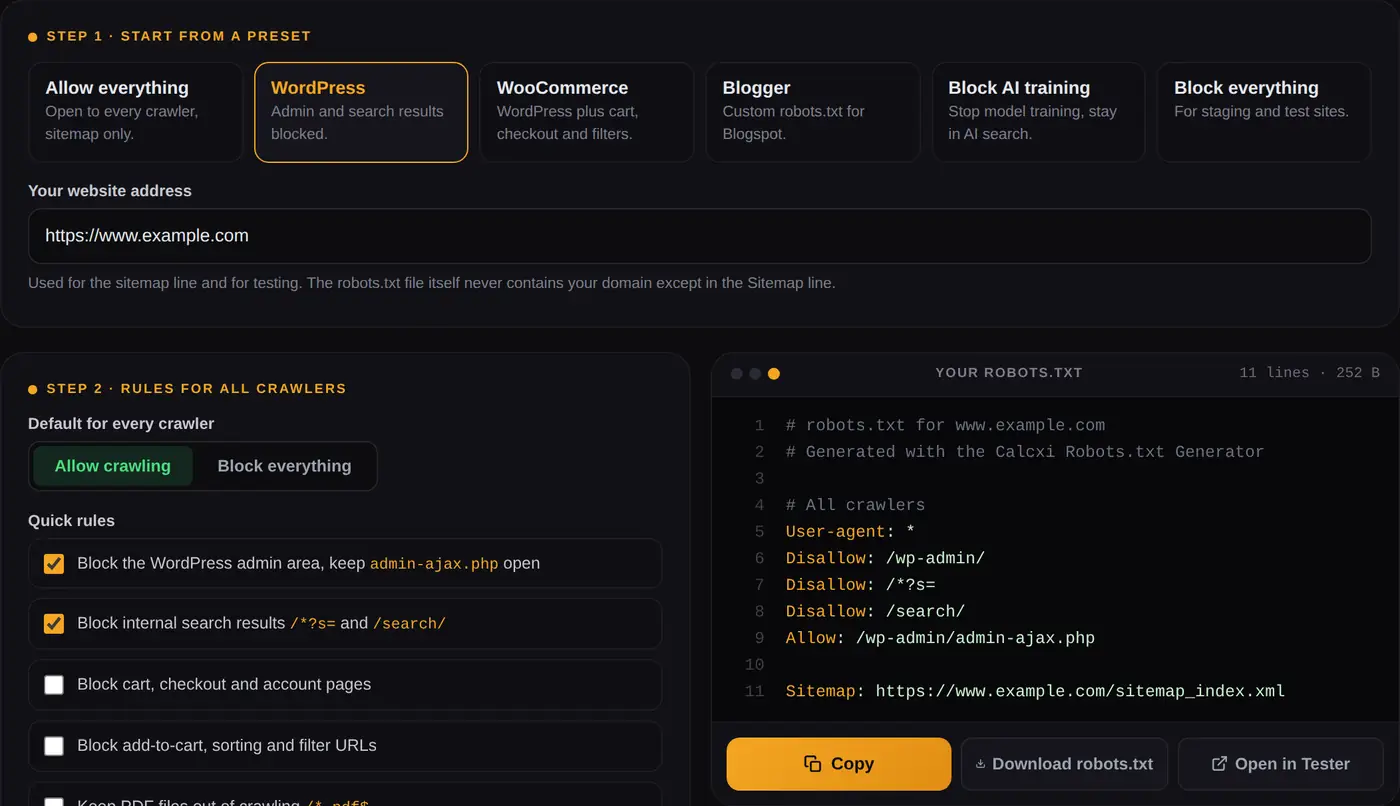
Pick the preset closest to your site, adjust the rules, and copy the file. The whole job takes a minute. What this robots.txt generator adds is the part that usually goes wrong afterwards: it writes groups the way crawlers actually read them, it warns you before you block something you need, and it shows which crawlers can still reach your pages before you upload anything.
Choose a preset and enter your website
WordPress, WooCommerce, Blogger, an AI training opt-out, allow everything or block everything. Each one fills in sensible rules you can change. Your website address goes into the Sitemap line.
Set the rules every crawler follows
Allow or block by default, tick the quick rules that match your site, then add any folders or URL patterns to disallow, one per line. Paths are cleaned up for you, so private/ becomes /private/.
Allow or block crawlers one by one
Leave most crawlers on Default. Switch individual ones to Allow or Block: Googlebot, Bingbot, AI crawlers like GPTBot and ClaudeBot, or SEO tool crawlers like AhrefsBot. The file updates as you click.
Check, copy and upload
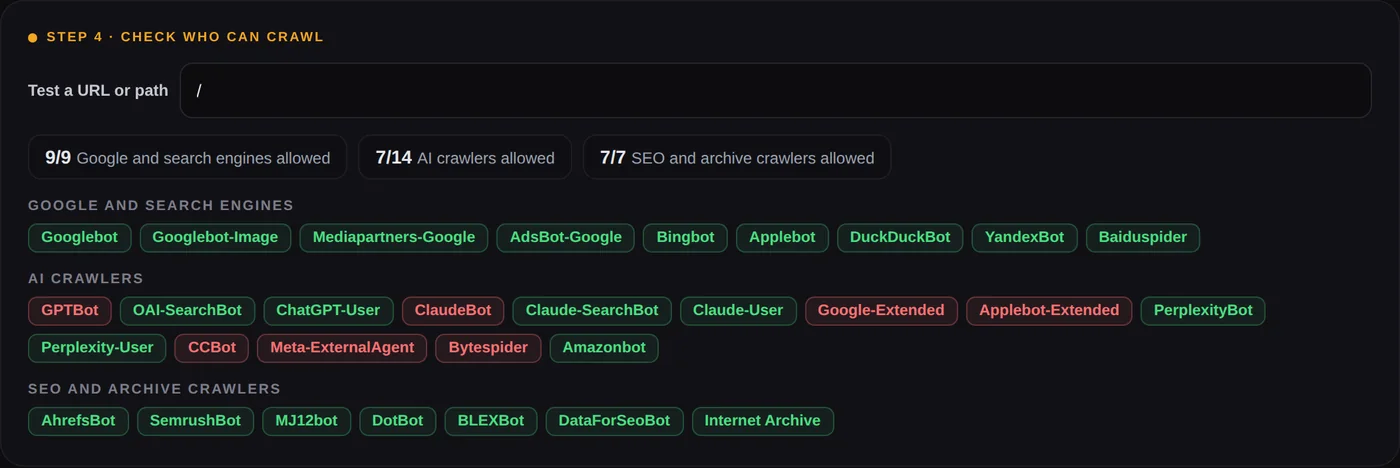
Step 4 shows which crawlers can reach any URL you type. When it looks right, copy the text or download robots.txt, then upload it to the root of your site. Open in Tester sends the file to our robots.txt tester for a deeper check.
What this robots.txt file generator does differently
Most robots.txt makers and builders work the same way: a default setting, a list of search engines with Allowed or Refused, and a box for restricted directories. That layout has a flaw that is easy to miss, and it is the main reason this tool was built the way it is.
It repeats your shared rules inside every named group
A crawler follows only one group in robots.txt: the one that names it. As soon as a file contains
User-agent: Googlebot, Googlebot stops reading the User-agent: * group completely. So if a
generator puts your restricted directories in the * group and then adds a separate "allowed" group for
Google, Google is now free to crawl those directories. Nothing warns you.
This generator copies your disallowed paths into every crawler group it creates, and adds a comment saying why. Allow
Googlebot and Bingbot on a site that is otherwise blocked, and both still stay out of /wp-admin/.
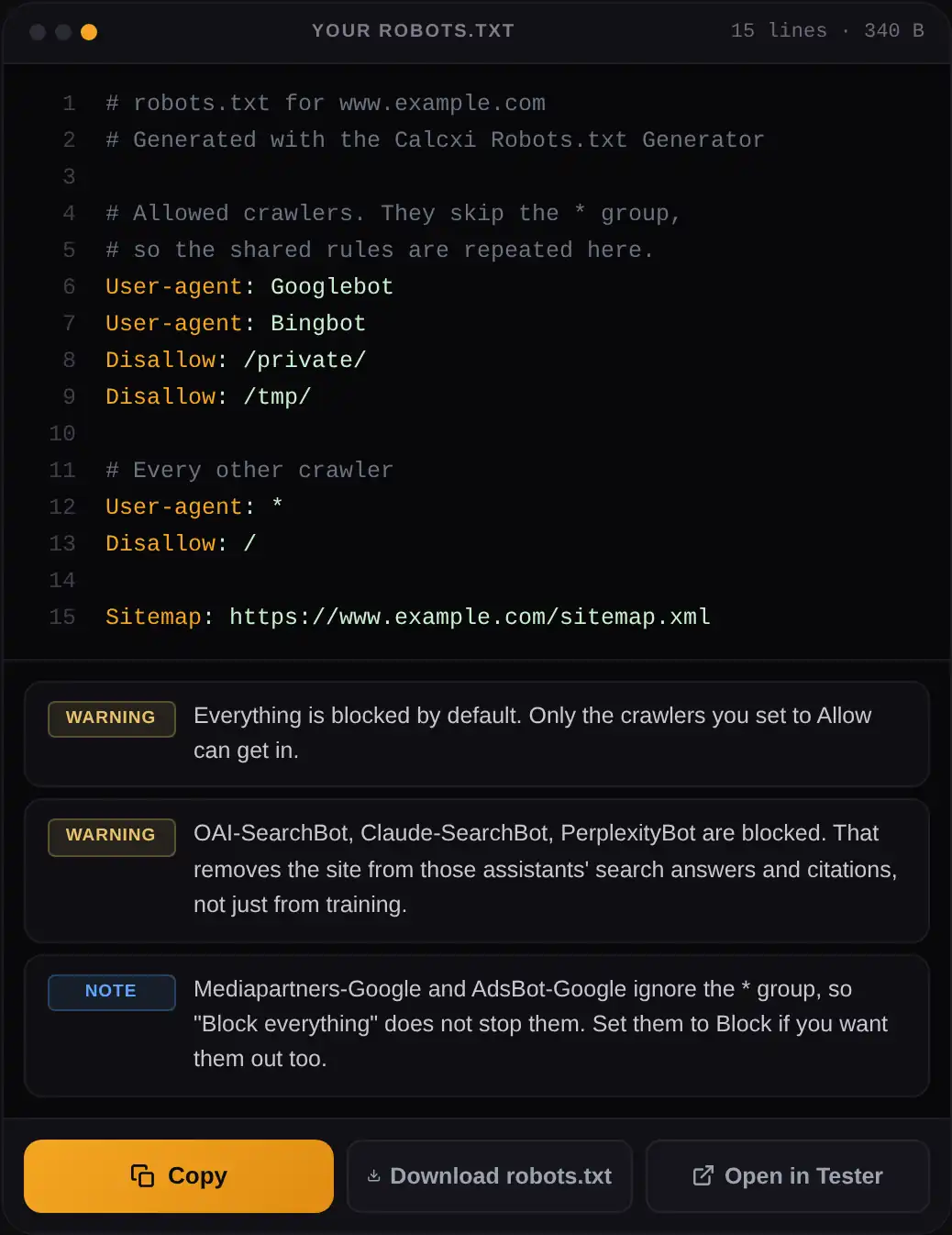
/private/ and /tmp/ rules are repeated inside it, and the warnings explain what else the file does.It shows who can crawl before you publish
Step 4 runs the file you just built through the same matching logic as our tester, based on Google's open-source robots.txt parser, and shows every crawler as allowed or blocked for any URL you type. That catches side effects a plain generator never mentions, such as Googlebot-Image and Applebot following your Googlebot rules when they have no group of their own.
Only crawlers that still exist
Many robots file generators still list DMOZ, which closed in 2017, Alexa, which was retired in 2022, and old Yahoo and MSN crawlers. Yahoo search now runs on Bing's results, so blocking Bingbot is what actually matters. This list covers the crawlers you are likely to see in your logs today, including the AI crawlers most sites now have to make a decision about.
Robots.txt generator for WordPress
WordPress creates a virtual robots.txt file on its own, and it is a sensible starting point. The WordPress preset
builds on it: it keeps the admin area out, leaves admin-ajax.php open because themes and plugins use it
on the front end, and blocks internal search results, which are thin pages that waste crawling. This is the WordPress
robots.txt it produces:
User-agent: *
Disallow: /wp-admin/
Disallow: /*?s=
Disallow: /search/
Allow: /wp-admin/admin-ajax.php

Sitemap: https://example.com/sitemap_index.xml
The sitemap address depends on how your sitemap is made. WordPress on its own uses /wp-sitemap.xml. Rank
Math and Yoast use /sitemap_index.xml. Open the address in a browser before you use it.
WooCommerce robots.txt
The WooCommerce preset adds the cart, checkout and account pages, plus the add-to-cart, sorting and filter parameters. Those parameters are where shops lose most of their crawl budget, because every combination of filters creates a new URL with the same products on it.
Disallow: /cart/
Disallow: /checkout/
Disallow: /my-account/
Disallow: /*?add-to-cart=
Disallow: /*?orderby=
Disallow: /*?filter_
How to edit robots.txt in WordPress
- Rank Math: General Settings, then Edit robots.txt. Paste the generated file and save.
- Yoast SEO: Tools, then File editor. It creates robots.txt if the site does not have one yet.
- No plugin: upload a file named
robots.txtto the folder that containswp-config.php. A real file always replaces the virtual one WordPress generates.
Custom robots.txt for Blogger
Blogger lets you replace its default file under Settings, Crawlers and indexing, Custom robots.txt. The Blogger
preset builds the usual custom robots txt: it blocks /search, which covers search results and label pages
that repeat your posts, allows everything else, and adds your blog's sitemap.
User-agent: *
Disallow: /search
Allow: /

Sitemap: https://yourblog.blogspot.com/sitemap.xml
Blogger's own default file also contains a Mediapartners-Google group for AdSense. You do not need to copy
it: that crawler ignores the * group anyway, so leaving it on Default already gives it full access. Only
turn the custom robots.txt switch on if you need something different from the default, because a mistake here can hide
the whole blog.
Robots.txt syntax: disallow, allow, wildcards and sitemap
You do not need to write any of this by hand, but knowing what each line means makes the generated file easy to check.
User-agent
Starts a group and names the crawler it applies to. * means every crawler that has no group of its own.
Several User-agent lines in a row share the rules below them, which is how the generator keeps the file short.
Robots.txt disallow: blocking a directory
Disallow: /private/ blocks the folder and everything inside it. Without the trailing slash,
Disallow: /private also blocks /private-offers/ and /private.html, because
rules match from the start of the path. To disallow a directory in robots.txt safely, end it with a slash. An empty
Disallow: means nothing is blocked.
Allow
Opens a door inside a blocked area. Allow: /wp-admin/admin-ajax.php works because it is longer than
Disallow: /wp-admin/, and the longer rule wins.
Robots.txt wildcards: * and $
* matches any run of characters, so Disallow: /*?sort= blocks the sort parameter on every
page. $ anchors the end of the URL, so Disallow: /*.pdf$ blocks PDF files but not a page
whose address merely contains ".pdf". Both are supported by Google and Bing.
Robots.txt and sitemap.xml
A Sitemap: line tells every crawler where your XML sitemap is, including those you have never set up in a
webmaster tool. It must be a full URL, it can point to another host, and you can list several. It sits outside the
groups, so its position in the file does not matter. The generator turns /sitemap.xml into a full address
using the website you entered.
Crawl-delay
Asks a crawler to wait between requests. Google ignores it and sets its own pace based on how quickly your server responds. Bing follows it. Leave it empty unless a specific crawler is putting real load on your server.
Generate robots.txt rules for AI crawlers
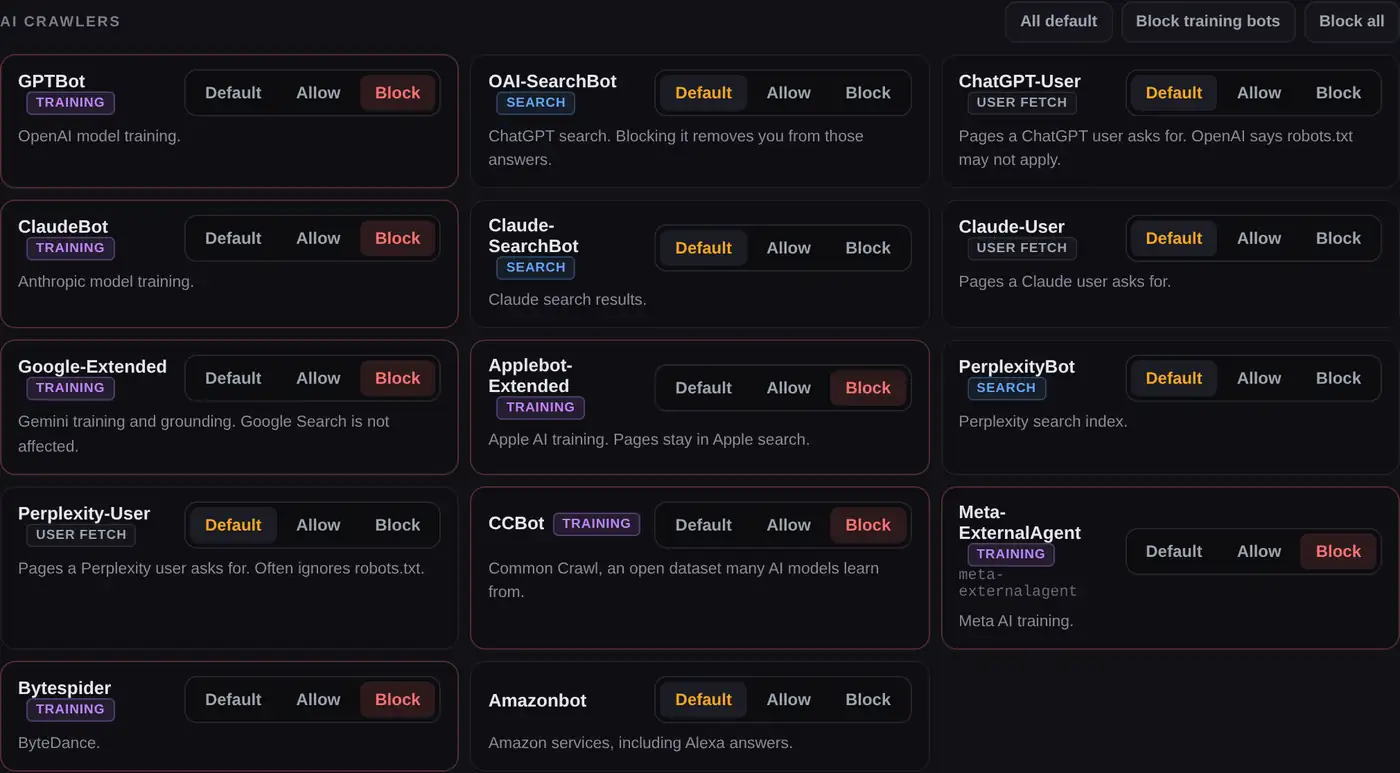
AI companies run more than one crawler, and they do different things. A training crawler collects pages for future models. A search crawler builds the index an assistant uses to answer questions and cite sources. A user fetcher opens a page because someone asked about it. The generator labels each one, because blocking the wrong type has a real cost.
- Training: GPTBot, ClaudeBot, Google-Extended, Applebot-Extended, CCBot, Meta-ExternalAgent, Bytespider.
- Search: OAI-SearchBot, Claude-SearchBot, PerplexityBot. Blocking these removes you from those answers and citations.
- User fetches: ChatGPT-User, Claude-User, Perplexity-User. OpenAI and Perplexity say robots.txt may not apply to these.
The Block AI training preset blocks the training group and leaves search crawlers open, which is the choice most publishers make: keep content out of model training, stay visible and citable in AI search. Google-Extended and Applebot-Extended are control tokens rather than crawlers, and blocking them does not affect Google Search or Apple search.
Robots.txt disallow subdomain: one file per host
A robots.txt file only covers the exact host it sits on. https://example.com/robots.txt has no effect on
https://blog.example.com, https://shop.example.com or even http://example.com.
So you cannot disallow a subdomain from the main domain's file. To block a subdomain, give it its own robots.txt with
Disallow: /. The Block everything preset builds exactly that. For staging subdomains, a password
is safer still, because blocked URLs can be indexed from links even though they are never crawled.
Where to put your robots.txt file
Whether you use a robots.txt generator, a robot text generator or write it by hand, the file must be called
robots.txt, in lowercase, saved as plain UTF-8 text, and placed at the root of
the host, so it opens at https://yoursite.com/robots.txt. A file in a subfolder is ignored. You do not
need to submit it anywhere: crawlers request it before crawling. Google usually picks up changes within a day, and the
robots.txt report in Search Console lets you request a recrawl sooner.
Shopify robots.txt
Shopify generates robots.txt for every store and does not let you upload a file. To change it, add a
robots.txt.liquid template under Online Store, Edit code. Shopify calls this an unsupported customization
and warns that mistakes can cost all of your traffic, so add only the lines you need to the existing template rather
than replacing it with a generated file.
After you upload it
Open yoursite.com/robots.txt in a private window to confirm the new version is live, then test your most
important URLs in the robots.txt tester. It fetches the live file,
reports the HTTP status Google sees and shows the exact line that allows or blocks each URL.
Mistakes the generator warns you about
- Blocking Googlebot on a live site, which removes it from Google Search.
- Blocking Bingbot, which also removes the site from Yahoo.
- Blocking AI search crawlers when you only meant to stop training.
- Blocking CSS or JavaScript, for example
/wp-content/, which stops Google rendering your pages. - AdSense and Google Ads crawlers ignoring "Block everything", because they skip the
*group. - A relative sitemap address, which crawlers cannot use.
- Expecting robots.txt to remove pages from Google. It only stops crawling. Use a noindex tag for that, and leave the page crawlable so Google can see it.
Other free SEO tools on Calcxi
These sit in the same SEO category as this robots.txt generator.
Robots.txt Tester
Fetch any live robots.txt, test up to 100 URLs against 33 crawlers and see the rule that decided each one.
Schema Markup Generator
JSON-LD for 15 schema types, with Google's required fields marked and honest rich result labels.
YouTube Tag Extractor
The hidden tags from any public video, for keyword research on YouTube.
YouTube Title Generator
Title ideas built around a keyword, kept inside the length search results display.
All SEO tools
The full set, with more technical SEO tools being added.
Robots.txt generator FAQ
What is a robots.txt generator?
A robots.txt generator builds the robots.txt file for your website from simple choices, such as which folders to keep out of crawling, which crawlers to allow or block and where your sitemap is. It writes the syntax for you, so a typo cannot accidentally block the whole site.
How do I generate a robots.txt file for my website?
Choose a preset above, enter your website address, adjust the paths and crawlers, then copy or download the result. Upload it as robots.txt to the root of your site so it opens at yoursite.com/robots.txt, and check it in a robots.txt tester.
Is this robots.txt generator free?
Yes. There is no sign-up and no limit. The file is built in your browser, and nothing you type is sent to a server or stored.
What should a robots.txt file contain?
At minimum a User-agent line and a rule, plus a Sitemap line. Most sites only need to block a few areas with no search value, such as admin pages, internal search results, cart pages and filter parameters. Everything else should stay crawlable.
What is the best robots.txt for WordPress?
Block /wp-admin/ while allowing /wp-admin/admin-ajax.php, block internal search results, and add your sitemap. Do not block /wp-content/ or /wp-includes/, because they hold the CSS, JavaScript and images Google needs to render your pages. The WordPress preset above builds exactly this.
How do I add a custom robots.txt in Blogger?
In Blogger, open Settings, go to Crawlers and indexing, turn on Custom robots.txt and paste the file. The Blogger preset blocks /search and adds your blog's sitemap.xml, which is what most blogs need.
How do I disallow a directory in robots.txt?
Add Disallow followed by the folder path with a trailing slash, for example Disallow: /private/. The slash matters: without it the rule also blocks any path that starts with the same letters, such as /private-offers/.
Should I add my sitemap to robots.txt?
Yes. A Sitemap line with the full URL tells every crawler where to find your pages, including search engines you have not set up in a webmaster tool. You can add more than one sitemap.
Can robots.txt block a subdomain?
Only from the subdomain's own file. Each host, such as blog.example.com, needs its own robots.txt at its own root. The main domain's file has no effect on it.
How do I block AI bots with robots.txt?
Give each AI crawler a User-agent line followed by Disallow: /. The Block AI training preset does this for GPTBot, ClaudeBot, Google-Extended, Applebot-Extended, CCBot, Meta-ExternalAgent and Bytespider, while leaving AI search crawlers open so your pages can still be cited.
Does robots.txt stop a page from appearing in Google?
No. It stops Google from crawling the page, but the URL can still be indexed from links, usually without a description. To keep a page out of results, allow crawling and add a noindex robots meta tag.
Why is Crawl-delay not recommended?
Google ignores it completely, and for crawlers that do follow it, such as Bing, a high value slows how quickly new and updated pages are picked up. Use it only if one crawler is overloading your server.
Before you upload
The generator writes valid syntax and checks it against Google's matching rules, but it cannot know which pages on your site matter most. Read the file once, test your key URLs, and keep a copy of your old robots.txt so you can put it back if something looks wrong in Search Console. Everything happens in your browser, and nothing you enter is sent to a server or stored.

Written & verified by
B.Tech Computer Science · 8 years in web development & SEO · Bhilwara, India
About ·
LinkedIn ·
Report an error