
Instagram Caption Extractor
Pull the text out of any public Instagram post, with the hashtags and mentions separated from the writing, the line breaks kept intact, and every count measured against Instagram's real limits.
Works with every post type: reels /reel/, feed posts and carousels /p/, older videos /tv/, and share links carrying ?igsh=
How to copy an Instagram caption in three steps
Instagram gives you no way to select caption text. There is no copy option in the menu, long pressing opens a translate prompt instead, and on desktop the text is there but the layout fights you. This Instagram caption extractor takes the link and gives you the writing back as text you can actually use.
Copy the post link, not the caption
Tap the three dots on the post and choose Link, or take the address bar on a computer. You are copying the address, which Instagram does allow, and the caption comes back from that.
Paste it and read the breakdown
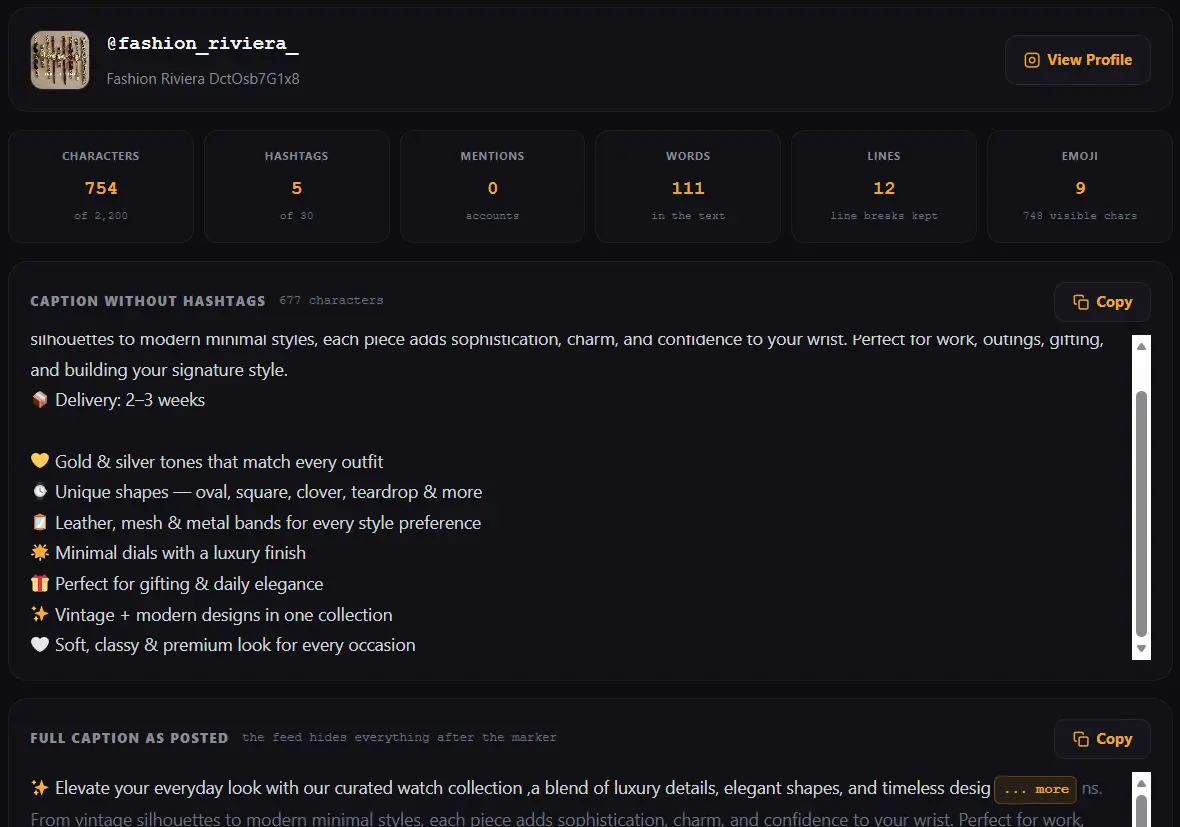
The caption arrives split into the writing, the hashtags and the mentioned accounts, each with its own copy button. Counts sit above them, measured against the limits Instagram actually enforces.
Copy the part you came for
Take the text on its own, the hashtag block on its own, the mentions, or all of it as one file. Line breaks survive the trip, which is the thing that usually breaks when text is copied out of a screenshot.
What this Instagram caption extractor gives you that a copy button does not
Most caption copy tools do one thing: hand back the caption as a single block and let you sort it out yourself. That is fine if you only want to read it. It is not enough if you are studying how a post was written, which is what people are usually doing when they extract a caption.
| What you get here | Why it matters |
|---|---|
| Writing separated from hashtags | The caption on its own is the part worth reading. A thirty tag block at the end buries it |
| Hashtags as their own list | Copy the tag set in one move instead of picking them out of a paragraph |
| Mentioned accounts pulled out | Collaborations, credits and brand partners are visible at a glance |
| Character count against 2,200 | Instagram's hard ceiling. Useful when you are adapting a caption of your own |
| Hashtag count against 30 | The other hard limit, and one people routinely guess at |
| The fold marked in the text | Shows exactly what a reader sees before tapping more |
| Line breaks preserved | Caption spacing is a deliberate choice, and screenshots destroy it |
The fold: the 125 characters that actually get read
In the feed, a caption collapses after roughly 125 characters and the rest hides behind a small more link. Almost nobody taps it. So the opening sentence of a caption is doing nearly all of the work, and the other two thousand characters are for the minority who already decided to stay.
This is the single most useful thing you can learn from someone else's caption, and no other caption copy tool shows it. Here the cut off point is marked inside the text, so you can see where the visible part ends and read the opening the way a scrolling reader would. Study a few captions from an account that performs well and the pattern in their first line becomes obvious very quickly.
Instagram's real caption limits, and where people get them wrong
2,200 characters
The hard ceiling on any caption. Go past it and the post will not publish. Worth knowing, though it is rarely the limit that matters, since almost nothing is read that far down.
30 hashtags
The maximum Instagram accepts on a post. Hitting the maximum is not a strategy, and a wall of loosely related tags reads as spam to people even when the platform allows it.
Around 125 characters
Where the feed truncates. This is the number that changes how a caption performs, and the one almost no guide leads with.
A caption near the ceiling with the full thirty tags is not automatically a good caption, and copying that shape from a big account teaches you the wrong lesson. Extracting captions is worth doing precisely so you can compare what different accounts actually do rather than repeat advice.
Why emoji make character counts disagree
Paste a caption into two different counters and you will often get two different numbers. Emoji are the reason. A plain smiling face is one character to most systems, but a thumbs up with a skin tone is built from two joined pieces, and a family emoji can be four faces stitched together with invisible joiners between them.
So this page shows the count the way a limit would be enforced, and where that differs from what your eye sees, it says so rather than picking one number and hoping. On a caption full of emoji the gap can be large, and knowing which figure you are looking at is the difference between a caption that publishes and one that gets rejected at 2,200.
What people actually use extracted captions for
Studying what works
Pulling captions from accounts in your field and comparing openings, length and tag habits. This is research, and it is the most common honest reason to extract a caption.
Backing up your own writing
Captions are often the only place a piece of writing exists. Instagram offers no export for them individually, so pulling your own back before archiving a post is simple housekeeping.
Translating or reading properly
Text you can select is text you can paste into a translator, a reader or a notes app. A caption trapped in an app is not.
Reusing your own tag sets
If a tag block worked for you before, pulling it out of your own old post beats retyping thirty hashtags by hand.
Where copying a caption crosses a line
Worth being clear, because this tool makes taking text easy and the honest boundary is not obvious to everyone. A caption is writing, and writing is the author's. Extracting it is not the problem. What you do next can be.
Reading, studying, translating, quoting with credit, or saving your own work are all ordinary uses. Pasting somebody's caption onto your own post and publishing it as though you wrote it is plagiarism whether or not anybody notices, and audiences notice more often than people expect. Using a caption in advertising without permission adds a commercial problem on top of the ethical one.
Hashtags sit differently. A tag is a label rather than a creative work, so reusing a tag set is normal practice and nobody objects. The writing between the tags is the part that belongs to someone. If your own captions have been lifted and republished, the DMCA page explains how to raise it. General information, not legal advice.
When a caption cannot be extracted
- The account is private. Nothing on a private profile is served publicly, so there is no caption to read.
- The post has no caption. Plenty of posts are published with none at all, and the tool says so rather than showing an empty box with no explanation.
- The post was deleted. The link survives, the text does not.
- The post is age restricted. Instagram serves the page but withholds the content for anyone not signed in as an adult.
Comments are a separate thing and are not included. The caption is the text the author wrote under their own post, and that is what comes back. Text burned into an image is also out of reach, since that is part of the picture rather than text at all.
Other Instagram tools on Calcxi
This page deals in words. When you want the media that went with them, these are built for that.
Instagram Photo Downloader
Pictures at the full size Instagram stores, rather than the smaller copy shown in the feed.
Instagram Carousel Downloader
Every slide of a multi slide post in one ZIP, numbered in the order it was posted.
Instagram Reels Downloader
Reels as HD MP4 with the sound in place, plus feed posts and older videos in the same box.
Instagram to MP3
The audio on its own, converted to MP3 on your device, with the original M4A beside it.
The full set with a table of which tool suits which link sits on the Instagram tools page.
Instagram caption extractor FAQ
How do I copy an Instagram caption?
Copy the post link rather than the caption itself, since Instagram gives you no way to select caption text in the app. Paste that link into the box at the top of this page and press Extract Caption. The text comes back split into the writing, the hashtags and the mentions, each with its own copy button, and the line breaks are preserved exactly as the author wrote them.
What is an Instagram caption extractor?
It is a tool that reads a public Instagram post and returns its caption as text you can select, copy and save. Instagram does not offer a copy option for captions, so the text is effectively locked inside the app. An extractor also separates the parts, so the hashtags and mentioned accounts come out as their own lists rather than buried in a paragraph.
Can I copy hashtags separately from the caption text?
Yes, and that is the main reason to use this rather than a plain copy button. Hashtags appear as their own list with a copy all option, the mentioned accounts get the same treatment, and the caption is shown a second time with both stripped out so you can read the writing on its own. Duplicate tags are listed once even if the author repeated them.
What is the Instagram caption character limit?
2,200 characters, and a post will not publish beyond it. A more useful number is around 125 characters, which is where the feed collapses a caption behind a more link. This page counts against the 2,200 ceiling and also marks the point where the fold falls, so you can see how much of a caption a scrolling reader ever actually sees.
How many hashtags can an Instagram post have?
Thirty is the maximum Instagram accepts on a post. The extractor counts the tags it found against that limit, so you can tell at a glance whether an account is filling the allowance or using a handful. Reaching the maximum is not a strategy in itself, and a block of loosely related tags reads as spam to people even where the platform permits it.
Does the caption extractor keep line breaks and emoji?
Yes to both. Line spacing in a caption is a deliberate choice by the author, so it is preserved rather than flattened into one paragraph, which is what happens when text is retyped from a screenshot. Emoji come through unchanged, and because some of them count as more than one character, the page shows where the counted length and the visible length differ instead of picking one number.
Can I extract the caption from a private Instagram account?
No. Private posts are not served publicly, so there is nothing for any tool to read, and that is the privacy setting doing its job. Any site claiming it can reach captions on private accounts is either wrong or asking for your Instagram login, which you should never give to a third party site.
Does this work for reels and carousels as well as photos?
Yes. A caption belongs to the post rather than to the media inside it, so reels, carousels, feed photos, feed videos and older long form uploads all work the same way. Whether the post holds one picture or twenty slides makes no difference to the text that comes back.
Is it legal to copy someone's Instagram caption?
Reading, studying, translating or quoting a public caption with credit is ordinary use. Republishing someone's caption as your own writing is plagiarism, and using it commercially without permission adds a further problem. Hashtags are different, since a tag is a label rather than a creative work, so reusing a tag set is normal practice. This is general information, not legal advice.
Can I download the extracted caption as a file?
Yes. One button saves everything as a plain text file: the full caption, the writing with tags removed, the hashtag list, the mentioned accounts and the counts. It is useful when you are collecting several captions to compare, since a folder of text files can be searched in a way that a screenshot cannot.
Is the Instagram caption extractor free, and does it need an app?
It is free with no signup, no account connection and no limit on how many captions you extract. It runs in the browser you already have on any phone, tablet or computer, with nothing to install. Nothing is posted to Instagram on your behalf, because the tool never touches your account.
Does the tool save the captions I extract?
No. The caption is read on demand and shown to you, and nothing is kept as a library, indexed or made searchable. Links you paste are not published anywhere. If you want a copy of a caption, the text file button is how you keep one, on your own device.
Limits and disclaimer
This Instagram caption extractor works with public posts only. It cannot read private accounts, deleted posts, age restricted content or Stories, it does not return comments, and it cannot read words that were drawn into an image rather than typed as text. Counts are measured from the caption Instagram returns.
Calcxi is an independent tools site and is not affiliated with, endorsed by or sponsored by Instagram or Meta. Instagram is a trademark of Meta Platforms, Inc. Nothing here is legal advice. A caption is the author's writing, so use what you extract as reference rather than as copy to republish. See the DMCA policy and the Terms and Conditions.

Written & verified by
B.Tech Computer Science · 8 years in web development & SEO · Bhilwara, India
About ·
LinkedIn ·
Report an error