
Schema Markup Generator
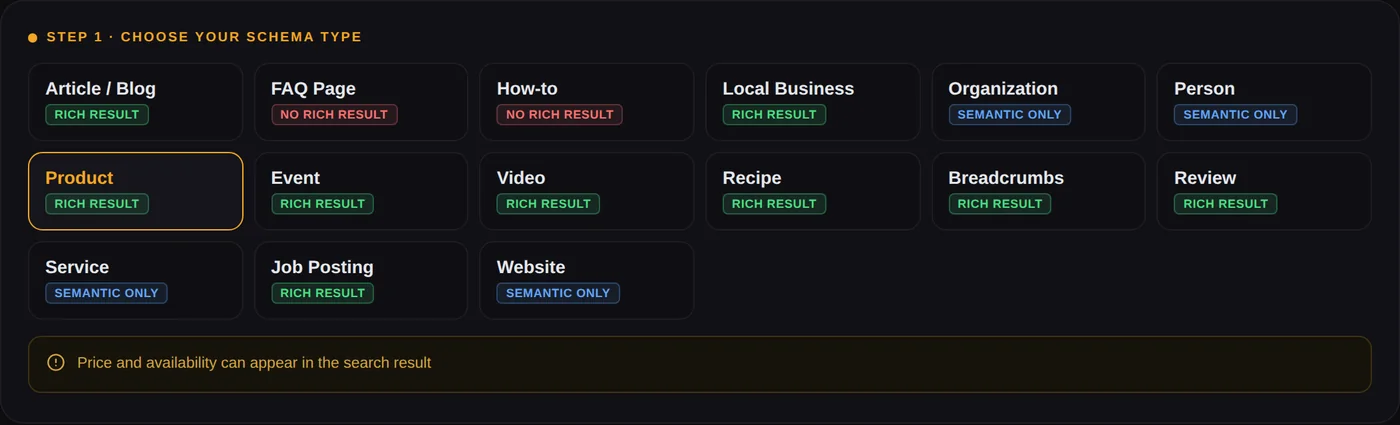
Free JSON-LD structured data generator for 15 schema types. Required fields are marked, the markup is checked as you type, and every type tells you whether it can still earn a rich result in Google.
Already published? Test the live page instead, no pasting needed.
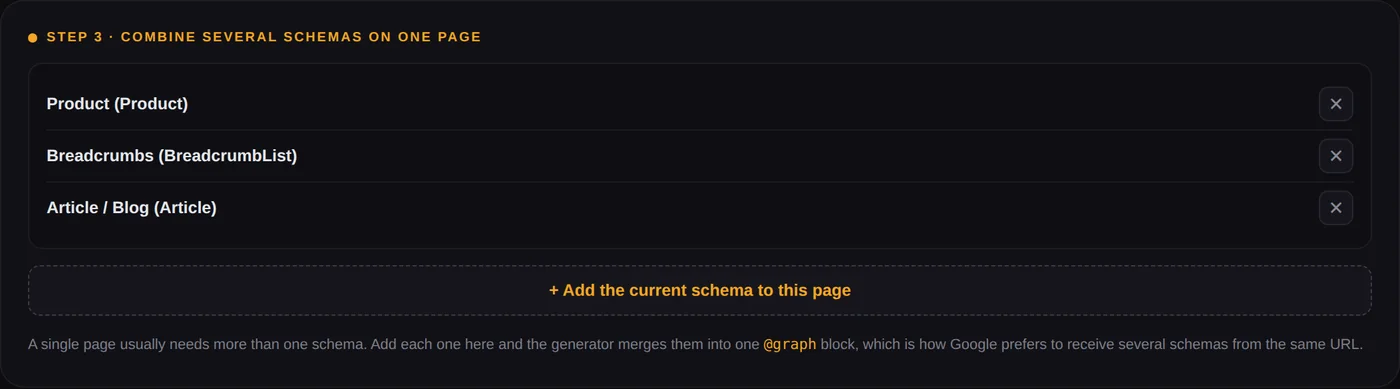
A single page usually needs more than one schema. Add each one here and the generator merges them into one @graph block, which is how Google prefers to receive several schemas from the same URL.
How to use this schema markup generator
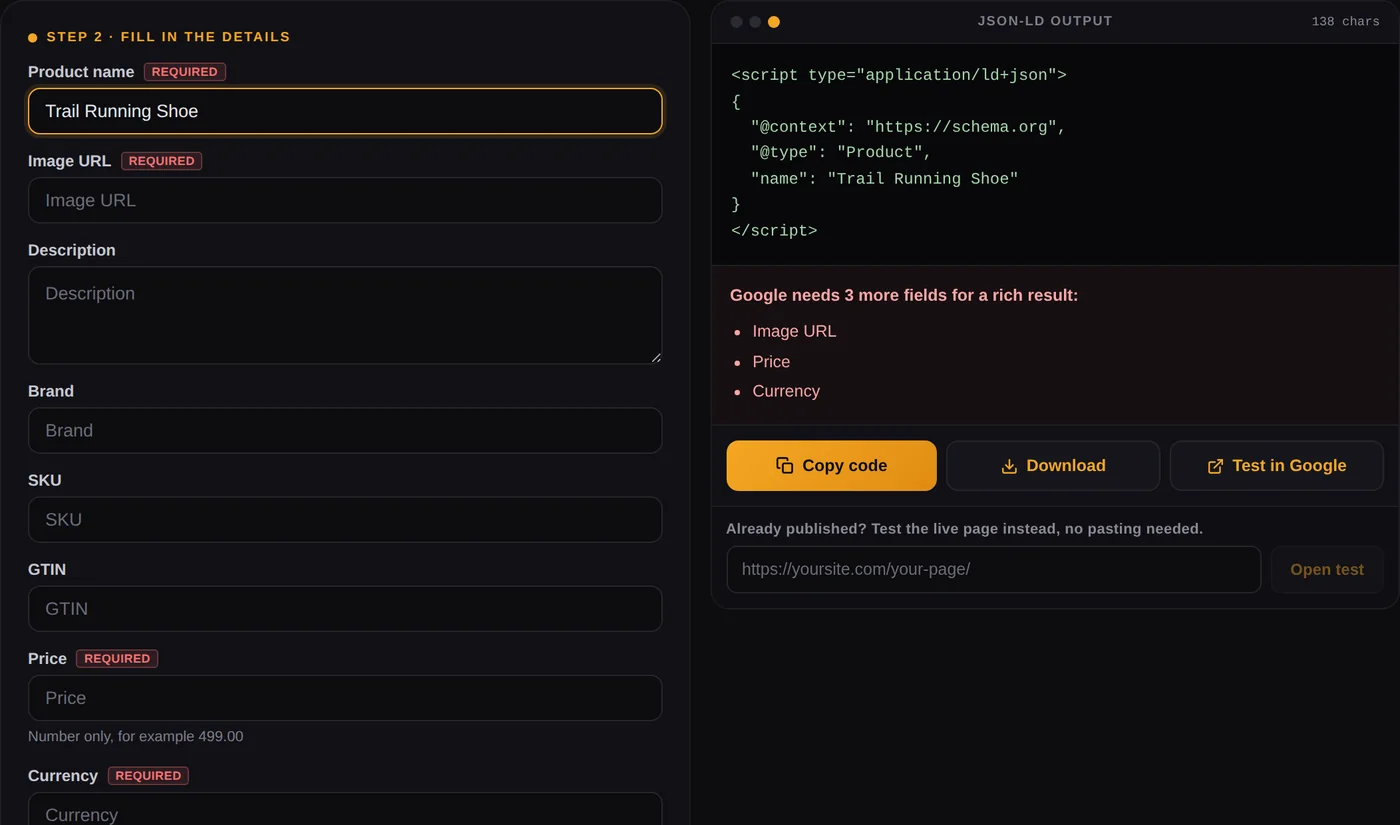
Pick a type, fill the fields, copy the JSON-LD. That is the whole process and it takes about a minute. What this schema markup generator adds beyond that is the part people usually get wrong: it marks which fields Google actually requires, it tells you when something is missing before you publish, and it is honest about which schema types still earn a rich result. Those three things are why a lot of structured data sits on pages doing nothing at all.
Choose the schema type that matches the page
Not the page you wish you had. A blog post is Article, a shop page is Product, a business address page is LocalBusiness. Marking a page as something it is not is the fastest way to get structured data ignored.
Fill the required fields first
Fields tagged Required come from Google's own documentation for that type. Miss one and the rich result will not appear, even though the markup is perfectly valid schema.org. The panel under the code tells you exactly what is still missing.
Copy the JSON-LD and paste it into your page
The output is a complete <script type="application/ld+json"> block. It goes in the <head> or anywhere in the <body>, and it is invisible to visitors.
Which schema types still produce rich results in Google
This is the section no other structured data generator gives you, and it is the most useful thing on this page. Schema.org has hundreds of types. Google shows a rich result for a small number of them, and that list got shorter in 2026.
| Schema type | Rich result in Google? | Worth adding? |
|---|---|---|
| Product | Yes | Price, availability and rating can show in search |
| Recipe | Yes | Image, rating, cook time |
| Event | Yes | Date and location show in search |
| JobPosting | Yes | Required for Google Jobs |
| VideoObject | Yes | Video thumbnails and key moments |
| BreadcrumbList | Yes | Replaces the raw URL in the result |
| Review | Yes | Star rating snippet |
| LocalBusiness | Yes | Feeds business panels and local results |
| Article | Yes | Headline and image treatment in some results |
| Organization | Indirect | Feeds knowledge panels and entity understanding |
| Person | Indirect | Entity signals, no direct snippet |
| Service | Indirect | Semantic clarity only |
| WebSite | Indirect | Names the site as an entity, supports sitelinks search |
| FAQPage | No, since May 2026 | See below, still worth keeping |
| HowTo | No, since 2023 | Semantic value only |
What happened to FAQ rich results
Google deprecated FAQ rich results in May 2026. FAQ snippets stopped appearing in search on 7 May, the reporting was removed from Search Console in June, and API support went in August. Before that, in August 2023, Google had already limited both FAQ and HowTo rich results to a small set of government and health sites.
Almost every schema markup generator online still offers a faq schema generator as if nothing changed. If you
add schema.org FAQPage markup today expecting stars or accordions in the search result, you will
be waiting a long time.
Should you still add it? Yes, and that is not a contradiction. Google has confirmed the markup causes no problem if it stays on the page, it is still valid schema.org, and it still describes your content in a machine readable way. That matters more than it used to, because AI search and generative answer engines parse structured data to understand what a page covers. You are no longer adding FAQPage for a rich snippet. You are adding it so machines can read your answers cleanly. The pages on this site use it for exactly that reason, and you can see a live example on the Instagram reels downloader.
A schema markup generator for every JSON-LD type you need
The generator above covers fifteen types. These are the ones people search for most, and the notes below are the details that actually decide whether the structured data works.
FAQ schema generator
Builds a FAQPage with any number of question and answer pairs. Every question needs a
name and an acceptedAnswer containing real text. The most common mistake is marking up
questions that are not visible on the page. Google has always required that FAQ markup reflects content the
visitor can actually see, and invisible markup can be treated as spam.
Schema organization generator
Organization markup is how you tell Google what your brand is rather than what a single page says.
Include the logo, the official URL, and the sameAs array pointing at your verified social profiles.
The schema sameAs property is doing more work than most people realise, because it is the link
between your website and the profiles that confirm the same entity elsewhere. Organization schema markup is
usually placed once, on the homepage or in a site wide block.
Local business schema generator
LocalBusiness needs a name and a full postal address at minimum. Add opening hours, phone, price
range and geo coordinates and the markup starts supporting local search properly. If you run a restaurant, use
the Restaurant subtype rather than plain LocalBusiness, because it accepts menu, cuisine and
reservation properties that a generic restaurant json-ld schema generator will not give you.
Product listing schema generator
Product is the type with the most direct commercial payoff, because price and availability can
appear in the search result. Google needs the product name and an image, plus at least one of
offers, review or aggregateRating for a merchant listing. A free product
listing schema generator that omits the offers block gives you markup that validates and still shows nothing.
Article and blog schema
Article covers NewsArticle and BlogPosting as subtypes. Google lists no
strictly required properties here, but the headline, image, publication date and author are what make the markup
useful. The headline field has a soft limit of 110 characters, which the generator counts for you. Schema blog
markup is usually the first structured data a site adds, and it pairs naturally with BreadcrumbList.
Person, Service and Website schema
Person schema describes an individual, typically an author or a founder, and links to their
profiles through sameAs. Service schema describes something you offer rather than
something you sell as a physical product. Neither produces a rich result on its own. Both are worth adding
because they resolve ambiguity for search engines and for AI systems reading the page, and person schema in
particular strengthens author signals on articles. WebSite sits alongside them and names the site itself as an entity, which is also where a sitelinks search box would be declared if Google chooses to show one.
JSON-LD, microdata and RDFa: which format to use
There are three ways to write structured data. Google supports all three and recommends one.
JSON-LD
A single script block, separate from your HTML. Google's recommended format. Easy to generate, easy to change, and it does not break when you redesign the page. This is what the generator outputs.
Microdata
Attributes woven into your existing HTML tags. Still supported, but every markup change means touching the template, and it breaks the moment the layout changes.
RDFa
Similar to microdata, older, and rarely used for SEO now. Supported, but there is no practical reason to pick it for a new site.
If you are choosing today, choose JSON-LD. The only common reason to reach for microdata is a legacy template where you cannot add a script block.
Where to put the generated structured data code
The output is a complete script tag, so it needs no editing. Where it goes depends on your setup.
| Setup | Where the JSON-LD goes |
|---|---|
| Plain HTML | Inside <head>, or anywhere in <body>. Both work. |
| WordPress, one page | A Custom HTML block at the end of the page, or the theme's header scripts field. |
| WordPress, site wide | Header scripts in your theme options, so Organization and WebSite markup appears on every URL. |
| Google Tag Manager | A Custom HTML tag firing on the matching pages. Works, but Google has to render the page to see it, so direct output is safer. |
| Shopify or Wix | Theme code editor for site wide markup, or the page level custom code field. |
Required versus recommended fields, and why the difference matters
This is the single most useful thing this schema markup generator does, and it is worth understanding why.
Schema.org and Google are not the same authority. Schema.org defines the vocabulary, and almost nothing in it is strictly required, so a validator will happily tell you your markup is fine. Google then applies its own, stricter rules for each rich result type. Miss a property Google requires and you get valid structured data that produces nothing at all in search.
That gap is where most structured data work is wasted. A Product without offers
validates. An Event without startDate validates. Neither one will ever show a rich
result. The generator tags Google's required properties in red so you see the difference while you are building
the markup rather than three weeks later in Search Console.
Google's documentation is the source of truth and it does change, as the FAQ deprecation showed. Use the Rich Results Test button above for a final check before you publish.
Combining several schemas on one page with @graph
Real pages are rarely one thing. A blog post is an Article, it sits inside a
BreadcrumbList, it was written by a Person, and it is published by an
Organization. All four belong on the same URL.
You can output four separate script blocks and Google will read them. The cleaner approach, and the one this
generator uses in Step 3, is a single block containing an @graph array. One script tag, one
context, every entity in it, and the relationships between them stay readable. Add each schema to the stack and
the merged output builds itself.
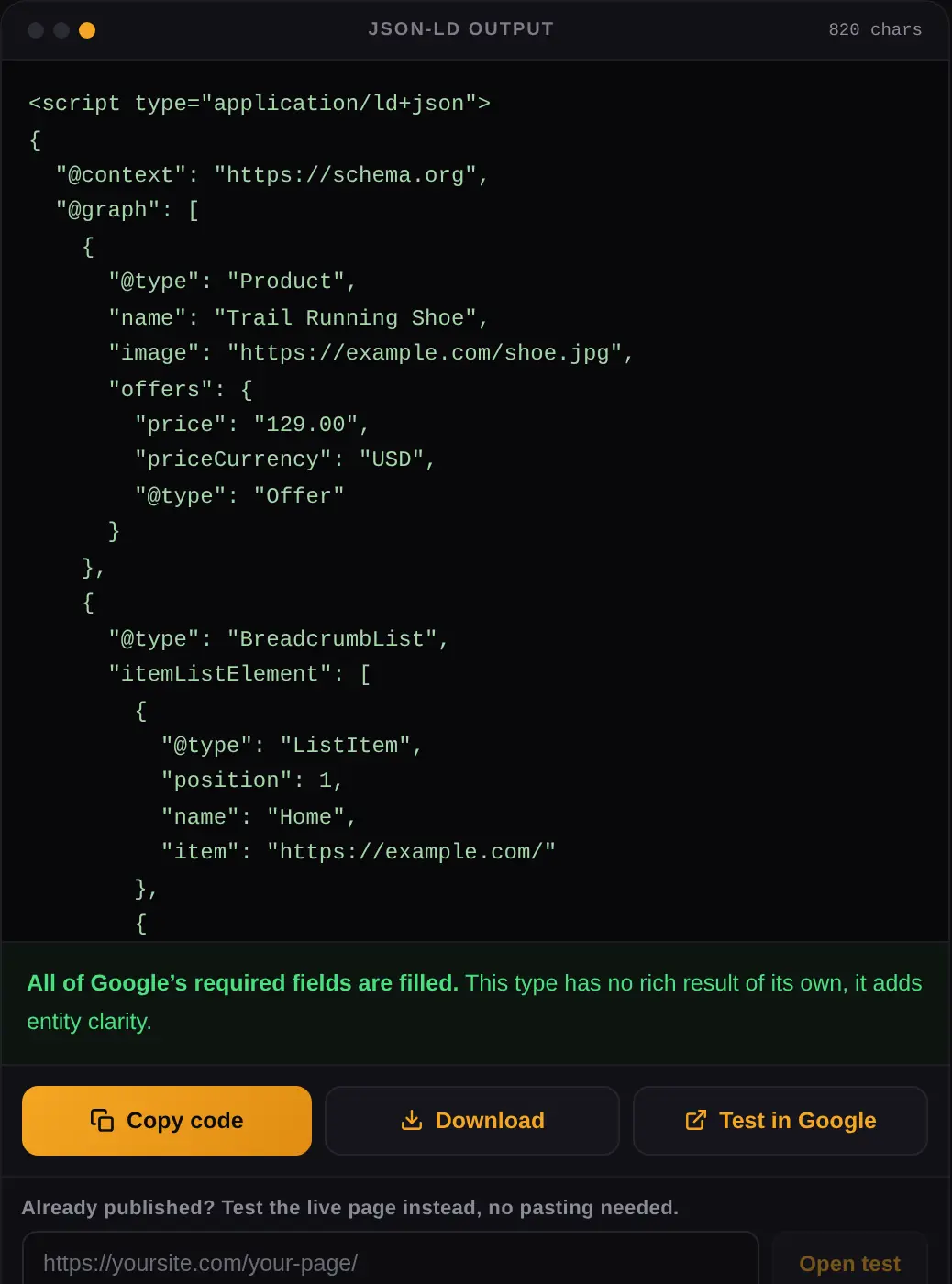
@graph array inside a single script tag, with the validation panel confirming Google's required fields are filled before you copy it.What structured data does and does not do for SEO
Worth being blunt here, because this topic attracts a lot of overselling.
What it does
Structured data makes a page eligible for rich results, which changes how your listing looks and can lift click through rate substantially at the same position. It also helps search engines and AI answer engines understand what a page is about, which is becoming more important as generative search grows.
What it does not do
Schema markup is not a ranking factor. Google has been consistent about this. Adding structured data to a weak page does not move it up. Eligibility for a rich result is also not a guarantee of one, because Google decides per query whether to show it. And structured data cannot describe content that is not on the page. Marking up reviews you do not display, or questions you do not show, is a policy violation rather than a shortcut.
Other free tools on Calcxi
These are the tools on this site that sit closest to this one.
YouTube Video Stats Checker
Pulls views, likes and engagement for any public video. Useful when you are filling in VideoObject markup and need the real upload date and duration.
YouTube Thumbnail Downloader
Grabs the HD thumbnail, which is exactly what the thumbnailUrl property in VideoObject schema needs.
All SEO and YouTube tools
The full set in one place. More structured data and Search Console tools are being added to this category.
Schema markup generator FAQ
Is this schema markup generator free?
Yes, completely, with no sign up and no limit on how much markup you generate. Everything runs in your browser, so nothing you type is sent to a server. You can build structured data for a hundred pages in one sitting if you want to.
What is schema markup and why does it matter?
Schema markup is a standard vocabulary from schema.org that describes what a page is about in a way machines can read. It does not change what visitors see. It makes a page eligible for rich results in Google, and it helps search engines and AI answer engines understand your content correctly rather than guessing from the text.
Should I use JSON-LD or microdata?
JSON-LD, unless a legacy template makes it impossible. Google recommends it, it lives in a single script block separate from your HTML, and it survives redesigns. Microdata is woven into your tags, so any layout change risks breaking the markup. This structured data generator outputs JSON-LD for that reason.
Does FAQ schema still work in 2026?
Not for rich results. Google deprecated FAQ rich results in May 2026, removed the Search Console reporting in June, and dropped API support in August. FAQPage markup is still valid and Google has said it causes no problem if you leave it on the page. Keep it for machine readability and for AI search, but do not expect an accordion in the search result.
Where do I paste the generated structured data code?
Anywhere in the page's HTML. The <head> is the usual choice, but Google reads it from the <body> too. In WordPress, a Custom HTML block works for a single page and the theme's header scripts field works for site wide markup like Organization or WebSite.
Can I put more than one schema on the same page?
Yes, and most pages should. A blog post can carry Article, BreadcrumbList, Person and Organization at once. Use Step 3 above to stack them, and the generator merges everything into one @graph block, which is cleaner than four separate script tags.
Why does my markup validate but show no rich result?
Almost always because a property Google requires is missing. Schema.org validators check the vocabulary, not Google's rules, so a Product without an offers block or an Event without a startDate will validate and still never produce a rich result. That is why required fields are marked in red in this generator. Eligibility is also not a guarantee, since Google decides per query whether to show a rich result at all.
Is schema markup a ranking factor?
No. Google has said this repeatedly and it is worth taking seriously. Structured data does not push a page up the results. What it does is make the page eligible for a richer listing, and a richer listing at the same position usually earns more clicks. The gain is in click through rate, not in position.
What is the sameAs property for?
Schema sameAs is an array of URLs that point to other profiles for the same entity, usually official social accounts, a Wikipedia page or a Crunchbase listing. It is how you connect your Organization or Person markup to the places that confirm the same identity elsewhere, which helps search engines resolve who you are rather than guessing.
Do I need a different schema organization generator for a restaurant?
No, but you do need the right type. Use the Restaurant option rather than plain LocalBusiness, because it accepts menu, serves cuisine and accepts reservations properties that generic markup has no place for. The generator switches the @type for you when you pick it.
Can structured data hurt my site?
Only if it describes content that is not actually on the page. Marking up reviews you do not display, prices that are not real, or FAQ answers a visitor cannot see is a structured data policy violation and can lead to a manual action. Markup that honestly describes visible content carries no risk.
How do I check my schema after publishing?
Use Google's Rich Results Test on the live URL, which is linked from the output panel above. It tells you what Google can actually parse and which rich result types the page qualifies for. Search Console's Enhancements reports then track the same markup across your whole site once Google has recrawled the pages.
Limits and disclaimer
This generator produces JSON-LD structured data and checks it against Google's documented requirements at the time of writing. Google changes those requirements, as the FAQ deprecation in May 2026 showed, so treat Google's own documentation and the Rich Results Test as the final authority. Generating valid markup makes a page eligible for a rich result. It does not guarantee one, and it does not improve rankings on its own.
Calcxi is an independent tools site and is not affiliated with Google or schema.org. Everything runs in your browser and nothing you enter is stored or transmitted.

Written & verified by
B.Tech Computer Science · 8 years in web development & SEO · Bhilwara, India
About ·
LinkedIn ·
Report an error