
Instagram Carousel Downloader
Save every slide of an Instagram carousel post in one go. Photos and videos together, numbered in the order they were posted, packed into a single ZIP so nothing gets blocked halfway.
Carousels normally use /p/ links. /reel/, /reels/ and /tv/ work too, and share links with ?igsh= or ?stkn= need no trimming.
How to download an Instagram carousel post
A carousel is the post type you swipe through, and Instagram allows up to twenty slides in one. This Instagram carousel downloader reads every slide at once, shows you what is inside, and lets you take the whole album or only the slides you actually want. Three steps, no account anywhere in it.
Copy the link of the carousel post
In the app, tap the three dots above the post and choose Link. On the web, copy the address while the post is open. Carousels almost always sit on a /p/ address, and a share link ending in ?igsh= works without trimming anything off it.
Paste it and load the slides
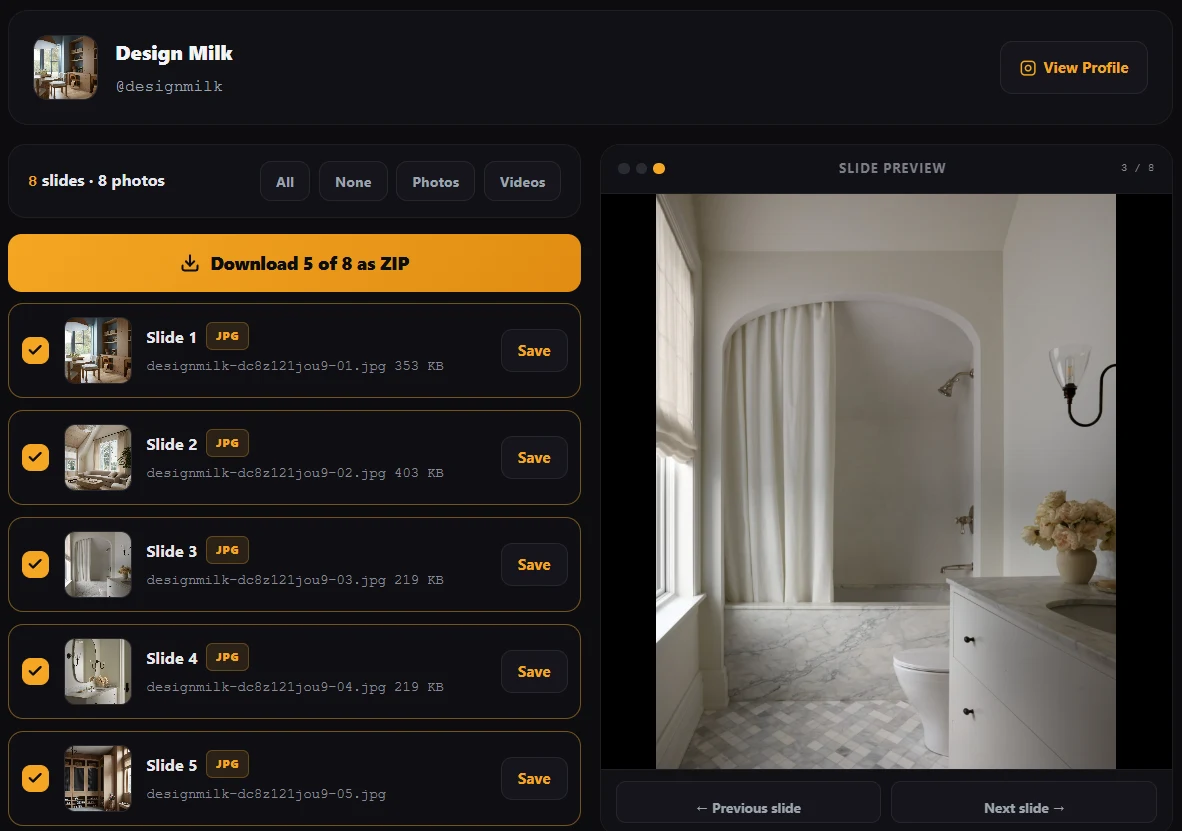
Every slide appears as its own row with a thumbnail, a photo or video label, and its position in the album. Tap a row to preview it full size before deciding, which matters when several slides look alike as thumbnails.
Take the whole album or just some slides
Leave everything ticked and press the ZIP button to download multiple photos from Instagram in one file, or untick what you do not need first. Single slides still have their own button if that is all you came for.
Why this carousel downloader gives you a ZIP
Almost every Instagram album downloader handles a multi slide post the same way: it fires off one browser download per slide, a fraction of a second apart. That looks fine on a two slide post and falls apart on a real one. Browsers treat a burst of downloads from one page as suspicious, so after the first few they quietly stop, ask permission, or drop files without saying anything. On a phone it is worse, and on iPhone worse still.
You end up with six of your ten slides, no error message, and no way to know which four are missing. Then you go back and click each one by hand, which is exactly the work the tool was supposed to save.
So this one collects the slides first and packs them into a single ZIP archive, which is one download, no matter whether the carousel has three slides or twenty. The archive is built inside your browser rather than on a server, so the pictures are never held anywhere on our side, and there is no queue to wait in when several people use the tool at the same time.
| Approach | What happens on a 10 slide album | Files you keep |
|---|---|---|
| One download per slide, fired in a burst | The browser blocks or silently drops most of them after the first few | Some, and you cannot tell which are missing |
| Right click and save each slide by hand | Ten separate saves, and the feed sized copy rather than the full one | All ten, smaller than they should be |
| One ZIP with every slide inside | A single download that the browser has no reason to block | All ten, numbered in order |
Slides come out numbered, so the order survives
Carousel order carries meaning. A recipe runs step by step, a before and after only makes sense one way round, a tutorial falls apart shuffled. Yet most tools name the files after whatever Instagram called them internally, which is a long string of characters with no relation to position. Drop ten of those into a folder and the sequence is gone.
Here each file is named after the account, the post, and its slide number
with a leading zero, like username-Cx7yZ-03.jpg. Leading zeros
matter more than they look: without them a file manager sorts slide 10 above
slide 2, because it is comparing text rather than counting. With them, every
operating system lists the album in the order it was posted.
Mixed albums with photos and videos in one post
Instagram lets a single album hold both kinds of media, and plenty of the better posts do exactly that: a video to stop the scroll, then stills that explain it. Tools built only for pictures tend to skip the video slides without a word, which is how people end up thinking a slide was missing from the post.
Both are handled here. Photo slides save as JPG, video slides save as MP4 with their sound, and the numbering runs straight through the album so a video sitting at position four stays at position four in your folder. The Photos and Videos buttons above the list let you grab one kind in a single move when a long album has a mix of both.
What quality the slides come down in
Each slide is saved at the largest size Instagram stores for it, which is not the same as what the feed shows you. Scrolling, Instagram serves a smaller copy to save your data. Right clicking a slide in the browser usually captures that smaller copy, which is why a hand saved carousel often looks soft when you open it later.
Nothing is re-encoded on the way to you, so there is no second round of compression and no quality added either. Instagram compresses on upload and that step cannot be reversed by anyone. Any Instagram carousel downloader promising to enhance or upscale your slides is inventing pixels rather than recovering them.
Slides in one album do not all have to be the same shape. Instagram crops every slide to match the first one for display, but it keeps the original frame. So a slide that looked square while swiping can arrive taller or wider than expected. That is the real picture, not a fault in the download.
When a carousel will not download
If loading fails, it is nearly always one of these, and the tool names which one it hit instead of showing a blank error:
- The account is private. Nothing on a private profile is served publicly, so there is nothing for any tool to read. No downloader can get around this, and any site claiming otherwise wants your Instagram password.
- The post was deleted or archived. The link stays valid looking but resolves to nothing.
- The post is age restricted. Instagram serves the page but strips the media out for anyone not signed in as an adult.
- It is not actually a carousel. A single photo or video loads fine, it just arrives as one slide.
One more worth knowing: Instagram's media links are signed and expire after a few hours. If you leave a loaded album open overnight and come back to it, the ZIP button will report an expired link. Loading the post again fixes it in a couple of seconds.
Saving a carousel on iPhone, Android and desktop
The tool runs in the browser on every platform with nothing to install, but what happens to the ZIP afterwards differs.
iPhone and iPad
Safari saves the archive into Files under Downloads. Tap it once and iOS unpacks it into a folder beside it. From there, select the pictures and use Share then Save Images to move them into Photos in one go.
Android
Chrome puts the ZIP in Downloads. Most file managers open it directly, and the built in Files app on recent Android versions extracts it without any extra download. Photos appear in the gallery after the next media scan.
Windows and macOS
Both unpack ZIP archives without any extra software. On Windows, right click and Extract All. On macOS, double click. The numbered filenames keep the slides in posted order in either one.
This is the main reason the ZIP matters on mobile. Multiple simultaneous downloads are least reliable on phones, and phones are where most people are when they find a carousel worth keeping.
Why people save Instagram albums
Worth separating the reasons, because they carry different risks. Creators backing up their own albums is the most common one and the least complicated: Instagram is not an archive, accounts get locked, posts get removed, and a local copy of your own work is simply sensible.
Beyond that, people save reference material they want offline, collect swipe files of layouts and formats they admire, or keep a copy of a post they appear in. Designers and marketers pull carousels apart to study how a sequence is built, which is research rather than reuse.
Where it gets complicated is republishing. Reposting somebody's album as your own content is the thing creators report, and a carousel makes it obvious, because the slide order is a fingerprint. Using slides in advertising adds a second problem on top of copyright when recognisable people appear in them. Saving is a private act and publishing is a public one, and only the second needs permission. If your own album has been taken and reused, the DMCA page covers how to raise it. This is general information rather than legal advice.
Other Instagram tools on Calcxi
This page is built around multi slide posts. When the link you have is a different shape, one of these fits it better.
Instagram Photo Downloader
For a single picture at full size, with a layout tuned to one image rather than a list of them.
Instagram Reels Downloader
Reels as HD MP4 with the sound in place, plus feed posts and IGTV in the same box.
Instagram Video Downloader
Longer feed videos and IGTV, with a quality picker where Instagram serves more than one size.
Instagram to MP3
When only the sound matters. The audio is converted to MP3 on your own device, with the original M4A alongside it.
The full set, with a table of which tool suits which link type, sits on the Instagram tools page.
Instagram carousel downloader FAQ
How do I download all photos from an Instagram carousel at once?
Copy the carousel post link, paste it into the box at the top of this page, and press Load Slides. Every slide appears in a list, and the ZIP button saves all of them in a single download. Because it is one file rather than one download per slide, the browser has no reason to block any of it, which is where most tools lose files on longer albums.
What is an Instagram carousel post?
It is a single post holding several photos or videos that you swipe through, which Instagram also calls an album and users often call a slideshow or a swipe post. Instagram allows up to twenty slides in one, and its own developer documentation refers to the format as a sidecar. Every slide shares one caption, one comment thread and one link, which is why saving them individually is such a nuisance.
Can I download only some slides instead of the whole album?
Yes. Each slide has a tick box, so you can untick the ones you do not want before building the archive. The Photos and Videos buttons select one kind in a single move, which is handy on a long mixed album. Any single slide can also be downloaded on its own with the button beside it.
Does this Instagram album downloader handle videos as well as photos?
Yes, including albums that mix both. Photo slides save as JPG and video slides save as MP4 with their audio intact, and both go into the same archive. The numbering runs straight through the album, so a video sitting at position four is still file number four in your folder rather than being pushed to the end.
How many slides can an Instagram carousel have?
Instagram allows up to twenty slides in one post. This tool reads whatever the post contains, so a twenty slide album is handled the same way as a two slide one. Since it all arrives as a single ZIP, a long album is no more likely to lose files than a short one.
Can I download a carousel from a private Instagram account?
No. Private posts are not served publicly, so there is nothing for any tool to fetch, and that is the privacy setting doing its job rather than a limitation to work around. Any site claiming it can reach private albums is either wrong or asking you to hand over your Instagram login. Never enter your Instagram password into a download site.
What quality do the carousel slides download in?
At the largest size Instagram stores for each slide, which is bigger than the copy shown while you scroll. Nothing is re-encoded, so there is no extra compression and equally no improvement, since whatever Instagram removed during upload cannot be recovered by anyone. A tool advertising enhanced or upscaled slides is inventing detail rather than restoring it.
Why do my slides download in the wrong order elsewhere?
Because most tools name files after Instagram's internal identifiers, which say nothing about position, or number them without leading zeros. Without a leading zero a file manager sorts slide 10 above slide 2, since it compares text rather than counting. Files here are numbered with leading zeros, so every operating system lists the album in posted order.
Is this Instagram carousel downloader free, and is there a limit?
It is free with no signup, no account connection and no daily counter. The archive is assembled in your own browser rather than on a server, so there is no per download cost on our side and therefore no reason to cap you. The practical limit is your device's memory on a very large album of long videos.
Does the tool store the carousels I download?
No. Slides are fetched on demand and the ZIP is built in your browser, so the files never reach us as an archive at all. Links you paste are not published anywhere, and the media links themselves expire a few hours after they are generated, which is why reloading is sometimes needed on an album left open.
Do I need an app to download multiple photos from Instagram?
No. This runs in the browser you already have on any phone, tablet or computer, with nothing to install and no extension to add. Apps that ask you to sign in with your Instagram account for this are asking for far more access than saving a public album requires.
Is it legal to download an Instagram carousel?
Saving a public album for personal use, or backing up your own posts, is generally fine. The risk lies in what happens next, since the slides remain the creator's work. Republishing someone's album as your own, using it commercially without permission, or removing their credit can all draw a complaint, and a carousel makes copying obvious because the slide order acts as a fingerprint. This is general information, not legal advice.
Limits and disclaimer
This Instagram carousel downloader works with public posts only. It cannot open private accounts, recover deleted albums, reach age restricted posts, or improve any slide beyond the file Instagram serves. Very large albums depend on your device having enough free memory to hold the slides while the archive is assembled.
Calcxi is an independent tools site and is not affiliated with, endorsed by or sponsored by Instagram or Meta. Instagram is a trademark of Meta Platforms, Inc. Nothing here is legal advice. Download responsibly, credit the creator where you share, and get permission before using someone's slides commercially. See the DMCA policy and the Terms and Conditions.

Written & verified by
B.Tech Computer Science · 8 years in web development & SEO · Bhilwara, India
About ·
LinkedIn ·
Report an error