
Instagram to MP3
Pull the sound out of any public Instagram reel or video and save it as a real MP3 file. The conversion runs inside your browser, so nothing is uploaded anywhere.
Works with /reel/, /reels/, feed videos /p/, IGTV /tv/ and share links carrying ?igsh= or ?stkn=
How to convert an Instagram reel to MP3
Paste a link, press Get Audio, then press Convert. The sound is pulled out of the post and turned into an MP3 on your own device, which is why there is a short progress bar rather than an instant download. Nothing is uploaded to a conversion server, because there is no conversion server.
Copy the link of the reel or video
Tap the three dots on the post and choose Link, or use Share then Copy link. On desktop, take the URL from the address bar. Share links carrying ?igsh= or ?stkn= are handled as they are.
Press Get Audio
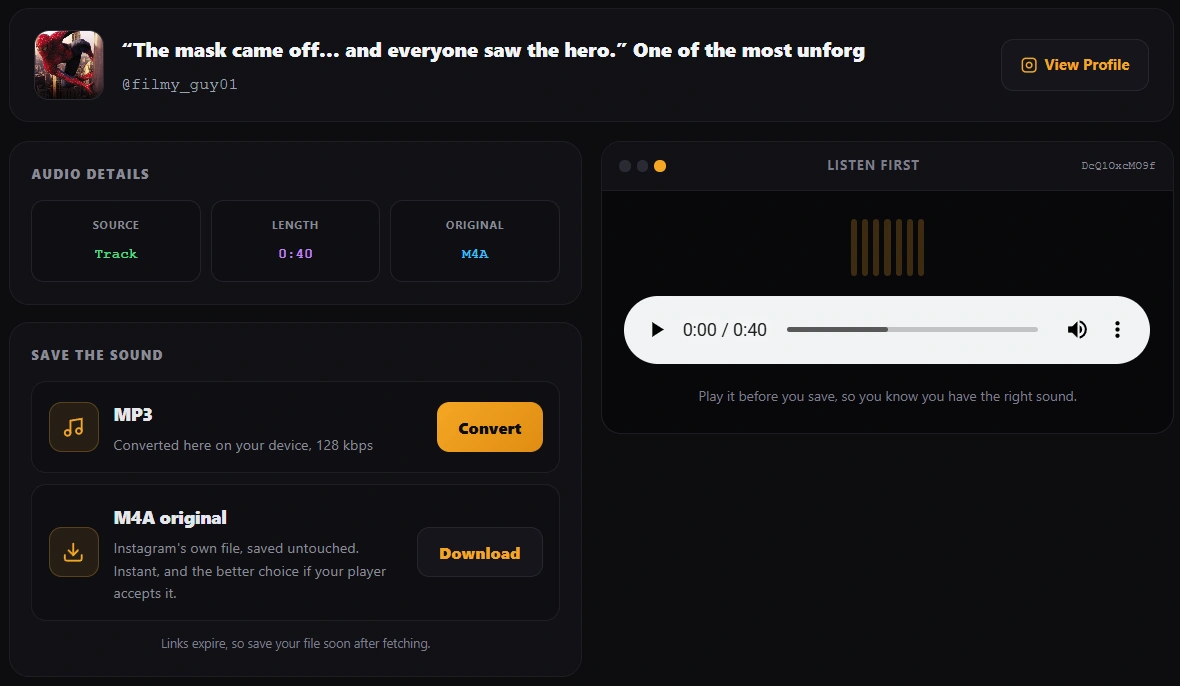
The post is read and its sound is located. You get a small player so you can listen and confirm you have the right track before saving anything.
Choose MP3 or the original M4A
Convert gives you a genuine MP3. The M4A button, when it appears, hands you Instagram's own audio file with nothing done to it, which is faster and technically the cleaner copy.
Why there are two buttons and which one you want
Instagram does not store MP3. Its audio is AAC, kept in a container that ends in .m4a. Every site advertising an Instagram MP3 download is doing one of three things with that fact, and only one of them is honest:
| What a site does | What you actually receive | Honest |
|---|---|---|
| Renames the M4A to .mp3 | An AAC file wearing the wrong name. Some players refuse it, some car stereos skip it | No |
| Re-encodes AAC into MP3 | A real MP3 that any device plays | Yes |
| Hands you the M4A as an M4A | Instagram's exact file, nothing lost | Yes |
This page does the second and the third, and lets you pick. Take the MP3 if the file is going into an older car stereo, a ringtone slot, a video editor that will not read M4A, or anywhere the extension itself matters. Take the M4A if you just want to listen, because it is Instagram's original file with no second round of compression, and every phone made in the last decade plays it.
Why the MP3 is 128 kbps and not 320
Plenty of converters offer a 320 kbps option. On Instagram audio that number is decoration. Instagram delivers a compressed AAC stream, usually well under 128 kbps, and re-encoding it at 320 does not put back anything that compression already discarded. It only makes the file roughly two and a half times bigger while sounding the same.
Re-encoding is also generational: going from AAC to MP3 loses a little, whatever bitrate you pick, because the second encoder is guessing at a signal the first one already trimmed. 128 kbps sits comfortably above what Instagram gave us, so the loss is small and the file stays sensible on a phone. If you want a copy with zero generational loss, that is exactly what the M4A button is for.
Where the sound actually comes from
Two different things can happen when the post is read, and the Source line in the results tells you which one you got.
Separate audio track
Reels built on a sound from Instagram's library usually carry that track as its own file. This is the better case: the audio is fetched on its own, nothing else is downloaded, and the M4A button appears.
Pulled from the video
When the creator recorded the sound with the video, there is no separate track to fetch. The video is read and the audio is lifted out of it in your browser. You still get an MP3, and it sounds the same, but there is no separate M4A to hand you.
A lot of converters simply fail on the second case and tell you the reel has no audio, which is not true. It has audio, it just does not have a separate audio file. Covering both is the difference between working on some reels and working on nearly all of them.
When the audio cannot be reached at all
Three cases genuinely cannot work, and it is worth knowing them so you do not waste time retrying:
- Private accounts. Nothing on a private profile is served publicly, so there is no file to read. This is the privacy setting working as intended.
- Stories. These are delivered against the logged in viewer rather than published openly, so a public fetch has nothing to ask for.
- Age restricted posts. Instagram strips the media from these for anyone not logged in as an adult. The post loads, the sound does not.
A photo post also has no audio, which sounds obvious but catches people out with carousels that mix pictures and video. Paste the link and the page will tell you plainly which of these it ran into rather than showing a blank error.
Saving the file on iPhone and Android
The converter runs in any modern mobile browser with no app to install. Where phones differ is what happens once the file exists.
On Android, Chrome drops the MP3 into your Downloads folder and most music apps pick it up on their next scan. On iPhone, Safari saves it into the Files app under Downloads. iOS will not add a loose MP3 to the Music app on its own, so if you want it in your library the usual route is to open it from Files and share it into whichever player you use, or move it across with a computer.
One practical note for phones: conversion is real work for the processor. A fifteen second reel finishes almost immediately, while a long IGTV video can take a while on an older handset. The progress percentage is honest about where it has got to, and the M4A button, where it is offered, skips the wait entirely.
Using Instagram audio without getting into trouble
This part matters more here than on a video downloader, because sounds on Instagram are very often commercially licensed music. This is general information rather than legal advice.
Usually fine
Saving a sound to listen to privately, keeping a copy of audio you created yourself, or pulling the audio from your own reels for reuse in your own editing.
Where it goes wrong
Publishing licensed music anywhere outside Instagram, which is what most trending sounds are. Using someone's voice, song or original audio in your own content without asking. Selling or monetising a track you extracted. Instagram's licence covers playback inside Instagram, and it does not travel with the file when you save it.
The short version
Extracting audio is a technical act, publishing it is a legal one. If you are going to publish, get permission or use music you are licensed for. If you believe your own audio has been taken and reused, the DMCA page explains how to raise it with us.
Other Instagram tools on Calcxi
This page exists for one job, the sound. When the file you actually want is the video or the picture, these are built for that instead.
Instagram Reels Downloader
The full reel as an HD MP4 with the sound still in it, plus feed posts, carousels and IGTV in the same box.
Instagram Video Downloader
For longer feed videos and IGTV, with a quality picker where Instagram serves more than one size.
Instagram Photo Downloader
Pictures at the full size Instagram stores, with every carousel slide listed separately.
All of them, with a short table of which one suits which link, are listed on the Instagram tools page.
Instagram to MP3 FAQ
How do I convert an Instagram reel to MP3?
Copy the reel link from Instagram, paste it into the box at the top of this page, press Get Audio, then press Convert. The sound is turned into an MP3 inside your browser and downloaded to your device. No account, app or extension is needed, and the file is never uploaded to a server.
Is the MP3 a real MP3 or a renamed file?
A real one. Instagram stores audio as AAC in an M4A container, and many converters simply change the extension to .mp3 and hope for the best, which fails in older players and car stereos. This page actually re-encodes the audio into MP3 format. The original M4A is offered as a separate button so you can take whichever suits you.
Why is there no 320 kbps option?
Because it would not improve anything. Instagram serves a compressed AAC stream well below that, and re-encoding at 320 cannot restore detail that was thrown away before the file reached us. It would triple the file size for identical sound. 128 kbps sits above what Instagram provides, and the M4A download is there for anyone who wants a copy with no re-encoding at all.
Does the audio get uploaded to your server?
No. The post details are read by our server, but the conversion itself runs in your browser using your own processor. The audio data goes from Instagram to your device and is turned into an MP3 there. That is also why long videos take longer on an older phone: the work is happening locally rather than in a data centre.
Can I get the audio from any reel?
From nearly all public ones. Reels using a sound from Instagram's library carry a separate audio track that can be fetched directly. Where the creator recorded sound with the video, the audio is lifted out of the video instead. What cannot work is a private account, a Story, an age restricted post, or a photo post, since none of those give a public fetch anything to read.
Why does the M4A button sometimes not appear?
Because that post has no separately addressable audio file. The sound exists only inside the video, so there is nothing to hand over untouched. In that case the MP3 conversion still works, since the audio is extracted from the video on your device. The Source line in the results tells you which of the two situations you are in.
How long does the conversion take?
A short reel is usually done in a couple of seconds. Longer videos take proportionally longer, and an older phone will be slower than a laptop, because the encoding runs on your device rather than on a server. The percentage shown is the real progress through the audio, not a decorative animation.
Can I use the music I download in my own videos?
Usually not without permission. Most trending Instagram sounds are commercially licensed music, and Instagram's licence covers playing it inside Instagram rather than anywhere you take the file. Saving it for private listening is a different matter from publishing it. If you are creating something for release, use audio you own or are licensed for. This is general information, not legal advice.
Does this work on iPhone?
Yes, in Safari and in any other modern browser on iOS. The MP3 lands in the Files app under Downloads rather than in the Music app, because iOS does not add loose audio files to your library automatically. Open it from Files and share it into your preferred player, or move it over with a computer.
Is the tool free, and are there limits?
It is free with no signup, no account connection and no download counter. Since the conversion happens on your own device, there is no server cost per file and therefore no reason to cap you. Very long videos are limited by your device's memory rather than by any rule we set.
Does the site keep the audio I convert?
No. The converted file is created in your browser and handed straight to your downloads. It is never sent to us, so there is nothing on our side to store, index or share. The links used to fetch the original media expire shortly after they are generated.
Limits and disclaimer
This tool works with public Instagram content only. It cannot reach private accounts, Stories or age restricted posts, cannot improve audio beyond what Instagram serves, and cannot separate a voice from background music. Very long videos depend on your device having enough free memory to hold the decoded audio.
Calcxi is an independent tools site and is not affiliated with, endorsed by or sponsored by Instagram or Meta. Instagram is a trademark of Meta Platforms, Inc. Nothing here is legal advice. Most sounds on Instagram are licensed music owned by someone else, so treat a saved file as a personal copy rather than something you are free to publish. See the DMCA policy and the Terms and Conditions.
Written & verified by
B.Tech Computer Science · 8 years in web development & SEO · Bhilwara, India
About ·
LinkedIn ·
Report an error