
Instagram Photo Downloader
Save Instagram photos as full size JPG. No signup, no daily limit, no waiting screen. Takes every slide of a carousel, and works with reels and videos in the same box.
Best with feed posts /p/, including carousels of up to twenty slides. Reels /reel/, IGTV /tv/ and share links ending in ?igsh= also work, and a video returns its cover image as a JPG.
Download Instagram photos in full resolution
Paste a post link, and this Instagram photo downloader hands you the JPG at the largest size Instagram stores. No account, no signup, no daily allowance and no waiting screen. The file arrives in about a second because there is no queue between you and it.
It reads the same public data that Instagram already serves to any browser opening that post. Nothing is uploaded, nothing is kept on a server afterwards, and no cloud folder is created in your name that you later have to remember to empty.
How to download Instagram photos
Copy the link to the Instagram post
Open the post. Tap the three dots at the top right, or the paper plane icon, and choose Copy link. On a computer you can copy the address straight from the browser bar. The clipboard button next to the input will paste it for you.
Paste it into the Instagram image downloader
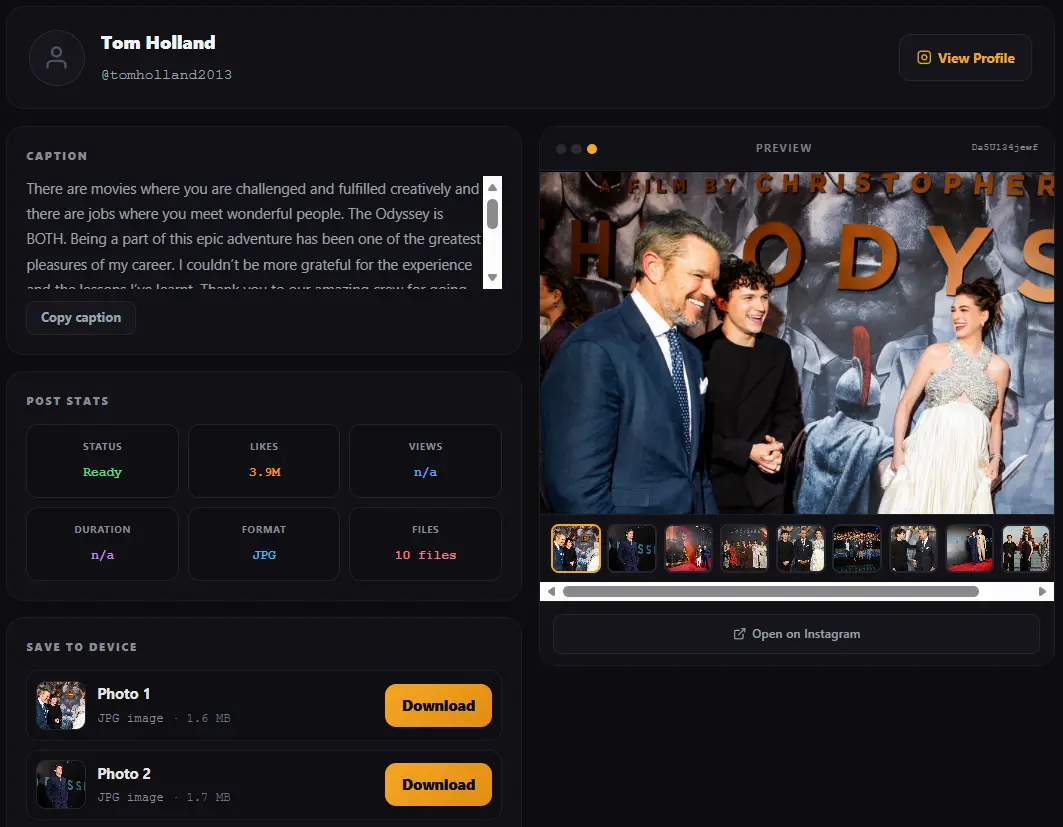
Drop the link in the field above and press Download. You will see the caption, the account and the number of files before anything is saved, so you know what you are getting.
Save the JPG
Press download next to the photo you want. A single post gives one button. A carousel gives one button per slide plus a button that takes the whole set. Files are named after the account and the post, so they stay identifiable in your downloads folder.
instagram.com/share/… or ending in ?igsh= are redirects rather than the post itself. Open one in a browser, let it settle on the real address, then copy that instagram.com/p/ link and use it here.
What resolution Instagram photos actually come in
You get 1080 pixels on the longest side in most cases. That is what Instagram keeps, and it is the ceiling for every Instagram photo downloader in existence, including the paid ones.
This is worth being clear about, because the phrase HD gets used loosely on tool pages. Instagram resizes and re-compresses every upload. The 4000 pixel wide file the photographer sent from their camera is not stored on the servers that serve public posts, so nothing can retrieve it. What you receive is the best copy that exists on the public side, untouched by any further compression from this site.
| Post shape | Typical size you receive |
|---|---|
| Square | 1080 by 1080 pixels |
| Portrait | 1080 by 1350 pixels |
| Landscape | 1080 by 566 pixels or similar |
| Older posts | 640 or 750 pixels wide, from the years before Instagram raised its limit |
One more thing that surprises people. Instagram strips camera metadata during upload, so the JPG you download carries no EXIF data. There is no shutter speed, no lens, no GPS coordinate. That is Instagram removing it at their end, not this tool removing it at ours.
Downloading every photo from a carousel post
A carousel holds up to twenty slides in a single post. Most photo downloaders return the first slide and stop, which is the single most common complaint about this whole category of tool.
Here the post is opened out. Every slide is listed with its own thumbnail so you can see which is which, and every slide has its own download button. There is also one button that takes the complete set. When a carousel mixes photos and video, the photos come as JPG and the video comes as MP4, each labelled and numbered so nothing gets muddled.
An Instagram photo downloader with no limits and no signup
Several of the better known tools in this space are not really free. One of the most visible ones allows two downloads a day and then asks for a monthly subscription. Another routes files into a cloud folder that expires unless you pay to keep it.
That model is worth naming, because people arrive at these pages expecting free and only find the meter after the second download.
No daily cap
Download one photo or two hundred. There is no counter, no cooldown and no upgrade prompt waiting at the third attempt.
No account
Nothing to sign up for and no email to hand over. You never enter an Instagram username or password anywhere on this site.
No cloud folder
Files go straight to your device. Nothing is parked on a server for you to retrieve later or lose when a trial ends.
No waiting screen
Fetching takes roughly a second. There is no queue position and no artificial delay designed to sell you a faster tier.
Where Instagram photos save on iPhone, Android and desktop
The tool behaves the same everywhere because it runs in the browser. The part that differs is where the operating system files your photo afterwards, and that is what most people are actually searching for when a download seems to vanish.
Downloading Instagram photos on iPhone and iPad
Safari and Chrome both work. The JPG lands in Downloads inside the Files app rather than in your camera roll. To move it into Photos, open Files, press and hold the image, choose Share, then Save Image. It will then behave like any picture you took yourself.
Downloading Instagram photos on Android
The file goes to the Download folder in internal storage. Most gallery apps index it within a minute. If it has not appeared, open your file manager, locate it under Download, and move it into DCIM or Pictures, which prompts the gallery to pick it up straight away.
Downloading Instagram photos on Windows and Mac
It arrives in your usual Downloads folder with the account name in the file name. Desktop is the easier place to take a large carousel, since a desktop browser will not treat a run of files as suspicious the way a phone browser sometimes does.
For the routes that need no tool at all, this walkthrough covers the manual options: saving Instagram content without an app.
Saving the cover image from a reel or video
Every video on Instagram carries a still frame that serves as its cover, and that still is a full sized JPG in its own right. When you paste a video or reel link here, a separate button appears for that cover image.
It is a small thing that no other photo downloader on the first page of results offers, and it is useful more often than it sounds. Designers pull covers for moodboards. Writers use them as article thumbnails. People who run pages study which frames other accounts chose to lead with.
If the link you are holding is a video rather than a photo, the Instagram video downloader is the page built around that, and the Instagram reels downloader handles reels. All three accept the same links, so you do not need to guess which page to land on.
Why an Instagram image download sometimes fails
Failures nearly always trace back to one of five things, and four of them take seconds to correct.
The account is private
Instagram serves private posts only to approved followers. The request returns nothing, so no downloader can produce the photo. Any tool advertising private account downloads is either collecting logins or misleading you.
You pasted a profile link, not a post link
An address like instagram.com/username/ points at an entire account. Open the individual photo you want first, then copy that link.
The post was deleted
Deleted posts leave nothing behind. If you saw the photo earlier today and it will not fetch now, this is the likely reason.
The link is a story
Stories sit behind a login even on public accounts, which puts them in a different category from feed posts. They are not supported here.
The download link has expired
Instagram signs its media addresses with a time limit of roughly a day. If you fetched a post yesterday and the tab is still open, the button now points at an address that no longer resolves. Paste the link again and a fresh one is issued. This is also why it is worth saving the file soon after fetching rather than bookmarking the button.
What people use an Instagram photo downloader for
Search intent here is mostly practical rather than curious, so it helps to say plainly what the reasonable uses look like.
Keeping your own posts
Instagram compresses on upload and the original may be long gone from your phone. Pulling your own photo back is the most common use of all.
Moodboards and references
Designers, photographers and page owners collect images for private reference boards. Useful alongside a look at what makes Instagram content perform.
Offline viewing
Recipes, workout charts, study notes and product shots that you want available without a connection.
Reposting with credit
Fine when you have permission and you name the creator. Not fine when you crop their handle out and pass the work off as yours.
Is it legal to download Instagram photos
Saving a public photo for private use is generally accepted. Republishing it, selling it, putting it in an advertisement or using it as though you made it are separate matters, and that is where genuine trouble starts. The photographer keeps copyright regardless of where the picture was posted.
The practical rules are short. Ask before reusing. Credit when you share. Never remove a creator's watermark or handle. Take something down if the creator asks. A longer look at the rules and the grey areas sits here: the legal guide to downloading Instagram content.
Instagram photo downloader FAQ
Is this Instagram photo downloader free with no limits?
Yes. There is no daily cap, no subscription and no upgrade prompt. Some well known alternatives allow only two downloads a day before asking for a monthly fee. This one does not meter you at all, and the site is funded by advertising instead.
Do I need an account to download Instagram photos?
No. There is no signup, no email and nothing to install. You never type an Instagram username or password on this site. A tool that asks for your Instagram login in order to fetch a public photo does not need it, and giving it away puts your account at risk.
What quality do downloaded Instagram photos have?
You receive the largest JPG Instagram stores, usually 1080 pixels on the longest side, with no extra compression added. No Instagram image downloader can exceed that, because the original camera file is never published. Treat claims of 4K or upscaled Instagram photos with suspicion.
Can I download all photos from a carousel post?
Yes. Every slide is listed separately with its own thumbnail and its own button, and there is a single button that takes the whole set at once. Mixed carousels work too, with photos saved as JPG and any video saved as MP4.
Can I download photos from a private Instagram account?
No, and no other tool can either. Instagram only serves private posts to approved followers, so the media never reaches any downloader. Tools that advertise this are usually harvesting logins.
Will the owner know I downloaded their Instagram photo?
No. Instagram sends no notification when a public post is viewed or saved through a tool like this, and nothing appears in their activity. Stories are the exception where Instagram does show a viewer list, and stories are not supported here.
Where do downloaded Instagram photos go on my phone?
On Android they land in the Download folder in internal storage and usually appear in the gallery shortly after. On iPhone they go to Downloads inside the Files app, and you move one into Photos by pressing and holding it, choosing Share, then Save Image.
Can I download a profile picture with this tool?
Not from a profile link on its own, because a profile address does not point at any single post. You can save the cover image of any video or reel, which appears as its own button once the link is fetched.
Can I download every photo from someone's whole account at once?
No. This tool works one post at a time by design. Bulk profile scraping is what paid services charge for, and it is also the behaviour most likely to be treated as abusive. For a handful of images, pasting each link takes about a second per post.
Does the downloaded photo have a watermark?
Nothing is added by this site. The JPG is exactly what Instagram serves. If the creator burned their own logo or handle into the image before posting, that stays, because it is part of the picture itself and no downloader can lift it out.
Why is my Instagram photo download not working?
The usual causes are a private account, a deleted post, a profile link pasted instead of a post link, a story link, or a fetch left open long enough for the link to expire. Pasting the link again solves the last one. The section above explains how to tell them apart.
Does this Instagram photo downloader work on iPhone?
Yes, in Safari and Chrome, with no app and no shortcut. It also works on Android, Windows, macOS and Linux, since everything happens inside the browser rather than in installed software. Reels and videos work in the same box, and the guide to downloading reels covers those.
Limits and disclaimer
This Instagram photo downloader handles public content only. It is not affiliated with, endorsed by or connected to Instagram or Meta. Instagram is a trademark of its respective owner.
Every photo belongs to the person who made it. Downloading gives you a copy for personal use and nothing more. It does not transfer any right to republish, sell or claim the work. If a creator asks you to remove something you posted, remove it.
Written & verified by
B.Tech Computer Science · 8 years in web development & SEO · Bhilwara, India
About ·
LinkedIn ·
Report an error