
Instagram Video Downloader in HD
Download Instagram videos in HD MP4 with the original sound. No login, no app, no watermark.
Supports: /reel/ and /reels/, feed posts /p/ including photo carousels, IGTV /tv/, and share links with ?igsh=
How to download Instagram videos in three steps
Copy the post link from Instagram, paste it in the box above, then save the file. The whole thing takes about six seconds and needs no login, no app and no account of any kind. This Instagram video downloader reads the public data that Instagram already serves to anyone opening the post in a browser, so nothing is stored and nothing is posted on your behalf.
Copy the Instagram video link
Open the post in the Instagram app or on the web. Tap the three dots above the video, or the paper plane share icon, and choose Copy link. On desktop you can simply copy the address from the browser bar.
Paste the link into the downloader
Paste it into the field at the top of this page and press Download Video. The tool checks the link, fetches the post data and shows you a preview along with the caption, the file count and the format before anything is saved.
Save the file to your device
Press the download button next to the file you want. Videos arrive as MP4 with the original audio track, photos as JPG. If the post is a carousel you get a separate button for every item, so you can take one slide or all of them.
instagram.com/share/… or carry an ?igsh= code point at a redirect, not at the post itself. Open that link once in any browser, wait for the real address to load, then copy the full instagram.com/p/ or instagram.com/reel/ address from the bar and paste that instead.
What this Instagram video downloader can save
One box handles every public video format Instagram publishes. You do not need a different tool for each one, and you do not need to know in advance what kind of post you are pasting. The downloader works it out from the link and shows you what it found.
| Content type | Link looks like | What you get |
|---|---|---|
| Feed video | instagram.com/p/… | MP4 with sound, plus the cover image |
| Reel | instagram.com/reel/… | MP4 with sound, plus the audio track on its own |
| IGTV or long video | instagram.com/tv/… | MP4 at the length Instagram serves |
| Carousel with video | instagram.com/p/… | Each slide separately, video as MP4 and photos as JPG |
| Photo post | instagram.com/p/… | Full resolution JPG |
| Story or private post | any | Not supported, see the section on failures below |
If the link you have is a reel and you would rather use a page built around that format, the Instagram reels downloader is the same engine with reel specific guidance. Both pages accept the same links, so use whichever you landed on.
Video quality and file format you actually receive
You receive the highest quality version that Instagram itself is serving for that post. There is no re-encoding step in the middle, which means no second round of compression and no quality loss beyond what Instagram already applied when the creator uploaded.
In practice that means a vertical video usually arrives at 720 by 1280 pixels, and a square or landscape feed video usually arrives at 1080 pixels on its longest side. Older posts can be smaller. Instagram decides this, not the downloader, so no tool can hand you a resolution higher than what Instagram stores.
Container and codec
MP4 with H.264 video and AAC audio. That combination plays on every phone, every browser and every editor without conversion.
Audio
The original sound stays attached to the MP4. The audio is also offered as a separate M4A file when Instagram exposes it.
Photos
JPG at the largest size available, typically 1080 pixels wide. Carousel slides keep their own individual resolution.
Watermark
Nothing is added. The file is byte for byte what Instagram serves, so no logo, no border and no branding from this site.
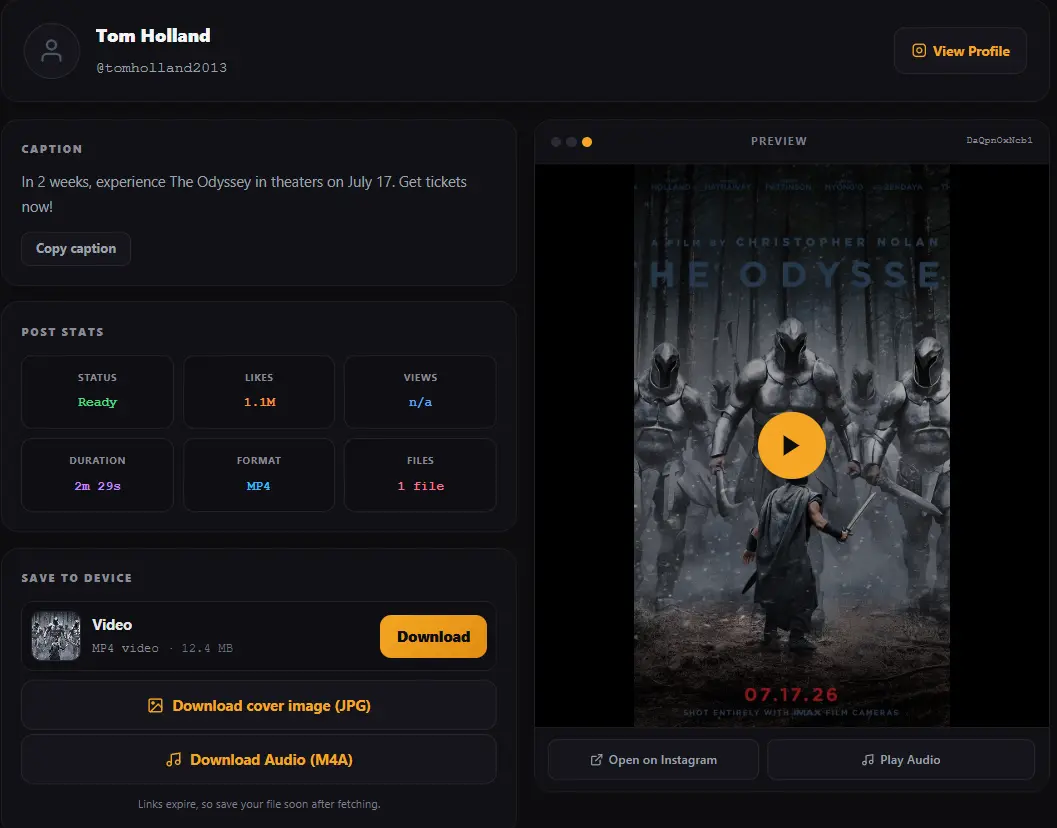
Download an Instagram video with sound, or take only the audio
Every video downloaded here keeps its sound. This matters because some screen recording methods drop the audio track, and some browser extensions save a muted stream by mistake.
There is also a second button that most Instagram downloader tools do not offer. When Instagram publishes the audio track separately, which it does for most reels and many feed videos, you can save that track on its own as an M4A file. That is useful if you want the sound for a project and do not need the picture at all.
The audio button only appears when a separate track genuinely exists for that post. If it stays hidden, the sound is still inside the MP4 and you can pull it out with any editor.
Saving Instagram videos on iPhone, Android and desktop
The Instagram Video downloader runs entirely in the browser, so the steps are the same everywhere. What changes is where the file lands afterwards, and that is the part people usually search for.
Instagram video download on iPhone and iPad
Use Safari or Chrome. After you tap download, iOS saves the file into the Downloads folder inside the Files app. To move a video into your camera roll, open Files, tap and hold the video, choose Share, then Save Video. It will then appear in Photos like any other clip.
Instagram video download on Android
Chrome, Samsung Internet and Firefox all work. The file goes to the Download folder in internal storage. Most gallery apps pick it up within a minute. If it does not appear, open your file manager, find the file under Download and move it into DCIM or Movies, which forces the gallery to index it.
Instagram video download on Windows and Mac
The file goes to your usual Downloads folder. Desktop is the easiest place to grab a large carousel, because the browser will not question multiple files the way a phone browser sometimes does.
If you would rather not use any tool at all and want the manual routes, this guide covers them: how to save Instagram videos without an app.
Why an Instagram video download sometimes fails
Almost every failure comes down to one of five causes, and four of them you can fix in a few seconds. The tool names the reason instead of showing a generic error, so match what you saw against this list.
The account is private
Private posts are not served to anyone who is not an approved follower, so no downloader can reach them. This is not a limitation of the tool, it is how Instagram authorises the request. If a tool claims it can download from private accounts, treat that claim with suspicion.
The post was deleted or the link is wrong
A deleted post returns nothing. A mistyped or truncated link does the same. Copy the address again straight from the share menu rather than retyping it by hand.
You pasted a profile link instead of a post link
A link like instagram.com/username/ points to a whole profile, not to any single video. Open the specific post first, then copy that address.
The link is a story
Stories sit behind a login even when the account is public, so a story link cannot be resolved the same way a feed post can. Stories are a separate problem and are not supported here.
The download link expired
Instagram signs its media links with a time limit of roughly a day. If you fetched a post yesterday and left the tab open, the button may now point at an expired address. Paste the link again to get a fresh one. This is also why you should save the file soon after fetching rather than bookmarking the download button.
Instagram video downloader versus screen recording
Screen recording is the obvious alternative, and for a quick clip it is fine. For anything you plan to keep or reuse, the difference is large enough to matter.
| Downloader | Screen recording | |
|---|---|---|
| Quality | Original file, no second compression | Re-encoded by the phone, visibly softer |
| Audio | Original track, always included | Often muted or picks up room noise |
| Interface elements | None, clean frame | Buttons, captions and status bar baked in |
| Carousel | All slides as separate files | One continuous recording of you swiping |
| Time taken | A few seconds | The full length of the video |
Is it legal to download Instagram videos
Downloading a public video for your own private viewing is generally accepted in most places. Republishing someone else's video, editing it into your own content, or using it commercially without permission is a different matter entirely, and that is where people get into trouble.
The safe habits are simple. Credit the creator if you share anything. Ask before you reuse. Do not strip a creator's name from a clip. Delete what you were only borrowing. A fuller discussion of the rules and the grey areas is here: is it legal to download Instagram reels.
Instagram video downloader FAQ
Is this Instagram video downloader free?
Yes, completely. There is no paid tier, no trial, no credit limit and no daily cap. You do not create an account and you do not enter payment details anywhere. The site is supported by advertising, which is why the tool itself stays free to use.
Do I need to log in or install an app to download Instagram videos?
No. You never enter an Instagram username or password, and there is nothing to install. Any tool that asks for your Instagram login to download a public video is asking for something it does not need, and handing over those details puts your account at risk.
What video quality does the Instagram video download give me?
The best version Instagram is serving for that post, with no extra compression added. Vertical videos usually arrive at 720 by 1280 pixels and feed videos at up to 1080 pixels on the long edge. No downloader can exceed what Instagram stores, so treat promises of upscaled or 4K output with caution.
Can I download Instagram videos with sound?
Yes. The original audio stays inside the MP4 file. When Instagram also publishes the audio as a separate track, an extra button appears so you can save just the sound as an M4A file without the video.
Will the person know when I download their Instagram video?
No. Instagram does not notify anyone when a public post is viewed or saved through a tool like this. There is no read receipt, no view entry and no trace left on their side. Stories are the one place Instagram does show viewers, and stories are not supported here.
Can I download a video from a private Instagram account?
No, and neither can any other Instagram downloader. Private posts are only served to approved followers, so the request never returns media. Tools that advertise private downloads are usually collecting logins or serving something other than the video you asked for.
Does the downloaded video have a watermark?
No watermark is added. The file is exactly what Instagram serves. If the creator burned a logo or a TikTok watermark into the frame before uploading, that stays in the picture because it is part of the video itself and cannot be removed by any downloader. The same point is covered in more depth in this guide on downloading Instagram reels without a watermark.
Where does the Instagram video save on my phone?
On Android it goes to the Download folder in internal storage and normally appears in the gallery shortly after. On iPhone it goes to Downloads inside the Files app, and you move it into Photos by tapping and holding the file, choosing Share, then Save Video.
Can I download Instagram reels with this Instagram downloader as well?
Yes. Reel links, feed post links, IGTV links and carousel links are all accepted in the same box. If you want a page written specifically around reels, use the Instagram reels downloader, or read this walkthrough on how to download Instagram reels.
Why is my Instagram video download not working?
The five usual causes are a private account, a deleted post, a profile link pasted instead of a post link, a story link, or a fetch you left open long enough for the link to expire. Pasting the link again fixes the last one. The section above on failed downloads explains how to tell them apart.
Is there a limit on how many Instagram videos I can download?
There is no daily limit and no queue. You can download one video or fifty. The only practical limit is your own browser, which may block several files arriving at once on mobile, in which case save them one at a time.
Does this Instagram video downloader work on iPhone?
Yes, in Safari and in Chrome, with no app and no shortcut needed. It also works on Android, Windows, macOS and Linux, because everything happens in the browser rather than in installed software.
Limits and disclaimer
This Instagram video downloader works with public content only. It is not affiliated with, endorsed by or connected to Instagram or Meta in any way. Instagram is a trademark of its respective owner.
All videos and photos remain the property of the people who made them. This tool gives you a copy for personal use. It does not give you the right to republish, sell or claim someone else's work. If a creator asks for their content to be taken down from anywhere you have posted it, take it down.
Written & verified by
B.Tech Computer Science · 8 years in web development & SEO · Bhilwara, India
About ·
LinkedIn ·
Report an error