
SERP Snippet Preview
See your title tag and meta description exactly as Google shows them, measured in pixels instead of characters. Preview desktop, mobile and Bing side by side, watch where the text gets cut, and fix it before the page is published.
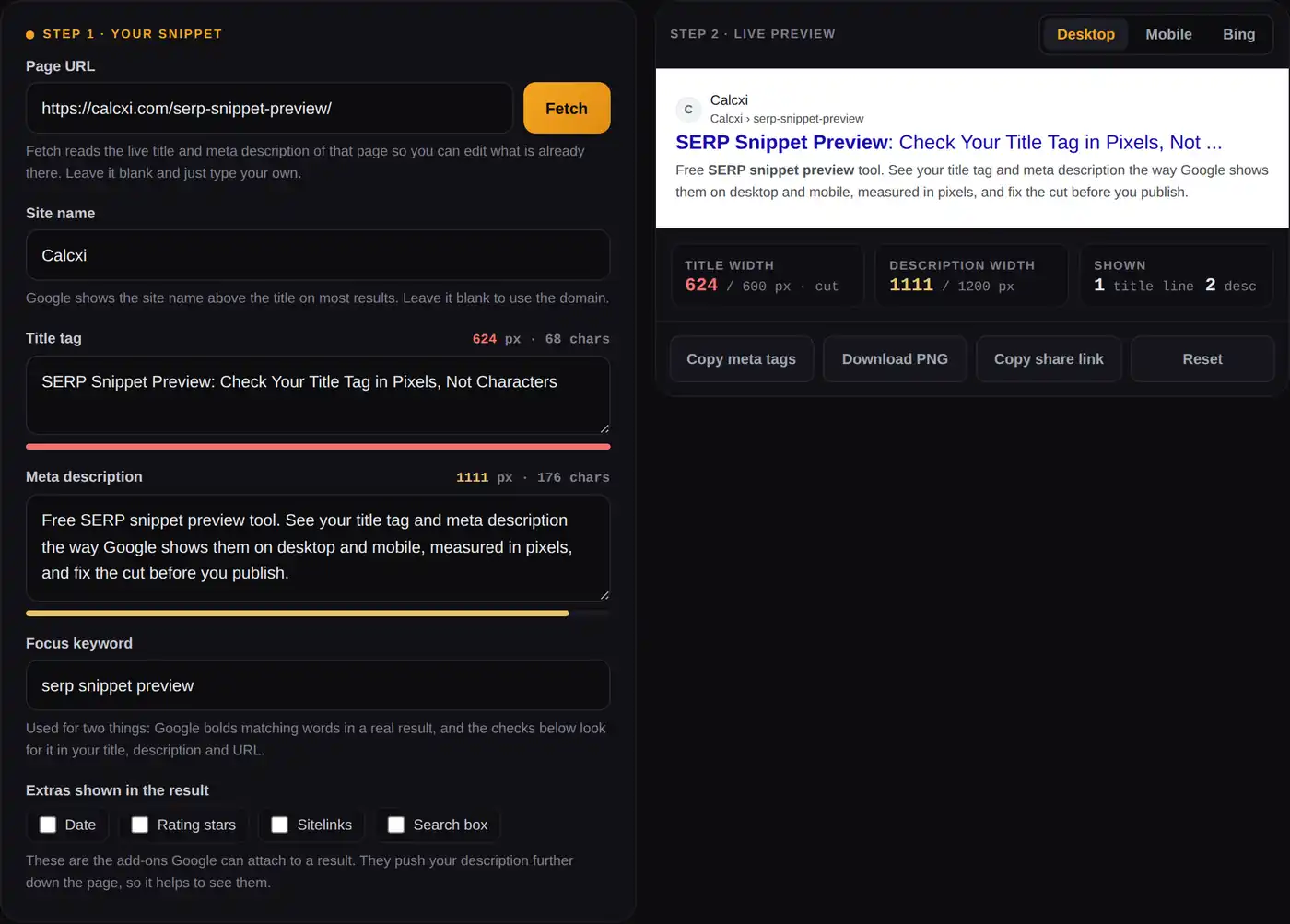
Fetch reads the live title and meta description of that page so you can edit what is already there. Leave it blank and just type your own.
Google shows the site name above the title on most results, with the site's favicon beside it. Leave this blank and the domain name is used. The favicon is loaded automatically from the URL you enter.
Used for two things: Google bolds matching words in a real result, and the checks below look for it in your title, description and URL.
The search bar and result tabs show the snippet in its real surroundings. The date, stars and sitelinks are add-ons Google can attach to a result, and each one pushes your description further down the page.
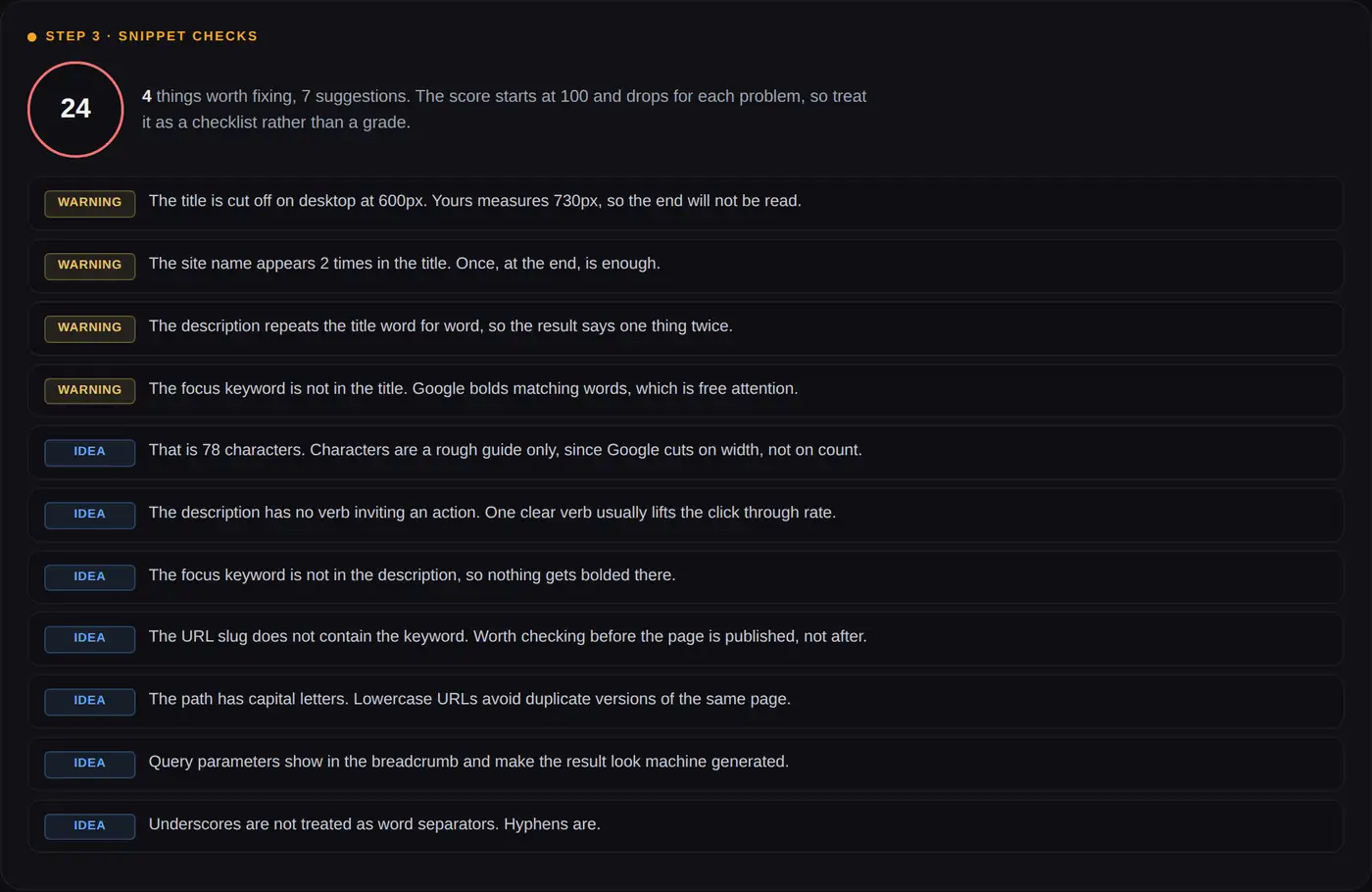
Type a title and a description above. Every check below reads the same numbers the preview uses, so nothing here is guesswork about character counts.
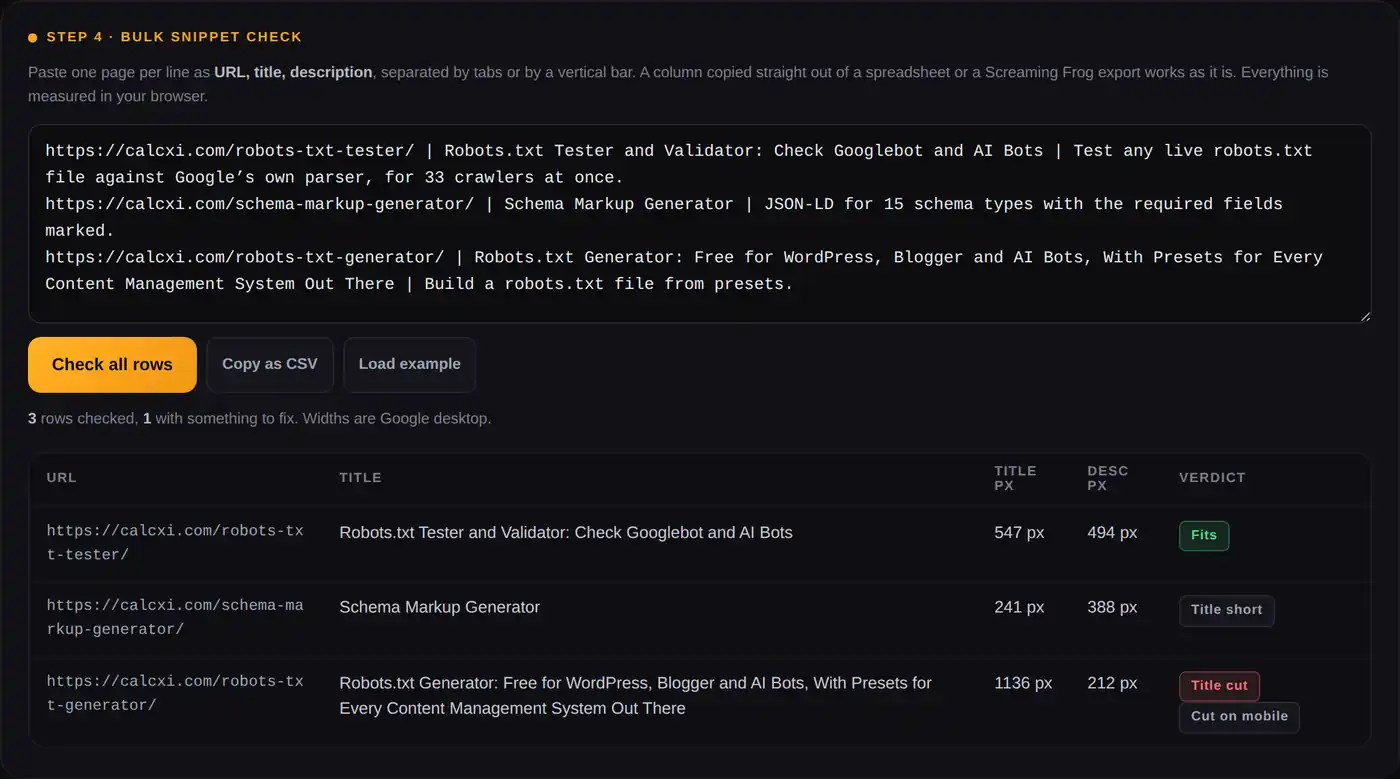
Paste one page per line as URL, title, description, separated by tabs or by a vertical bar. A column copied straight out of a spreadsheet or a Screaming Frog export works as it is. Everything is measured in your browser.
How to use this SERP snippet preview tool
Paste a URL, or just type a title and a description, and the preview above updates as you type. Every number you see
is measured in pixels with the same font Google uses, because that is what decides where your text gets cut. A
character count cannot know that illiterate takes barely more room than WWW.
Load a page or start from scratch
Enter any public URL and press Fetch. The live title tag and meta description come back so you can edit what is already published, along with a note if the page is set to noindex or its canonical points somewhere else. The site's favicon and breadcrumb are pulled in as well, so the preview matches the real result line for line. No URL? Type your draft straight into the two boxes.
Watch the pixel meters, not the character count
The title bar turns amber as you approach the cut and red once you pass it. The same happens for the description. The counters show characters too, since most plugins still ask for them, but the pixel figure is the one that decides.
Switch between desktop, mobile and Bing
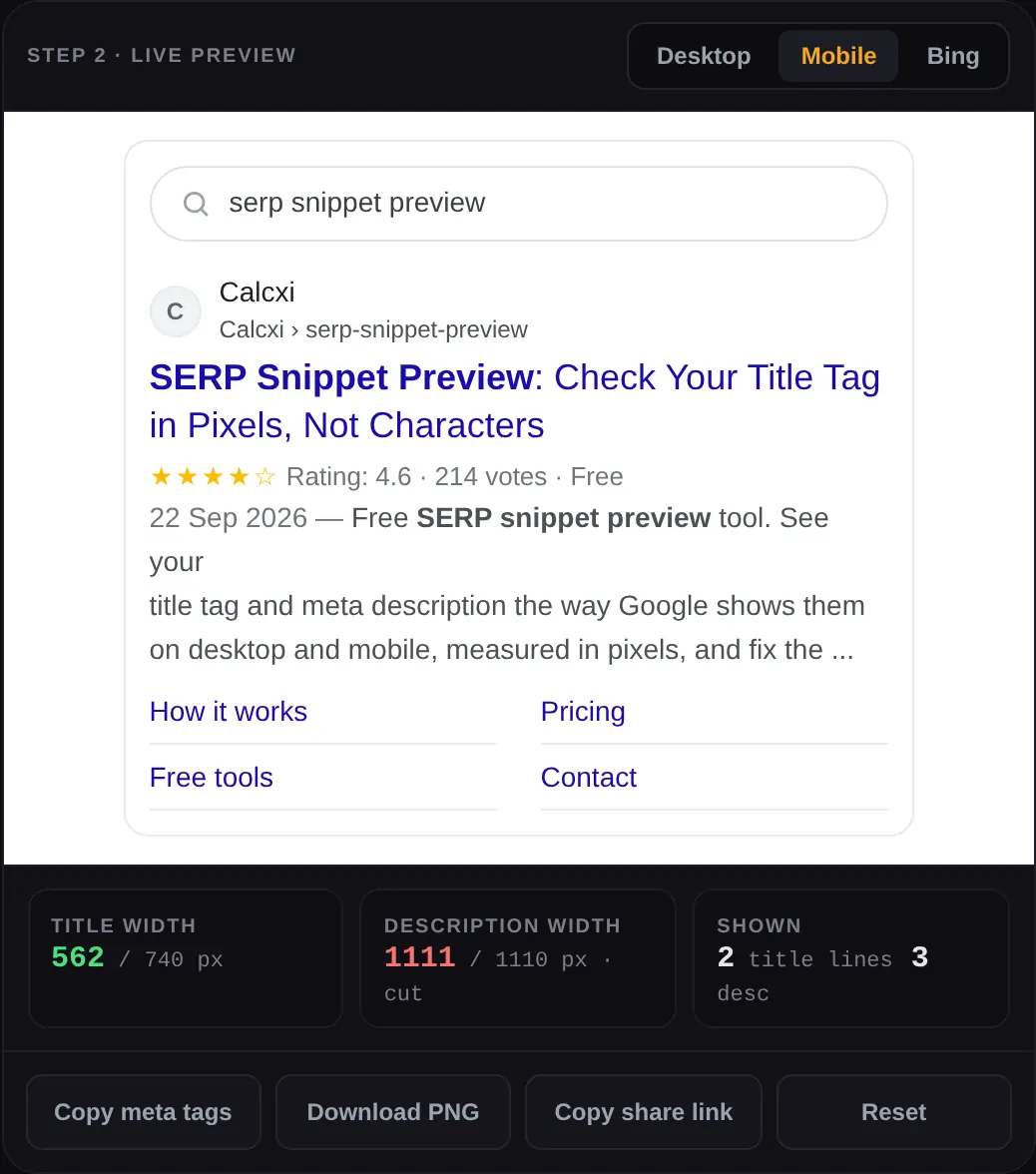
The same snippet is cut in three different places. Mobile gives the title two lines but takes away width, and Bing allows a longer description. Clicking through all three takes five seconds and saves a rewrite later.
Read the checks, then copy the tags
Step 3 lists what would weaken the result, from a missing keyword to a brand name repeated twice. When it looks right, copy the meta tags into your CMS, download the preview as a PNG for a client, or copy a share link so a colleague opens the same snippet.
Why a pixel based SERP preview beats counting characters
Google does not count your characters. It renders your title in Arial at 20px on desktop and cuts the line when it runs out of room, which means the limit is a width, not a number. Two titles with exactly 60 characters can behave completely differently: one fits, the other loses its last three words.
The 600 pixel title and where it comes from
Google has never published a limit. The 600px figure that every serious SERP simulator uses, this one included, comes from measuring the result block on a desktop search page. Your title gets one line there. Go past the width and the end is replaced with an ellipsis, so anything you put at the end may as well not exist.
How many characters is that in practice
Roughly 55 to 60 characters for a title in mixed case, and roughly 155 to 160 for a description, which is where the
old rules of thumb came from. They are still useful as a first guess. They stop being useful the moment your title
is full of wide letters (W, M, capital letters, numbers) or narrow ones
(i, l, t). Type both into the tool above and the difference is obvious
straight away.
Where the mobile preview differs
On a phone the result block is narrower but the title is allowed to wrap onto a second line, so a title that gets cut on desktop can survive on mobile and a description that fits on desktop can run to three lines on a phone. Since most searches happen on mobile, the mobile preview is the one to check last, after the desktop version reads well.
| Element | Google desktop | Google mobile | Bing desktop |
|---|---|---|---|
| Title lines | 1 | 2 | 1 |
| Title width per line | about 600px | about 370px | about 600px |
| Description lines | 2 | 3 | 3 |
| Description width per line | about 600px | about 370px | about 600px |
| Font used | Arial 20px title, 14px text | Arial 18px title, 14px text | Arial 20px title, 14px text |
| Site name above the title | Yes | Yes | No, URL only |
These are measured widths, not numbers published by Google or Microsoft. Both change their layouts from time to time, which is exactly why this tool measures rather than counting to a fixed number of characters.
What a Google SERP simulator can and cannot promise
Any honest google serp preview tool has to say this plainly: what you write is an input, not the final output. Google builds the title link from your title element, your headings, the text on the page and sometimes the anchor text of links pointing to it. The snippet under it is generated for each query, which is why the same page shows different descriptions for different searches.
Why Google rewrites titles, and what makes it more likely
Rewrites cluster around a few patterns: a title that is half boilerplate, the site name repeated at both ends, a title stuffed with keywords, a title that has nothing to do with the query, and a title so long that Google prefers the H1. Write something short, specific and honest and you give it far less reason to pick something else. The checks in Step 3 flag exactly these patterns.
The snippet is chosen per query
Your meta description is a strong suggestion. When a searcher uses words that appear in your body text instead, Google often pulls that passage in, because it answers the actual query better. This is normal and not a penalty. A good description still matters: it is what shows for your main term, and it is the one part of the result you fully control when it is used.
The controls you really do have
Four of them, all documented by Google. max-snippet:[number] caps how many characters Google may use.
data-nosnippet marks a section that must never appear in a snippet. nosnippet switches the
text snippet off completely. noindex keeps the page out of results entirely. If you want a page in
search at all, only the first two are usually a good idea.
What this SERP snippet preview does that other snippet tools do not
Most preview tools show one Google result and stop there. This one was built after using the others and writing down what was missing.
Bing as well as Google
Bing gives the description a third line and shows the plain URL instead of a site name and breadcrumb. If Bing sends you traffic, or your audience uses Copilot, it is worth one click to check.
Bulk snippet check
Paste a whole export, one page per line, and get every title and description measured at once with a clear verdict. No other free snippet preview does this, and it is the only sane way to audit a site with more than ten pages.
Live fetch with real warnings
Pull the title and description straight off a published page, and get told if that page is noindex, redirects, or has a canonical pointing elsewhere. Those three explain most cases of "my snippet is not showing".
Checks, not just a preview
A score and a plain English list: keyword missing from the title, brand repeated, description that copies the title, capitals, underscores in the URL. Each one says why it matters instead of showing a red dot.
Share a link, save a picture
Copy a link that opens the exact snippet you are looking at, so a client or an editor sees the same thing. Or download a PNG to drop into a document.
Nothing leaves your browser
Measuring, wrapping and checking all happen on your device. Only the optional Fetch button touches the network, and it reads the public page you named, nothing else.
How to write a title tag that survives the cut
Put the phrase people type at the front
If the title gets cut, the end goes first. The words you most want read, usually the search phrase itself, belong in the first thirty characters. On a phone, where the title wraps, the first line is doing almost all of the work.
One brand mention, at the end
A site name at the start eats the space your topic needs, and Google already prints the site name above the title on most results. Once, after a separator, is enough. Two mentions of the same brand in one title is one of the patterns that invites a rewrite, and the checker flags it.
Numbers, years and brackets
A number or a year can lift click through rate because it promises something specific. It also dates your page. Either commit to updating it, or leave it out. Brackets and separators are fine in moderation: three or more in one title and the result starts to look like a template rather than a page written by a person.
Do not write the same title twice on one site
Two pages sharing a title is a signal to Google that one of them is redundant, and it makes your own Search Console data hard to read. Run the bulk check over a site export and duplicates stand out immediately.
How to write a meta description that earns the click
Write for the cut, not for a character count
The first line of your description is the only part guaranteed to be read. Put the promise there and use the second line for the detail. The tool shows you exactly where line one ends, so there is no guessing.
Give the keyword something to bold
Google bolds words from the query in the snippet, and bold text pulls the eye down the page. Use the searcher's own phrasing once, naturally, in the description. Tick the focus keyword box above and the preview shows exactly what gets bolded. Repeating it four times does not double the effect; it just reads badly, and the checker will say so.
Say what happens when they click
"Free, no sign-up, works on mobile" tells a searcher more than another sentence describing the topic they just searched for. A single verb, one concrete detail and a reason to choose you over the result above is the whole job.
Every page gets its own
A description repeated across a category is worse than none at all, because Google will write its own anyway and you have simply made your pages look identical to each other. Write descriptions for the pages that earn traffic and let Google generate the rest.
Rich results, dates and sitelinks: what pushes your snippet around
A result is rarely just a title and two lines. A date prefix, rating stars from review markup and sitelinks under the description all take space, and everything below them moves down. The checkboxes above let you see the crowded version rather than the ideal one, with the search bar and result tabs around it. If your page carries review or FAQ markup, the Schema Markup Generator shows which types still earn a visible rich result, and the preview here shows what that does to the rest of your snippet.
Checking a whole site instead of one page
One page at a time is fine for a new article. For a site audit it is hopeless. Step 4 takes one row per page as
URL | title | description, which is exactly what a Screaming Frog, Sitebulb or spreadsheet export gives
you, and measures every row in your browser. You get the pixel width of each title and description, a verdict for
each page, and a CSV you can paste back into the sheet you started from.
A practical order of work: export your pages, sort by traffic, run the top fifty through the bulk check, and fix the ones marked Title cut and No description first. Those two are where the lost clicks are. Titles marked short are an opportunity rather than a problem: unused width is a place to say something useful.
Using the SERP preview with WordPress, Rank Math, Yoast and Shopify
Rank Math and Yoast
Both show a snippet preview inside the editor, and both are useful. Both also base their traffic light on character counts, which is why a title they call green can still be cut in a real result, and why a title they call too long sometimes fits perfectly. Write the title here, check the pixel width, then paste it into the plugin and ignore the colour. If you use Rank Math and your page already carries its own JSON-LD, turn the plugin's schema off for that page so the markup is not published twice.
Shopify, Wix, Webflow and everything else
Every platform has a field for the title and the description, usually called the page title and the search engine listing. None of them measure in pixels. The workflow is the same everywhere: draft here, check the three previews, paste there.
When the live result still looks wrong
Give it time, first of all. Google has to recrawl the page before anything changes. If it has been weeks, check the three usual suspects with the Fetch button: the page is noindex, the canonical points at a different URL, or the crawler is blocked before it ever reads your tags. That last one is what the Robots.txt Tester answers in one click.
Do snippets still matter with AI Overviews and AI Mode?
They matter in a different way. An AI answer cites sources, and the citation carries your title and your domain. A title that explains what the page actually gives you is easier for a model to place, and easier for a person to trust when they decide which citation to open. The same qualities that make a snippet worth clicking, being specific, honest and readable without context, are what make a page quotable in an AI answer.
What has changed is the arithmetic. When an overview sits above the results, fewer people scroll, so the ones who do are choosing deliberately. A vague title that used to pick up stray clicks now picks up nothing. If you want control over which AI crawlers can read the page in the first place, that is a robots.txt decision, and the Robots.txt Generator handles it.
Mistakes this snippet checker catches most often
- The brand at both ends. "Calcxi | SERP Snippet Preview | Calcxi Tools" wastes half the width on one word.
- A description that repeats the title. The result then says the same thing twice and answers nothing.
- Writing to 60 characters exactly. Sixty capital letters overflow badly; sixty narrow letters leave room unused.
- Forgetting the phone. A title that works on a wide screen can lose its last two words on the layout most people are using.
- Emoji carrying meaning. They are often stripped from results, so never let one be the reason a title makes sense.
- Smart quotes and stray markup. A curly quote pasted from a document can break the description in some templates.
- The same description on twenty pages. Category templates do this quietly, and the bulk check finds it in seconds.
- No description at all. Sometimes fine, often a wasted chance on a page that ranks.
More free SEO tools from Calcxi
Robots.txt Tester
Fetch any site's live robots.txt, test up to 100 URLs and see the exact line that allows or blocks each crawler. Matching follows Google's own open source parser.
Robots.txt Generator
Build a robots.txt from presets for WordPress, WooCommerce and Blogger, with one click controls for AI crawlers like GPTBot and ClaudeBot.
Schema Markup Generator
JSON-LD for 15 schema types with Google's required fields marked and an honest label on which types still earn a rich result.
YouTube Title Generator
The same idea for video: ten title options for a topic, each scored for click through potential, with Shorts support.
All SEO tools
The full set, including everything above, on one page.
YouTube tools
Tags, thumbnails, stats and earnings estimates for creators, on the video side of search.
SERP Snippet Preview: FAQs
What is a SERP snippet preview?
A SERP snippet preview shows how your page will look in search results before you publish it. It renders your title tag, URL and meta description the way Google lays them out, including where the text gets cut, so you can rewrite the parts that would be hidden. This tool previews Google desktop, Google mobile and Bing, and measures every element in pixels.
Is this SERP snippet preview tool free?
Yes. It is free with no account, no email and no limit on how many snippets you check, including the bulk mode. Ads on the page pay for the site.
How long should a title tag be in 2026?
Aim for a title that fits inside about 600 pixels on desktop, which usually works out at 55 to 60 characters. The width is what matters, not the count: a title full of capitals and wide letters can be cut at 50 characters, while a narrow one can survive past 65. Type yours into the preview above and the meter tells you exactly where you stand.
How long should a meta description be?
About 155 to 160 characters is the usual guidance, which matches roughly two lines on a desktop result. Mobile gives you a third line, so a slightly longer description is not wasted there, and Bing shows more again. Write the important half first, because that is the part nobody misses.
Why does Google show a different title than the one I wrote?
Google generates the title link from your title element, your headings and other text on the page, and it swaps yours out when it thinks something else fits the query better. The usual triggers are titles that are too long, stuffed with keywords, mostly boilerplate, repeated across the site, or unrelated to the page content. A short, specific, non repetitive title is rewritten far less often.
Why is my meta description not showing in search?
Google builds the snippet per query, so when a searcher's words appear in your body text rather than your description, it often shows that passage instead. Other reasons: the page has no description, the description is too short to be useful, or the same one is repeated across many pages. None of these are penalties, and a well written description still shows for your main queries.
Does this google serp preview show mobile results too?
Yes. The Mobile tab renders the narrower phone layout, where the title is allowed two lines and the description three. Since most searches happen on a phone, check the mobile preview before you consider a snippet finished.
Can I preview Bing results as well?
Yes, and it is worth doing if Bing sends you meaningful traffic or your readers use Copilot. Bing shows the plain URL instead of a site name and breadcrumb, and gives the description a third line, so a description cut on Google can be fully visible there.
How does the tool measure pixels?
It draws your text in the same font, size and weight that the search result uses and measures the rendered width in your browser, then wraps and cuts the string exactly where the layout would. That is why the number moves when you swap a capital W for a lowercase i, which no character counter can do.
Can I check many pages at once?
Yes. Step 4 takes one page per line as URL, title and description, separated by tabs or vertical bars, which is what a Screaming Frog or spreadsheet export already looks like. Every row is measured in your browser and you can copy the results back as CSV.
Does the keyword need to be in the title and description?
In the title, almost always: it confirms to a searcher that the page answers their question, and matching words get bolded. In the description, once, in a sentence that reads naturally. The checks above flag a missing keyword and also flag the opposite problem, the same phrase repeated until the result reads like a machine wrote it.
Is my data sent anywhere?
The measuring, wrapping and checking all happen in your browser, and nothing you type is stored by Calcxi. The one exception is the Fetch button, which asks our server to read the public URL you entered and return its title and description. Do not use Fetch on a page that is not meant to be public.
How often should I check my snippets?
Before publishing anything new, whenever you rewrite a page, and once in a while over your top pages as a batch. Search layouts shift, pages get edited by other people, and plugins sometimes rewrite titles without telling you. A bulk check of your fifty best pages takes a minute.
Pixel widths here are measured from current search layouts, not published limits, and Google can change its rendering at any time. Treat the preview as an accurate model of today's result, and always confirm what is live in Search Console once a page has been recrawled.

Written & verified by
B.Tech Computer Science · 8 years in web development & SEO · Bhilwara, India
About ·
LinkedIn ·
Report an error