
YouTube Comment Picker
Pick a random winner from the comments on a YouTube video, with duplicate entries removed and keyword, date and like filters applied first. Every draw runs from a seed you can publish, so anyone who entered can reproduce the result and check you did not rig it.
01 How to run a YouTube giveaway people actually trust
The hard part of a giveaway is not picking a name. It is convincing several thousand strangers that the name was not your friend, your alt account, or whoever you felt like rewarding. Almost every comment picker skips this entirely: it shows a winner, and you are asked to take it on faith.
Three things make a draw checkable, and none of them are difficult:
- State the rules before entries open. What counts as an entry, the closing time and its timezone, how many winners, and how you will contact them.
- Publish the seed before you draw. Post the exact string in your video description or a pinned comment. Once it is public and timestamped you cannot quietly try seeds until you like the answer.
- Publish what you drew from. Say how many comments you loaded, how many the video had, and what filters you applied. If you drew from 500 of 5,000 comments, say so.
Do those and anyone can reproduce your result. Skip them and you are asking for trust you have given nobody a reason to extend.
02 The problem every comment picker has
YouTube's Data API returns comment threads in one of two orders, time or relevance. There is no option for a random sample, and no way to ask for a fair slice. The API also caps each request at 100 comments, so a picker loops through pages until it hits whatever limit it set.
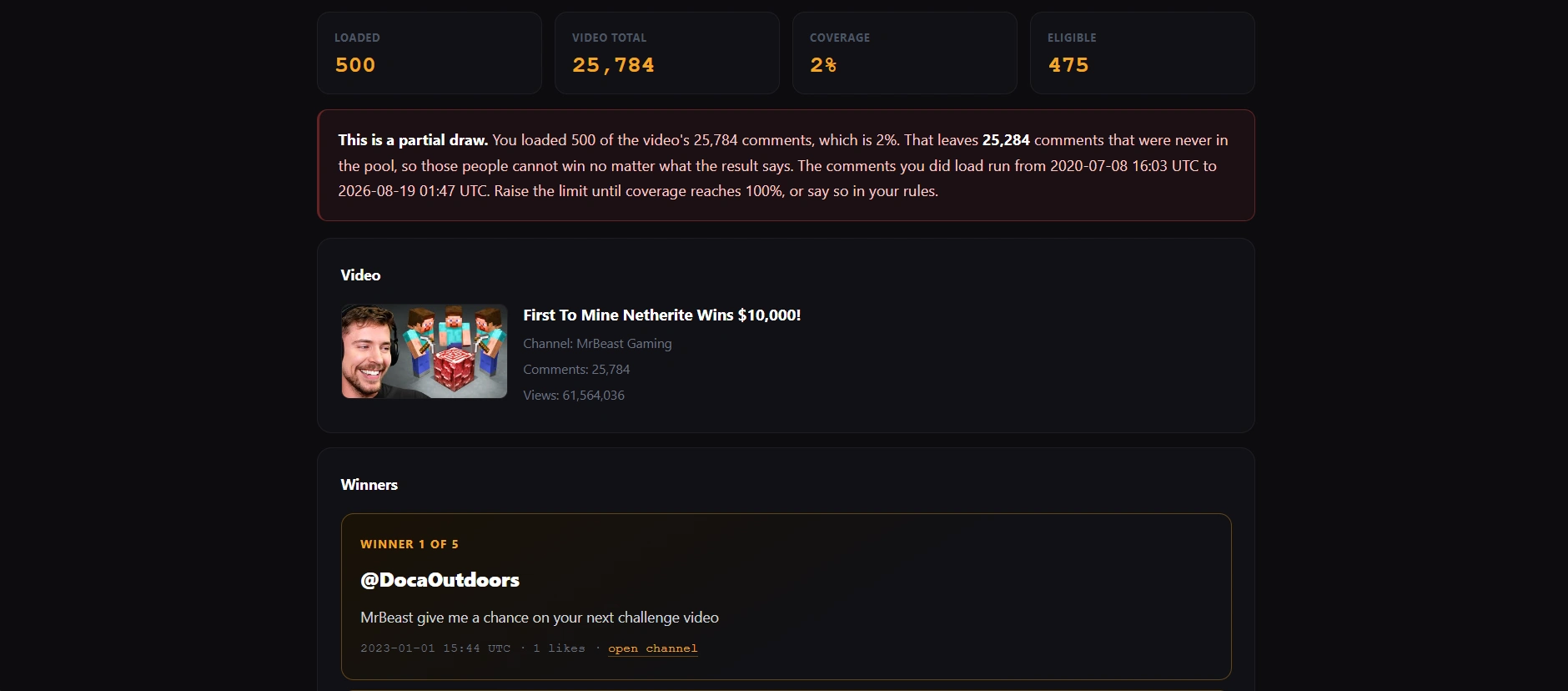
That limit is where fairness quietly disappears. Stopping at 500 comments on a video with 5,000 does not give you 500 random entrants. It gives you a contiguous block of the timeline, and everybody outside that block has a zero percent chance no matter what the tool says afterwards.
| You load | Video has | Excluded entrants | Share who cannot win |
|---|---|---|---|
| 500 | 1,200 | 700 | 58.3% |
| 500 | 5,000 | 4,500 | 90.0% |
| 500 | 20,000 | 19,500 | 97.5% |
| 1,000 | 5,000 | 4,000 | 80.0% |
| 2,000 | 50,000 | 48,000 | 96.0% |
This is not a flaw specific to any one tool. It is what the API allows. Nothing can pick fairly from comments it never loaded.
What a tool can do is be honest about it. This one reads the video's actual comment count from the API, compares it against what it loaded, and shows you the coverage percentage and the date range it sampled. Below full coverage it tells you plainly that the draw is partial. If you are running a giveaway that matters, raise the limit until coverage reaches 100%, or state the limitation in your rules so entrants know what they entered.
03 How the winner is chosen
Once the eligible pool is settled, selection runs in three steps that remove every source of hidden bias I could find:
- The pool is sorted by comment ID first. Without this, the winner depends on the order pages happened to arrive in, which is not something an entrant can check. Sorting first makes the draw depend only on who entered and the seed.
- A seeded generator shuffles the pool. The seed you type is hashed and drives a deterministic generator, so the same seed with the same pool always produces the same winners.
- Winners are taken from the front of the shuffled list. No entrant can be drawn twice.
Leave the seed blank and it falls back to your browser's cryptographic generator, using rejection sampling rather than a plain modulo. That last detail is worth a sentence because the previous version got it wrong: taking a 32 bit random number modulo the pool size very slightly favours the low indices. On a 500 entry pool the first 296 entrants were favoured by about 0.0000116%. It is far too small to change a real outcome, but it costs nothing to do correctly.
The larger point is that an unseeded draw is unverifiable by construction. If the result matters to anyone, use a seed and publish it first.
04 What the filters actually do
| Filter | Effect |
|---|---|
| Required word or hashtag | Case insensitive substring match on the comment text. "#giveaway" also matches "#giveaways", so pick your tag carefully. |
| Minimum likes | Excludes comments below the threshold. Note that likes accrue over time, so this filter behaves differently depending on when you draw. |
| Date range | Compared against the comment's published timestamp in UTC. Set these to your stated entry window. |
| Exclude usernames | Matched on display name, case insensitive, leading @ ignored. Useful for staff and for your own account. |
| One entry per person | Keeps a single comment per channel. Without it, anyone who commented fifty times has fifty times the chance. |
That last one is the filter most worth leaving on. It is also the one most worth stating in your rules, because entrants who spammed the comments to improve their odds will notice it did not work and will want to know why.
05 Rules, disclosure and the law
A giveaway is a legal promotion, not just a piece of content, and the rules vary considerably by country and by state. This section is general information rather than legal advice, and if the prize is valuable it is worth an hour of a professional's time.
Some things that hold fairly broadly. A promotion that requires payment to enter and awards prizes by chance starts to look like a lottery, which is heavily regulated almost everywhere. Keep entry free. Publish complete rules before entries open, including who is eligible, the closing time with its timezone, how winners are picked and notified, and what happens if a winner does not respond. If you are running it across borders, exclude jurisdictions you have not checked rather than hoping.
YouTube has its own contest policies covering what you may run on the platform, and they apply on top of local law. Read them before you announce anything, not after.
06 YouTube comment picker FAQ
Paste the video URL, load the comments, set any filters such as a required hashtag or an entry date window, then pick. This picker removes duplicate entries from the same channel by default so nobody improves their odds by commenting repeatedly. Use a published seed if you want entrants to be able to verify the result themselves.
The selection is, and you can check it. The pool is sorted by comment ID so the outcome does not depend on load order, then shuffled by a seeded generator, then winners are taken from the front. Same seed and same pool always gives the same winners. An unseeded draw falls back to your browser's cryptographic generator using rejection sampling rather than a plain modulo. The bigger fairness question is not the generator but how many comments were loaded, which is covered in section 02.
YouTube's API returns 100 comments per request and orders them by time or relevance, with no random sample available. Loading everything on a video with tens of thousands of comments means hundreds of requests, which is slow and burns API quota. Whatever limit you set, everyone outside it cannot win. This tool shows the coverage percentage so you know whether your draw was complete, and warns you when it was not.
It makes a draw reproducible. Publish the seed string before you draw, in your description or a pinned comment. After the draw, anyone can enter the same video, the same filters and the same seed and get exactly the same winners. Because the seed was public and timestamped beforehand, you could not have tried seeds until you liked the answer. Without a seed, a winner is just a claim.
Yes. The "one entry per person" option is on by default and keeps a single comment per channel, so commenting repeatedly does not improve anyone's odds. Worth stating in your rules, since entrants who tried it will want to know why it did not work. You can also exclude specific usernames, which is useful for staff and your own account.
No, it uses UTC, because that is how YouTube timestamps comments. This is a deliberate change: reading the dates as local time shifted the eligibility window by your timezone offset, so an owner in US Eastern setting a start date of 1 January would have wrongly excluded every comment posted in the first five hours of that day. Set the dates to match your stated entry window, and state the timezone in your rules.
No. Comments are requested from YouTube by your own browser and held in memory only. Nothing is sent to Calcxi, nothing is stored, and closing the tab discards everything. CSV downloads are generated in your browser. Comments loaded here are public comments already visible on the video.
Usually, but the rules vary by country and by state and this is general information rather than legal advice. Broadly: keep entry free, since requiring payment plus awarding by chance starts to resemble a lottery, which is heavily regulated. Publish full rules before entries open covering eligibility, the closing time and timezone, how winners are selected and notified, and what happens if a winner does not respond. YouTube also has its own contest policies that apply on top of local law.
07 Limits, sources and disclosure
What this tool cannot do
It cannot see comments that YouTube's API does not return, which includes comments held for review, comments on videos where comments are disabled, and anything beyond the limit you set. It cannot tell a genuine entrant from a bot account. It cannot verify that a winner met any off-platform condition such as subscribing or following elsewhere. And it cannot make a partial draw fair, only tell you it was partial.
YouTube API Services
This tool uses YouTube API Services to read public comments. By using it you agree to be bound by the YouTube Terms of Service. Data handling by Google is described in the Google Privacy Policy. Calcxi does not store, log or transmit any comment data: requests go from your browser directly to YouTube, and results stay in the page until you close it.
Sources
API ordering and result limits from the commentThreads.list reference, which states that the order parameter accepts only time and relevance and that maxResults accepts "1 to 100, inclusive". Quota costs from the quota cost reference. Client obligations from the YouTube API Services developer policies. Every figure quoted was read on the linked page, in line with the Editorial Policy.
Not legal advice
Calcxi is an independent tools site, not affiliated with, endorsed by or sponsored by YouTube or Google. Nothing here is legal advice about running a promotion. Contest and lottery rules vary by jurisdiction, and if your prize is valuable you should take proper advice before you announce it.
08 Related tools

Written & verified by
B.Tech Computer Science · 8 years in web development & SEO · Bhilwara, India
About ·
LinkedIn ·
Report an error