
YouTube Video Stats Checker
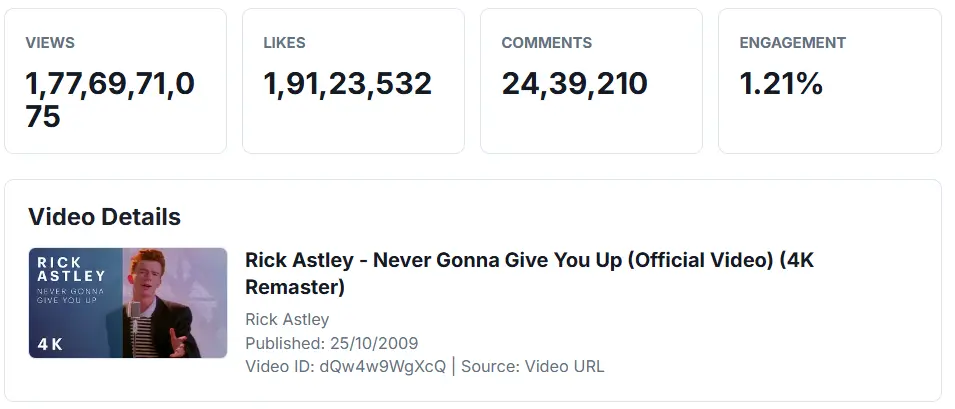
Check public statistics for any YouTube video or Shorts URL. Paste a video link to view video views, likes, comments, duration, publish date, channel, category ID, thumbnail, and engagement rate.
Video Details
Stats Breakdown
| Metric | Value |
|---|---|
| No stats checked yet. | |
Some metrics may be hidden or unavailable depending on the video's privacy settings, disabled comments, hidden like counts, or API response.
What Is a YouTube Video Stats Checker?
A YouTube video stats checker is a tool that fetches public video statistics and metadata from a YouTube video. It helps you understand how a video is performing by showing key numbers such as views, likes, comments, duration, publish date, and engagement rate.
Instead of checking each detail manually, you can paste a video URL and get a clean performance summary in one place.
How to Check YouTube Video Stats
- Copy the URL of a YouTube video or Shorts video.
- Paste the URL into the YouTube Video Stats Checker.
- Click the Check Stats button.
- Review views, likes, comments, duration, and engagement rate.
- Copy the stats or download them as a CSV file.
What Video Statistics Can This Tool Show?
This YouTube video statistics checker can display useful public video data, including:
- Video views
- Like count
- Comment count
- Engagement rate
- Video duration
- Publish date
- Video title
- Channel name
- Channel ID
- Category ID
- Thumbnail
- Caption availability
How Is YouTube Engagement Rate Calculated?
This tool estimates YouTube video engagement rate by comparing likes and comments with total views.
Engagement Rate = ((Likes + Comments) / Views) × 100For example, if a video has 10,000 views, 500 likes, and 50 comments, the engagement rate is:
((500 + 50) / 10,000) × 100 = 5.5%Engagement rate helps you understand whether viewers are interacting with the video, not just watching it.
Why Check YouTube Video Stats?
Checking YouTube video stats can help you understand what kind of content performs well. Creators and marketers can use video statistics to compare videos, study competitors, review engagement, and plan better titles, thumbnails, and topics.
A video with fewer views but strong engagement may be more valuable than a video with many passive views. That is why views, likes, comments, and engagement rate should be reviewed together.
YouTube Views vs Likes vs Comments
YouTube views show how many times a video has been watched. Likes show positive viewer response. Comments show deeper interaction because viewers took extra time to respond.
When these numbers are viewed together, they give a better picture of video performance than views alone.
More YouTube Tools
Can I Check YouTube Shorts Stats?
Yes. This YouTube Shorts stats checker supports Shorts URLs when the video data is available through YouTube. Paste a Shorts link, and the tool can fetch public stats such as views, likes, comments, duration, and publish date.
Supported YouTube URL Formats
This tool supports several YouTube URL formats:
- Regular YouTube video URLs
- YouTube Shorts URLs
- youtu.be short links
- YouTube embed URLs
- YouTube live URLs
- Direct YouTube video IDs
Why Are Some YouTube Stats Missing?
Some stats may be unavailable because of YouTube settings or API limits. For example, likes can be hidden, comments may be disabled, or a video may be private, deleted, age-restricted, or unavailable in some regions.
If a metric does not appear, it does not always mean the tool is broken. It may simply mean YouTube did not return that specific data.
Who Can Use This YouTube Video Stats Checker?
This tool can be useful for:
- YouTube creators checking video performance
- Marketers researching competitor videos
- SEO professionals analyzing video metadata
- Brands reviewing campaign videos
- Students and researchers studying video engagement
- Content teams comparing multiple video ideas
Frequently Asked Questions
What is a YouTube video stats checker?
A YouTube video stats checker is a tool that shows public statistics and metadata for a YouTube video, such as views, likes, comments, duration, publish date, and engagement rate.
How do I check YouTube video statistics?
Paste a YouTube video URL into the tool and click Check Stats. The tool will fetch available public video statistics and display them in a readable format.
Can I check YouTube Shorts stats?
Yes. You can paste a YouTube Shorts URL to check available public statistics for that Shorts video.
How do you calculate YouTube engagement rate?
YouTube engagement rate can be calculated by adding likes and comments, dividing by total views, and multiplying by 100.
Engagement Rate = ((Likes + Comments) / Views) × 100
Why are likes hidden for some YouTube videos?
Some videos may not return like count data because of YouTube settings, API behavior, or availability restrictions.
Why are comments unavailable for some videos?
Comments may be disabled by the creator, restricted by YouTube, or unavailable through the API for certain videos.
Can I download YouTube video stats?
Yes. The tool lets you download the checked video statistics as a CSV file.
Do I need to log in to check video stats?
No. Users only need to paste a YouTube video URL. The tool checks public video statistics when available.
Are YouTube video stats always real-time?
YouTube stats may not always update instantly. View counts, likes, and comments can take time to refresh or may differ slightly across YouTube surfaces.
Can I use this for competitor video research?
Yes. You can use this tool to review public stats from competitor videos and compare views, likes, comments, publish dates, and engagement rates.

Written & verified by
B.Tech Computer Science · 8 years in web development & SEO · Bhilwara, India
About ·
LinkedIn ·
Report an error