
Finance · Event studies
Cumulative Abnormal Return Calculator
Use this cumulative abnormal return calculator to measure how a stock performed around a specific event compared with its expected return. This CAR calculator can help you calculate abnormal returns, running CAR, CAPM expected return, event-window results, and downloadable charts from your stock and market data.
This tool is part of the CalcXi calculators‘ collection, built to make finance and research calculations easier online.
Upload your CSV data, choose an event date, select the return model, and calculate the stock’s abnormal performance before and after the event.
CAR Chart
Event Window Table
Swipe left/right to view all columns.
| Date | t | Stock return | Market return | Expected | Abnormal | Running CAR |
|---|---|---|---|---|---|---|
| Load sample data or paste your CSV, then calculate. | ||||||
What Is Cumulative Abnormal Return?
Cumulative abnormal return, also called CAR, is the total abnormal return of a stock over a selected event window. It is commonly used in event studies to measure whether a company event, news announcement, or market event had an unusual effect on stock performance.
In simple terms, CAR answers this question:
Did the stock move differently than expected around the event?
The basic idea is:
Then CAR adds all abnormal returns across the event window:
If CAR is positive, the stock performed better than expected during the event window. If CAR is negative, the stock performed worse than expected.
How to Use the Cumulative Abnormal Return Calculator
Using this CAR event study calculator is simple:
- Upload your CSV data or use the sample data.
- Choose whether your data contains prices or returns.
- Select the expected return model: CAPM, market-adjusted, or mean-adjusted.
- Enter the event date.
- Set the estimation window and event window.
- Click Calculate CAR.
- Download the results CSV or CAR chart.
The calculator will generate a row-by-row event window table showing stock return, market return, expected return, abnormal return, and running CAR.
Cumulative Abnormal Return Formula
The cumulative abnormal return formula is:
Where:
Meaning:
- ARt = abnormal return on day t
- Rt = actual stock return on day t
- E(Rt) = expected stock return on day t
So, the full formula is:
This abnormal return calculator first calculates the abnormal return for each day in the event window, then adds those values together to calculate cumulative abnormal return.
CAPM Expected Return in CAR Calculation
This tool can also work as a CAPM abnormal return calculator.
When you choose the CAPM model, the calculator estimates expected return using the Capital Asset Pricing Model:
The calculator uses your estimation window to estimate beta, then applies that beta to calculate expected returns during the event window.
This is useful when you want a more finance-based expected return instead of simply comparing the stock return to the market return.
What Is an Event Window?
An event window is the period around an event date that you want to study.
For example, if the event date is the earnings announcement date, you may want to calculate CAR from five trading days before the event to five trading days after the event.
Example:
This means the calculator looks at returns from five trading days before the event through five trading days after the event.
Common event windows include:
- -1 to +1
- -3 to +3
- -5 to +5
- -10 to +10
A shorter event window is useful when you want to measure a quick market reaction. A longer event window can help capture delayed reactions.
What CSV Format Is Required?
Your CSV file should include these columns:
Column meaning:
- date = trading date
- stock = stock price or stock return
- market = market index price or market return
- rf = risk-free rate, optional
The rf column is optional. If it is not included, the calculator can use the daily risk-free rate entered in the tool.
You can use either prices or decimal returns. Just make sure you select the correct data type before calculating.
What Results Does This CAR Calculator Provide?
After calculation, the tool provides:
- Final cumulative abnormal return
- Beta
- Alpha
- Number of event-window rows
- Stock return
- Market return
- Expected return
- Abnormal return
- Running CAR
- Event-window table
- Downloadable CSV results
- Downloadable CAR chart
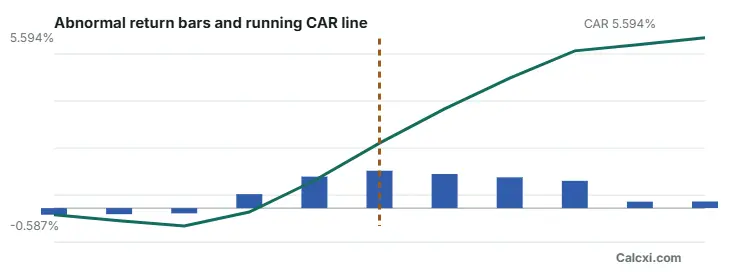
The event-window table helps you see exactly how CAR builds day by day. The chart gives a visual view of abnormal returns and running CAR across the event window.
When Should You Use a CAR Event Study Calculator?
You can use a cumulative abnormal return calculator when you want to measure how a stock reacted to a specific event.
Common examples include:
- Earnings announcements
- Mergers and acquisitions
- Dividend announcements
- CEO changes
- Product launches
- Legal decisions
- Stock splits
- Regulatory announcements
- Interest rate or policy announcements
Researchers, students, analysts, and investors often use CAR in event studies to understand whether an event created unusual stock performance.
CAR Calculator vs Abnormal Return Calculator
An abnormal return calculator measures the difference between actual return and expected return for one day or one period.
A CAR calculator goes one step further. It adds abnormal returns across multiple days in the event window.
Simple difference:
So if you want to study one day only, abnormal return may be enough. But if you want to measure the full impact before and after an event, cumulative abnormal return is more useful.
Frequently Asked Questions
A worked example you can reproduce in one click
Press Load sample in the calculator above and you get the figures below. Every number here came out of this tool, so you can check each step against your own screen rather than take it on trust.
The sample is 117 trading days of simulated prices with a deliberate positive shock planted around 7 April. Default settings: CAPM model, estimation window -120 to -20, event window -5 to +5, risk-free 0.0001 per day.
Step 1: prices become returns
117 price rows become 116 daily returns, because the first row has nothing before it to compare against. This is why an estimation window of 100 days needs 101 rows of price data.
Step 2: the estimation window fits the model
The window is set to -120 to -20, but the sample only begins 72 rows before the event, so 47 rows are actually used. The tool silently takes what exists rather than failing, which is worth knowing when you compare two studies.
Step 3: expected returns, then abnormal returns
For each of the 11 event-window days, the expected return is computed from the fitted model, and the abnormal return is what actually happened minus what was expected. Those 11 abnormal returns are added up.
Step 4: the result
So over the eleven days around the event, the stock beat what the model expected of it by roughly 5.6 percentage points. On its own that number means very little, which is what the next section is about.
Testing whether your CAR is statistically significant
A CAR of 5.6% sounds impressive until you ask the obvious question: how large would it have been anyway, on eleven random days, with no event at all? That is what a significance test answers, and it is the step most free calculators skip.
How the test works
The abnormal returns from the estimation window tell you how much this stock normally wanders from its model. That gives you a standard deviation to judge the event window against.
Running that on the sample above:
A t of 10.66 on 45 degrees of freedom is enormous. That is expected here, because the shock was planted in the sample on purpose, and it is a useful check that the test detects what it is supposed to detect. Real data rarely looks like this.
Reading the numbers
- |t| above about 1.96 is significant at the 5% level for a large estimation window.
- |t| above about 2.58 is significant at the 1% level.
- p below 0.05 means a CAR this large would turn up by chance less than one time in twenty if the event had no effect.
- A p-value above 0.05 is a real finding too. "The event did not move the price detectably" is a legitimate result, not a failed calculation.
Degrees of freedom. Under CAPM two parameters are estimated, alpha and beta, so df is the estimation-window length minus 2. For the mean adjusted and market adjusted models df is the length minus 1. The calculator handles this for you, but if you are reporting results you will need to state it.
This follows the standard approach set out in A. Craig MacKinlay's 1997 survey of event study methodology, published in the Journal of Economic Literature, volume 35, pages 13 to 39, and hosted here by Boston University.
Choosing between the three models, and what each one really computes
Being precise about this matters if you are writing the method up, because the labels used across the literature are not consistent.
CAPM (the default)
Alpha and beta are estimated by ordinary least squares on excess returns over the estimation window. Note that the fitted alpha is retained in the expected return. Strict CAPM theory says alpha should be zero, so what this option actually runs is closer to a market model in excess-return form. That is a common and defensible choice, and it is what most event study software does, but if a supervisor or reviewer asks, describe it as a market model rather than as pure CAPM. Retaining alpha has a useful property: abnormal returns average to zero across the estimation window by construction, which is exactly what the significance test assumes.
Market adjusted
No parameters are estimated at all. Beta is assumed to be 1 and alpha 0. Quick, transparent, and reasonable for a stock that tracks its index closely. It will mislead you on a high-beta or low-beta stock, because normal beta-driven movement gets counted as abnormal.
Mean adjusted
The market is ignored entirely. Only sensible when there is no suitable index, or as a robustness check. If the whole market moved on your event date, this model will attribute that move to your event.
A practical habit. Run all three. If CAR changes sign or loses significance when you switch models, the result is being driven by your model choice rather than by the event, and that is worth knowing before you write it up rather than after.
Common mistakes when setting up an event study
- Letting the estimation window touch the event. If the run-up to the event sits inside the estimation window, the model learns the event and the abnormal return shrinks towards zero. A gap of 10 to 20 days before the event window is the usual convention, which is why the default here ends at -20.
- Too short an estimation window. Under about 100 trading days, beta is noisy and the standard deviation behind the t-statistic is unreliable. The tool will run on far fewer rows, but the significance test gets weak fast.
- Calendar days instead of trading days. Offsets here are counted in rows of your data. If your CSV includes weekends or holidays with carried-forward prices, t = -5 will not be five trading days.
- The wrong benchmark. A small-cap stock measured against a large-cap index will show abnormal returns that are really just size and style differences.
- Choosing the window after seeing the result. Widening the event window until the p-value drops below 0.05 is how false findings are manufactured. Decide the window before you look.
- Confounding events. If earnings landed in the same week as your event, the CAR contains both and no model can separate them.
What this calculator cannot do
- Single firm, single event. There is no cross-sectional aggregation across multiple firms, and no portfolio-level test. For a multi-firm study you will need dedicated software.
- No adjustment for cross-correlation or event clustering. If several firms share an event date their abnormal returns are correlated and the standard test overstates significance.
- No non-parametric tests. Sign and rank tests are more robust when returns are far from normal, and are not implemented here.
- No data feed. You supply the prices. Nothing is fetched from any market data provider, and no ticker lookup happens.
- It cannot tell you why. A significant CAR says the price moved more than the model expected. It does not establish that your event caused it.
Not investment advice
This tool is for research and education. Nothing here is a recommendation to buy, sell or hold any security, and past abnormal returns say nothing about future ones. If you are acting on a financial decision, speak to a qualified adviser.
How the results are produced
Everything runs in your browser. Your CSV is never uploaded to a Calcxi server and nothing you enter is stored. Beta and alpha come from ordinary least squares on estimation-window excess returns, and the p-value from Student's t using an incomplete beta function, checked against published critical values at 10, 30 and 98 degrees of freedom before release.
If a number here looks wrong, email it in with the CSV and settings you used. Corrections are acknowledged within two business days.
Related calculators on Calcxi
Other finance tools that pair with event study work:

Written & verified by
B.Tech Computer Science · 8 years in web development & SEO · Bhilwara, India
About ·
LinkedIn ·
Report an error